
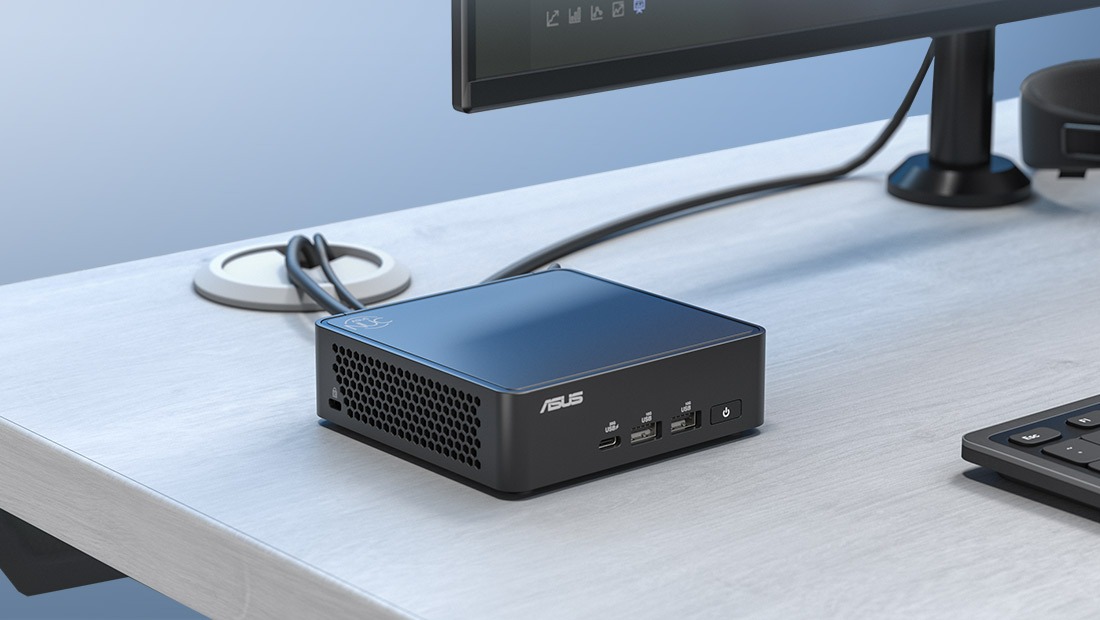
The Next Unit of Computing (NUC) line from ASUS is designed to fit into a similar segment to that occupied by Apple’s Mac mini — lots of power in a compact, good-looking enclosure. In fact, you’d be forgiven for mistaking an ASUS NUC for a Mac mini at first glance. But inside the box is quite a different beast.
The very top of the ASUS NUC range is the 15 Pro+. It can be configured with a range of Intel Core Ultra processors, right up to the Core Ultra 9 28SH — an impressive brain — and supports up to 96GB of DDR5 RAM in its pair of slots. That’s serious performance for the vast majority of applications, including AI, which is clearly a target for ASUS with this unit.
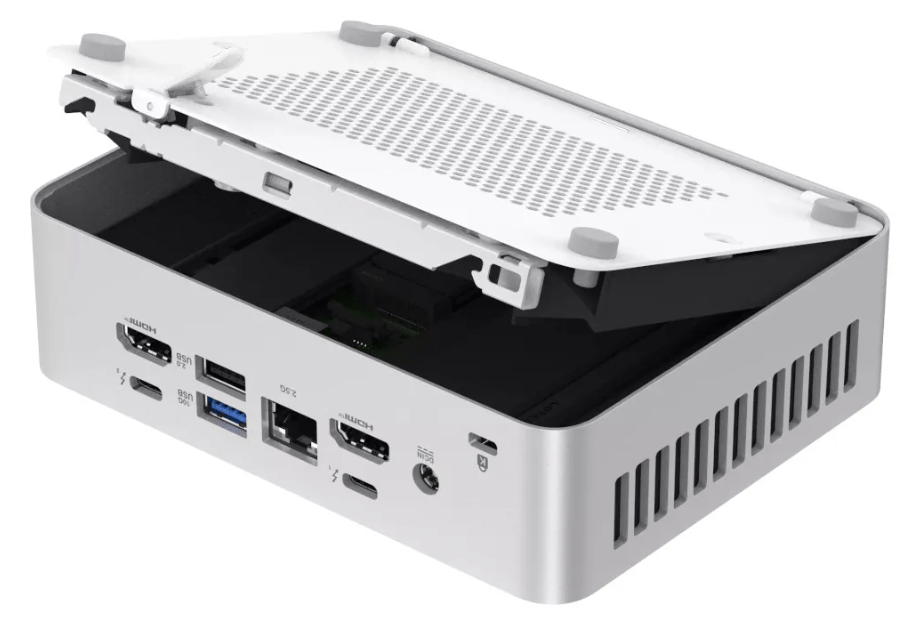
In terms of connectivity, you get two USB-A ports and a USB-C port conveniently located on the front, while the back sports another two USB-A ports, two USB-C ports with Thunderbolt 4, two HDMI ports and a 2.5Gbps ethernet port. It also supports WiFi 7 if you prefer wireless connections. All in a box measuring a mere 160mm x 172mm x 41.8mm — a slightly larger footprint than a Mac mini, but lower profile.
(If even that small footprint is more desk space than you want to spare, it comes with a kit to mount it to the back of a monitor.)
And if you’re wondering whether two HDMI ports and two Thunderbolt 4 ports is a bit much, the 15 Pro+ has sufficient grunt to run four 4K displays at once. So the answer is no — four display ports is about right.
The big compromise with this type of enclosure is expandability, and if you’re the type of user who likes to kit out their machine with expansion cards, look elsewhere. Likewise, gamers might be disappointed with the Intel integrated graphics. But gamers are invited to look at ASUS’s Republic of Gaming line, which is better suited to their needs.
To the extent that you can customise the NUC 15 Pro+, that’s actually very simple and even kind of fun. A panel on the bottom opens up without the use of tools, and springs up to expose the slots inside the box. I was impressed with how easy it was to open up the NUC 14 Pro+, and this is even easier. Inside you’ll find the slots for upgrading RAM and storage to suit your needs and budget.
ASUS is very big on the AI performance of the 15 Pro+, touting up to 99 TOPS (Tera Operations Per Second) in AI applications. It comes equipped with AI SuperBuild, an assistant that guides you through creating and customising large language models for use on the device. That means less lag time waiting for a remote computer on the network to do the processing for you, as well as obviously better data security..
I can see why ASUS is pushing the AI functionality of the 15 Pro+ so strongly. It’s difficult to see who the customers for this type of power in this type of design would be. Perhaps high-end graphics or video studios with minimal space? Consultancies that want to impress clients with both their computing power and their stylish offices?
It’s absolutely not a home machine. For one thing the specs are overkill for anything but professional and commercial use. For another, the fan can be a little noisy at times so it’s not really appropriate as a massively overpowered media centre.
(I should mention that ASUS touts “whisper-quiet operation” as a feature of this unit on its website, and that claim is not justified. It is, however, much quieter than the screaming fan in the 14 Pro+.)
The NUC 15 Pro+ is a pleasure to use and stylish to look at. If you like the looks of the Mac mini and want high performance but don’t want to use MacOS, it’s a fantastic option. If you’re on a budget though — and don’t need insanely high specs — there are much less expensive machines out there.
Pros
Extremely high performance configurations possible
Lots of connectivity
Specifically tuned to AI performance
Stylish design
Cons
Top configurations can be very expensive — out of range for many users
Fan noise a bit irritating at times