

Start with Apple Child Accounts to keep kids safe online.
Keeping kids safe online can feel like a full-time job but Apple’s family tools are here to make it a whole lot easier.
From setting age-appropriate limits to letting kids explore safely, these features empower parents without turning devices into the enemy.
Whether your kids are curious pre-teens testing boundaries or social-savvy teens discovering the online world, Apple makes protecting them simpler, smarter, and far less stressful, giving you peace of mind while they learn, play, and create.
Apple has built a suite of features designed to make online safety manageable, not overwhelming. From setting up Child Accounts to managing screen time and controlling content, these tools give parents the oversight they need while still letting kids explore and learn safely.
 Apple’s family tools make online safety manageable, not stressful. (Image: Getty Images)
How to set up Apple Child Accounts
Apple’s Child Accounts are your secret weapon. Required for kids under 13, and available up to age 18, they automatically come with protections like web content filters, app restrictions, Communication Safety and Ask To Buy.
Teens get age-appropriate protections too, plus access only to apps suitable for their age.
Setting up a Child Account has never been easier and you can even migrate existing accounts if birthdays need correcting. One account per family member is essential for unlocking parental controls and all Apple family features. Click here for details.
Manage screen time with ease
Screen Time lets parents manage how much time kids spend on devices and what they can access. From creating a Screen Time passcode to receiving alerts if it’s been entered unexpectedly, Apple helps parents stay in the loop without hovering.
It also includes Communication Limits, so you control who your child can chat with across Messages, FaceTime, and Phone. In iOS 26, kids must request permission to contact new numbers, one tap from you approves it. This works in third-party apps too, thanks to Apple’s new PermissionKit framework.
 Keep children safe from inappropriate content with Communication Safety. (Image: Getty Images)
Protect kids from sensitive content
Apple goes beyond screen limits. Communication Safety warns children if they’re sending or receiving sensitive photos or videos and guides them to get help if needed. In the latest updates, nudity detection even works in FaceTime calls and Shared Albums. And it’s automatically enabled for anyone under 18.
Age appropriate App Store restrictions
Content restrictions mean apps with higher age ratings won’t appear in your child’s App Store feed. Ask To Buy gives parents ultimate control, letting kids request apps and purchases while giving you the power to approve, revoke, or allow exceptions.
Apple also introduced a privacy-friendly Declared Age Range API, so developers can deliver age-appropriate experiences without needing your child’s birth date.
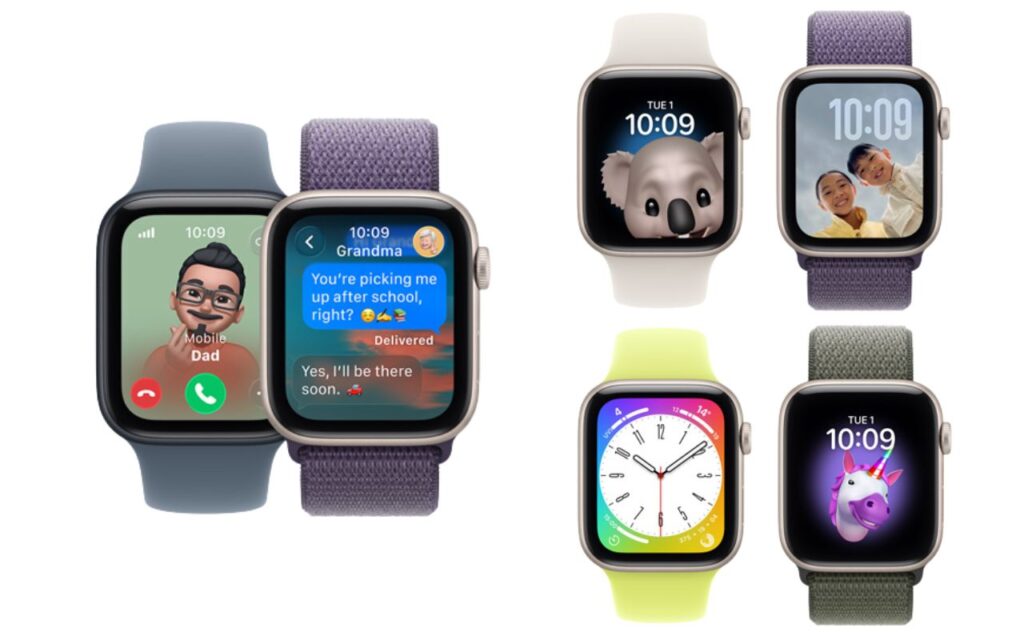 Apple Watch for Kids lets your child have their own cellular Apple Watch, no iPhone needed, while you manage everything easily from your iPhone via Family Sharing. (Image: Apple)
Call, text and know where they are with Apple Watch for Kids
Not ready for a phone yet? Apple Watch For Your Kids offers GPS, calls, messages, fitness tracking, and safety features, all under parent control. Schooltime, Downtime, and content restrictions help minimise distractions, while Find My and Emergency SOS give parents peace of mind. Kids get independence, parents get reassurance, everyone wins.
Family content, sharing and saving
Apple One bundles six subscriptions including, Apple Music, Apple TV+, Apple Arcade, iCloud+, Apple Fitness+ and Apple News+, into one clever plan. Up to six family members get their own accounts while sharing content safely across devices. More shows, more games, more storage… all for less money. Family entertainment, creativity, and learning, sorted.