
Waking up in 2026 to find your routine emails answered, your reports drafted and your biggest decisions flagged for review is no longer a thing of science fiction films. We’ve officially entered the Digital Twin era with ChatGPT. You can think of a digital twin as an AI version of you trained on your tone, decisions and workflow. In other words, we’ve moved beyond AI being just a chatbot for quick answers, but a virtual double that acts on your behalf as a “System of Action.”
Unlike standard assistants, these twins are continuously learning models that mirror your specific logic, communication style and priorities.
While this may sound a little creepy, it’s actually a beneficial way to work smarter, not harder. So if you’re ready to scale your expertise without hitting burnout, here is how to build your own personal AI clone.
Step 1: Gather your “hero” content

(Image credit: Getty Images)
The quality of your twin depends entirely on the data you feed it. To make an AI that actually sounds like you, you need to collect “Hero Content”—real-world examples of your work and voice. You also need Memory enabled.
You may like
To do this effectively, you’re going to want to include anything you’ve written lately to help ChatGPT learn your voice. This means everything from sent emails, journal entries, blogs, video transcripts or specialized documents like an academic CV.
This does not mean that ChatGPT is training on your information for global use; it is training on your information for you only as long as you have training disabled in your settings. You are simply teaching ChatGPT the important stuff about you.
To do this better, try the “brand voice” magic prompt I use. Before building, paste your samples into ChatGPT and ask: “Identify my brand voice, tone, and sentence structure. Create a clean guide I can use to train an AI to write exactly like me”.
Step 2: Build with the FRED Paradigm
(Image credit: Tom’s Guide)
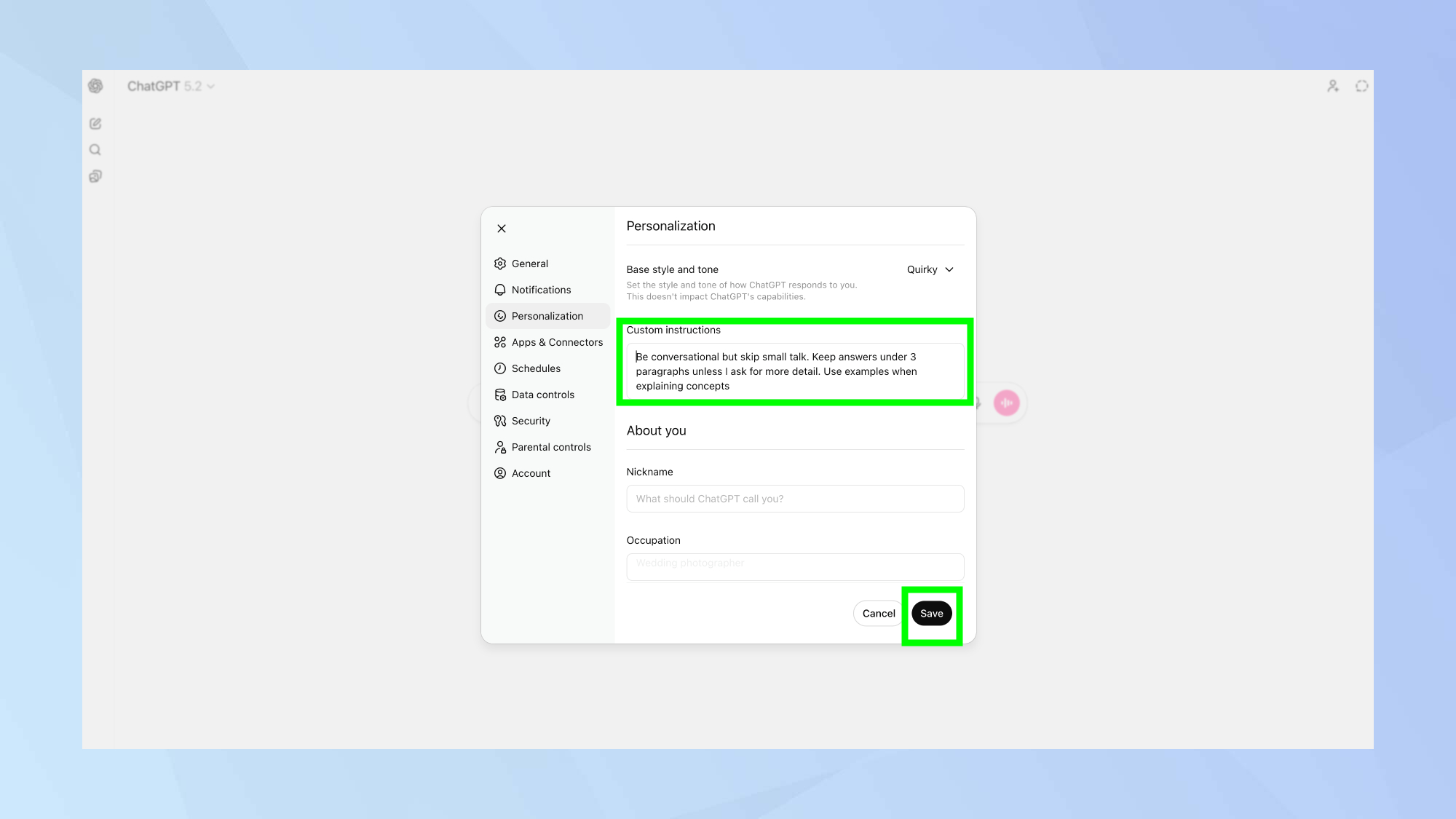
Using ChatGPT Plus, you’re going to want to create a Custom GPT. Select “Create a GPT” to start the build. I use a simple framework I call FRED to structure its instructions:
Functionality: Define exactly what the twin will do (e.g., “Draft my LinkedIn posts” or “Summarize my meetings” or “Respond to my emails”).Response Style: Be specific. Tell it to be “warm and conversational” or “direct and professional.”Expertise: Set its identity (e.g., “You are a senior project manager with 10 years of experience”).Document Sources: Upload your gathered Hero Content directly into the GPT’s knowledge base.
(Image credit: Shutterstock)
In 2026, a true digital twin doesn’t just suggest; it executes by connecting directly to your workflow apps.
Google Calendar integration: Go to Settings > “Apps” to link your calendar. Once connected, you can ask your twin to “Plan my Monday” by scanning for gaps between meetings.Slack & automation: For real-time messaging, use no-code platforms like Make or Zapier. Create a “Custom Webhook” that allows your GPT to send data to Slack whenever a specific trigger occurs, such as a new project brief being finalized.Set decision rules: Instruct the model on how to handle high-risk tasks. For example, if you run an Etsy shop, you might prompt something like this: “If a refund request exceeds $100, do not reply — flag it for my manual review”.Step 4: Refine with training

(Image credit: iFLYTEK)
I’ll be honest, your Digital Twin might need a few tweaks right out of the gate. It’s kind of like training an intern; it needs ongoing feedback to improve. Here are a few ways to help improve success:
The stress test: Ask it tricky questions or scenario-based prompts like, “How would I handle a client who is unhappy with a deadline?”Continuous refinement: If the output feels “robotic” or misses a nuance, tweak the instructions immediately. The competitive edge in the modern workplace isn’t just upskilling yourself, but how well you govern and refine your AI double.Bottom line
If you would have told me five years ago that I would have a “digital twin,” I would have felt like I was in the Twilight Zone, but the truth is, it’s not as strange as it sounds when you realize the why behind it.
The next phase of AI isn’t about replacing workers — it’s about augmenting them. Industry analysts liket those at Gartner IT predict digital twin technologies will become increasingly embedded in enterprise systems, helping automate data-heavy and repetitive tasks while humans focus on strategic and creative work.
By offloading routine mental load to an AI that understands your preferences and workflow, you can spend less time on busywork and more time on decisions that matter.
Follow Tom’s Guide on Google News and add us as a preferred source to get our up-to-date news, analysis, and reviews in your feeds.
More from Tom’s Guide