

Table of ContentsWhat is Acrobat Studio?PDF Spaces: An All-New Central Knowledge HubA Personalised AI Assistant for Every WorkflowSeamless Integrations to Supercharge ProcessesCan You Trust Acrobat’s AI?The Trusted PDF Toolkit, Now Smarter and FasterFrequently Asked Questions
Introducing Acrobat Studio
Free trial available now
Adobe has long led the industry in digital document innovation, and with Acrobat Studio, it’s pushing the boundaries of what AI can do for everyday workflows. The new AI Assistant goes far beyond simple text recognition: it lets you talk to your documents. Whether you’re using voice commands to summarise a contract or asking a question about a scanned receipt, the updated features will not just save you time but simplify your workload.
Adobe invented the PDF and is trusted by millions of users at 745,000 organizations around the world. 320 billion+ PDFs were opened or created with Acrobat in the last 12 months. Acrobat’s tools are designed to work with your PDF files, which means you can keep the original layout, text formatting, and overall document quality intact.
What is Acrobat Studio?
Acrobat Studio is Adobe’s next-generation workspace for intelligent document creation, analysis, and collaboration. It brings together the power of Acrobat, modern generative AI, and seamless cross-device workflows into one integrated environment. Designed for professionals who work with large volumes of information, Acrobat Studio allows you to organise documents, extract insights, create polished outputs, and collaborate more efficiently – all without leaving the Acrobat ecosystem.
PDF Spaces: An All-New Central Knowledge Hub
One of Acrobat Studio’s most impactful innovations is PDF Spaces. Instead of storing files in isolation, PDF Spaces let you organise entire collections (PDFs, Word docs, Excel sheets, and even external webpages) into a single, unified knowledge hub.
For large research projects, technical documentation, or multi-hundred-page legal files, this means no more digging through scattered folders. Once your documents are grouped into a PDF Space, the AI Assistant can answer questions, summarise content, compare sections, and pull insights from every file at once.
This transforms document management from a manual, file-by-file process into a streamlined, AI-driven experience.
A Personalised AI Assistant for Every Workflow
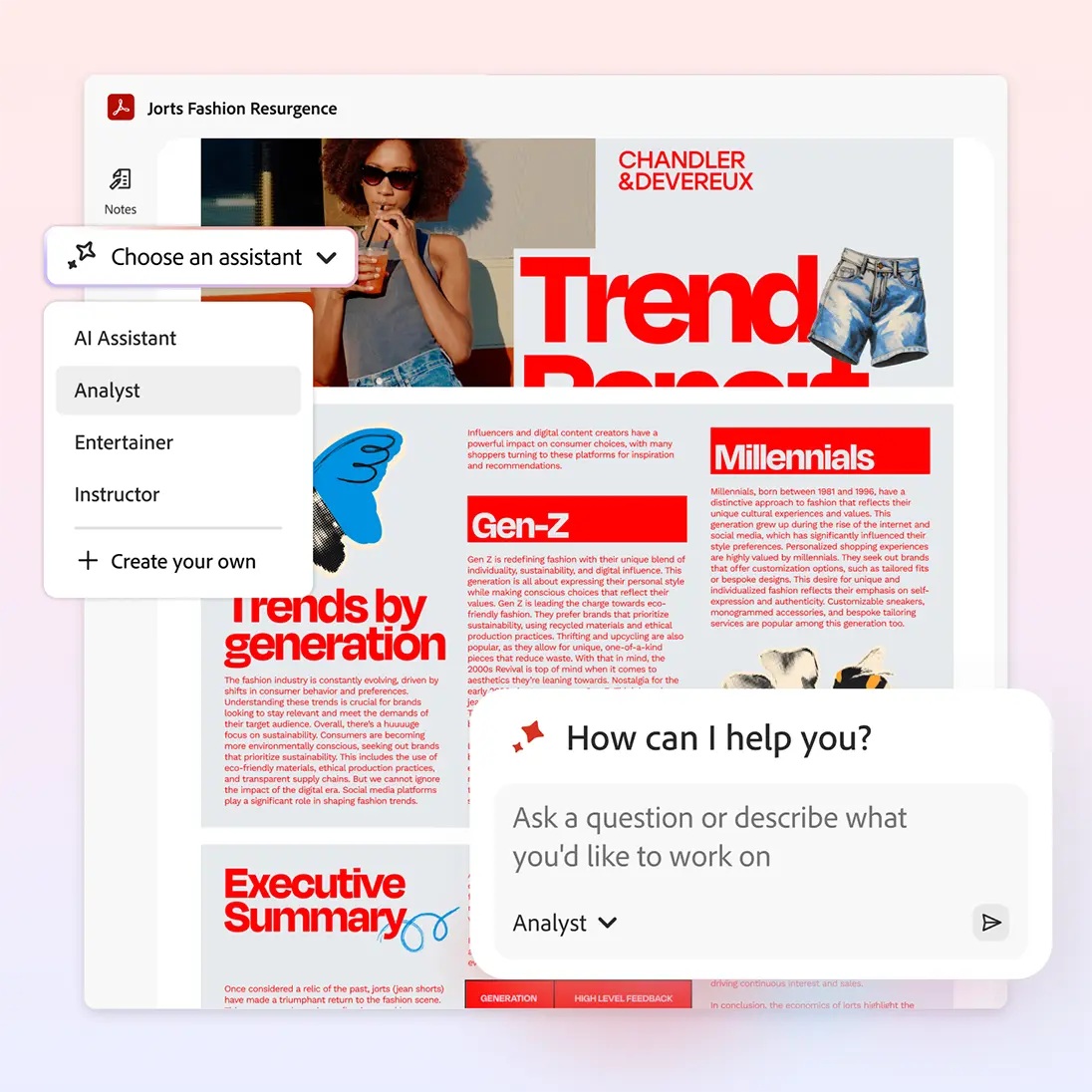
Within every PDF Space is a powerful, personalised AI Assistant that can adapt to your specific needs.
Instead of just receiving generic answers, you can choose the type of AI Assistant you need (an analyst or an instructor, for instance) to guide the conversation and get the answers you require. Even better, you can personalise the AI Assistant yourself, ensuring its responses match your team’s terminology, niche, and specialisation. This moves the experience from basic search to specialised team collaboration.
It also pairs seamlessly with voice functionality across mobile devices, giving you hands-free access to your documents and conversational AI without lifting a finger. You can ask your PDF Space a question aloud on your mobile device and get the answer read back to you, which is invaluable when you need information on the go.
Seamless Integrations to Supercharge Processes
Acrobat Studio is designed to work where you already work. Seamlessly integrating essential business applications, in particular Microsoft 365. You can create, edit, share, and request e-signatures directly from within Microsoft Word, Outlook, Teams, and SharePoint. This eliminates the need to constantly switch between applications, keeping your team in the flow of work. Reducing the need to have endless applications and tabs open.
Beyond document management, Acrobat Studio also includes Adobe Express Premium, a fast and intuitive content creation platform that gives you access to ready-made templates, brand kits, and easy drag-and-drop design tools. It also has integrated features powered by Adobe Firefly generative AI to help you quickly generate images and text effects using simple text prompts. This means you can use the Acrobat AI Assistant to extract insights, summaries, and key points from your documents, and then bring that content straight into Adobe Express to turn it into polished reports, presentations, infographics, and social posts in minutes.
Can You Trust Acrobat’s AI?
As AI becomes more embedded in professional workflows, trust and accuracy matter more than ever. Acrobat Studio is designed with two key assurances:
1. Fully cited and verifiable answers
For every answer that Acrobat AI Assistant generates, it provides a clickable source citation. The Assistant cites sources from your uploaded documents, so you can instantly verify the response. To explore more, you can click the citation number, and it will take you to the exact page and sentence the answer was pulled from. This feature is fundamental to building confidence in the accuracy of the insights.
2. Assurance that content is never used to train Adobe’s models
Adobe’s generative AI models are never trained on your documents, ensuring your personal and professional data remains confidential. Combined with Adobe’s longstanding commitment to privacy, this makes Acrobat Studio one of the safest AI-enabled document solutions available.
The Trusted PDF Toolkit, Now Smarter and Faster
While Acrobat Studio introduces major AI advances, it still includes the full suite of reliable PDF tools professionals depend on. These core features now work even faster and more intelligently within the new Studio environment.
With Acrobat Studio, you get the complete set of industry-leading features for:
Convert & Create: Easily turn any document (Word, Excel, image, or scan) into a high-quality PDF.
Edit & Organise: Access intuitive tools to edit text, swap images, organise pages, redact sensitive information, and compare file versions.
Share & Sign: Quickly collect legally binding e-signatures with Acrobat Sign, protect documents with passwords, and manage collaboration across teams.
Acrobat Studio brings together the most advanced AI insights, integrated creative tools, and the trusted PDF features professionals have relied on for years. Learn more on Adobe’s website. Lean more on Adobe’s website here.
Frequently Asked Questions
Is Acrobat’s AI safe to use?
Yes. Every answer from the AI Assistant includes a clickable citation linking to the source document. Additionally, Adobe’s generative AI models never use your content for training, keeping your documents secure and private.
Can I disable or turn off the generative AI features?
Yes. On desktop or web, you can go to Preferences > Generative AI and uncheck “Enable generative AI features.”
How many files can I add to a PDF Space?
You can add up to 100 files to a PDF Space, with each individual file limited to 100MB and 600 pages.
Where can I access Acrobat Studio?
You can access Acrobat Studio, including PDF Spaces and the AI Assistant, from desktops, laptops, or mobile devices for a consistent, cross-surface experience.
Can Acrobat Studio handle multiple file formats?
Yes. You can include PDFs, Word docs, Excel spreadsheets, images, and even web content in PDF Spaces.
Do I need a subscription to access Acrobat Studio?
Yes. Acrobat Studio is only available via a paid subscription. You can sign up for a 7-day free trial to experience the platform and see how it can level up the way you work.