
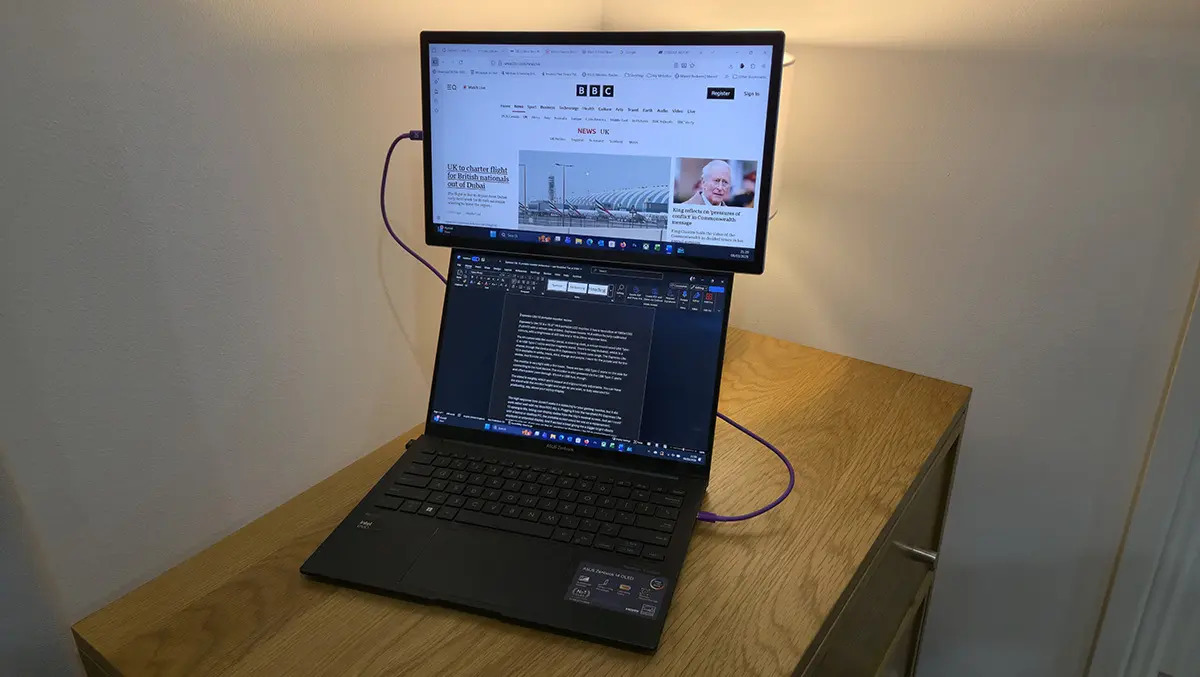
Espresso’s Lite 15 is a 15.6″ 16:9 portable LCD monitor. It has a resolution of 1980×1080 (Full HD) with a refresh rate of 60Hz.
The monitor uses a USB Type-C cable to connect to devices. This means any devices need to be compatible with DisplayPort Alternate Mode (DP Alt Mode) or Thunderbolt 3/4. Look for a lightning bolt or a “D” symbol on your device.
The first thing that struck me when I unboxed the monitor was how perfectly it would pair with my Asus ROG Ally X handheld gaming PC. I love the Ally X, but its seven-inch display can feel cramped. The Espresso Lite 15, on the other hand, more than doubles that screen size while matching the same 1920×1080 resolution, giving the Ally X a far more comfortable and expansive canvas to play on.
The kit comes with the monitor panel, a cleaning cloth, a colour-coordinated USB Type-C to USB Type-C cable and the magnetic stand. There’s no bag included, which is a shame, though the device does fit in Espresso’s 15-inch case range. The Espresso Lite 15 is available in white, black, mint, orange and purple. I went for the purple unit for the review. And it looks very nice.
The monitor is very light and thin, at only about 9mm. There are two USB Type-C ports on the side for connecting to the host device. The monitor is also powered via the USB Type-C ports and offers power pass-through. It’s not a USB hub, though.
The stand is weighty, which you’d expect, and ergonomically adjustable. You can have the stand with the monitor height and angle as you wish, or fully extended for positioning, say, above your laptop display. The stand is magnetic, sticking quite firmly to the back of the monitor via a large rubber-covered VESA-sized pad. There’s some flexibility on the location of the magnetised pad, but it does seem to stick best in the centre of the display. The stand has rubber feet to make it stable on your desk.
There is a 10mm black bezel around the display, so you’ll not be able to use them for a seamless display setup. But that’s not what Espresso is aiming at with this low-cost display.
The Espresso Lite 15 took over the main display duties from the Xbox Ally X’s modest screen. The portable screen can be used as a replacement, duplicate or extended display for the Ally. And it worked a treat, giving me a bigger, brighter, and more vibrant screen to play on. There are compromises to be had, with the 60Hz being a lower refresh than Ally’s native display, and the 10 to 20ms response time being a little higher. But unless you are entering a professional tournament, the Lite 15 makes an excellent portable enhancement for playing games on the Xbox Ally X.
The image quality on the display is impressive. Espresso boasts 16.8 million factory-calibrated colours and a brightness of 400 nits. It also has a very wide field of view with no discolouration, even when viewed at an acute angle.
The Espresso Lite 15 is perfect for positioning alongside or above your laptop display, allowing you to work in a hotel room with the same sort of second-monitor setup that you’ve likely got used to using in the office. If you are not using a second monitor in the office, the Espresso display will also be good for that as well.
The ROG Xbox Ally X is really just a Windows 11 PC. That means, with either an external hub or a Bluetooth keyboard and mouse, it can function as a proper PC, but who wants to do that on a seven-inch display?
Enter the Espresso Lite 15.
Expanding on my ROG Ally/Espresso gaming set-up, I added a Mokibo Fusion keyboard and a mouse to create a fully functional ultra-portable micro-PC. If you are on the go, packing an Espresso Lite 15 to complement your ROG Ally isn’t a bad idea.
But I didn’t stop there. The Espresso Lite 15 can also boost what your phone is capable of, giving you a big screen for productivity apps (especially if you pair it with a Bluetooth keyboard like the portable Mokibo Fusion) or for kicking back and streaming movies and TV shows.
The Lite 15’s power pass-through allowed me to connect my Samsung Galaxy Z Fold 6 power supply directly to the monitor and charge my phone via the cable to the monitor. With the phone’s built-in touchscreen, I could open apps and even type via the phone screen. It’s worth noting that the monitor doesn’t have speakers, so you will need to use your host device to provide audio.
Espresso fully supports its displays with a range of accessories from magnetised VESA mounts to industry-standard desk stands. Along with branded chargers, Espresso also carries a whole range of bags and cases for its displays.
In the end, the Espresso Lite 15 proved to be far more than a simple secondary display. It transformed my handheld gaming console into a legitimate Windows machine, opened the door to full desktop apps on the go, and gave my phone the kind of expansive screen real estate mobile apps rarely get to enjoy. It’s the kind of accessory that quietly reshapes how you work and play, being versatile, portable, and surprisingly empowering.