
I’ll be the first to admit: I’m not a strong cyclist. I don’t spend my evenings comparing cycling analytics or obsessing over “grams saved.” I have terrible W/kg and VO2 max. I just like to ride my bike, explore new paths, and have a reliable way to get home without getting stuck in roads that I’m not supposed to be.

For the last couple of years, I’ve been using the larger Edge 1040. It’s a legendary piece of gear, and I absolutely love it. When the Garmin Edge 850 was released in late 2025, I decided to see what is the buzz with the latest tech. After a few weeks of testing, I’ve came to realized that while the 1040 is a marathon runner, the 850 is the high-performance gadget. Let’s find out more.
A Screen that POPS!
 By comparison, the 1040 at 100% brightness while the 850 at 30% brightness.
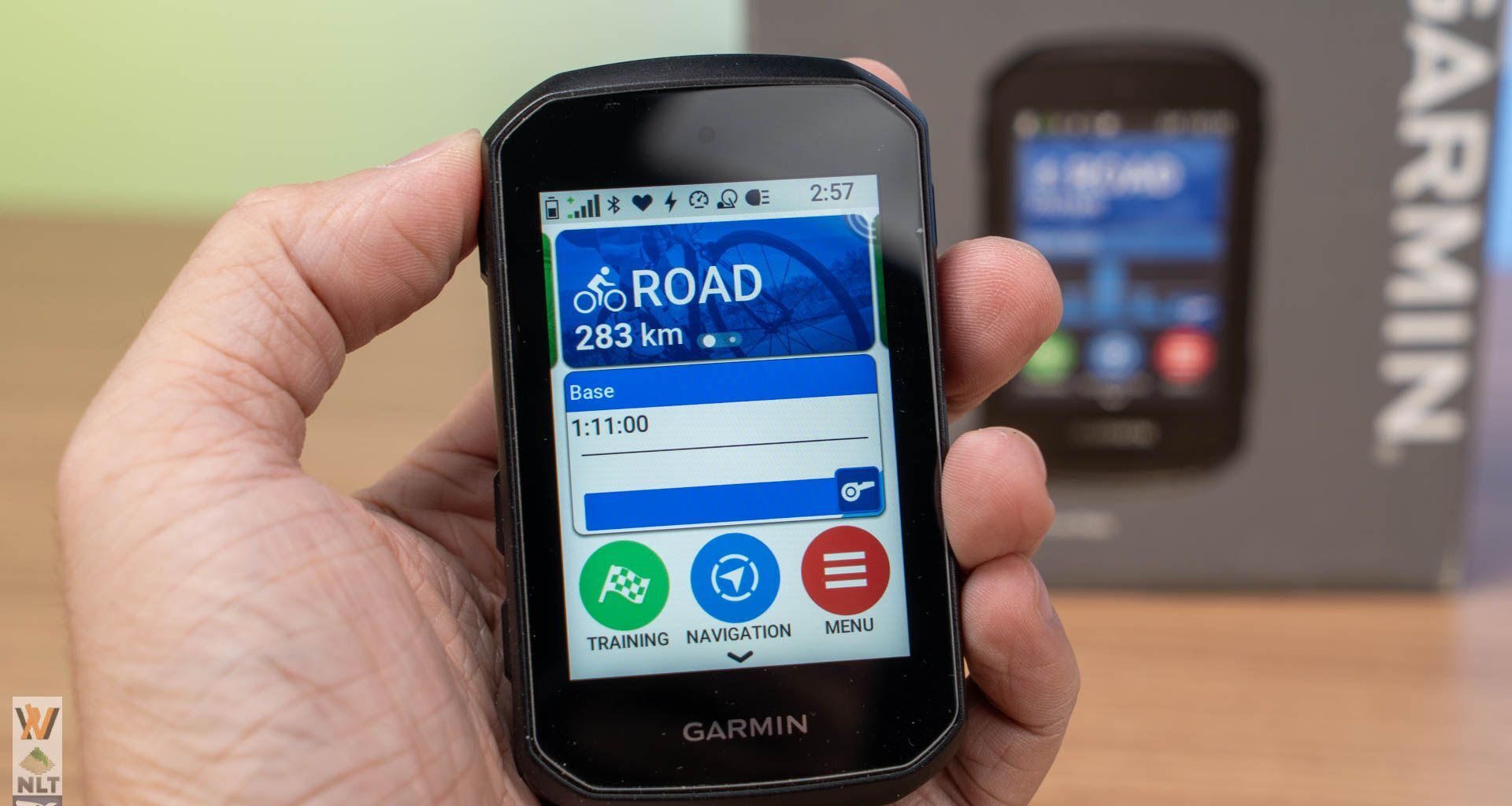
The most obvious change is the display. If you’ve used older bike computers, you know they can look a bit dull—almost like a digital watch from the 90s. The Edge 850 changes that entirely.

It uses a 2.7-inch transmissive liquid crystal display (LCD) that feels much more like a modern smartphone. It has 420×600 pixel resolution and 1,000 nits of peak brightness.

The colors are vivid and the contrast is sharp. Whether I’m riding under heavy tree cover or in the bright midday sun, the maps are incredibly easy to read. Even though the screen is physically smaller than the 1040’s massive 3.5-inch panel, the clarity makes my data fields easier to read at a quick glance.
The “Bike Bell” and Better Audio
The feature I ended up using a lot—which I honestly thought was a gimmick at first—is the built-in speaker. In the past, my computer would just “beep” at me. Those were the navigation and traffic radar beeps. Nothing exciting, or rather it is a reminder that you should check the screen what is going on.
The Edge 850 actually talks to you. It gives clear voice prompts like “Turn left in 100 meter.” It means spending less time looking down at the map and more time looking at the road. Even better? It has a digital bike bell. By double tapping on the screen, I can trigger a loud, friendly “ding-ding” from the device. It is significantly more effective (and polite) than me yelling “On your right!” at pedestrians or cyclists on a shared-use path.
Buttons vs. Touchscreen: The Best of Both Worlds


Coming from the Edge 1040, that device primarily rely on touch screen operations. In fact, the market trends seems to be swaying towards touch operations as per what we’re seeing in the modern bike computer releases. Customers expect every screen to work like an iPhone, but on a bike, you have sweaty fingers, gloves, or rain to deal with. The Edge 850 handles this by giving you options.


When I’m standing in my driveway setting up my route, the touchscreen is brilliant. It’s significantly more responsive than the 1040—swiping through menus feels natural and fast. The silky smooth UI interaction is all thanks to the new CPU upgrade (same as the Edge 1050). However, once I’m actually riding, I find myself reaching for the physical buttons on the sides. They have a nice, “clicky” feel, which is reassuring. Although I would prefer if the button is slightly less stiffer. If it starts to rain, you can even lock the touchscreen and use the buttons exclusively, so the water doesn’t “accidently” change your data screens.
Garmin Pay
Introduced on the 1050, Garmin Pay is now available on the 850 as well. If you’re used to Samsung Pay and Apple Pay, you already know how this technology works. Your device basically stores a virtual tokenized card to be used during payment. In case you accidentally leave your phone and wallet at home, you could still pay for the coffee at the stop.
I could not test out this feature because at the time of writing this review, there’s only one participating bank in Malaysia for Garmin Pay – Public Bank. And, I don’t have any cards with this particular bank.
Mountain Bike & Off-Road
Besides the 850 also received a ton of features for MBT and off-road riders. Since, I don’t really do mountain biking, I can only quote a few of the features that were introduced together with the 850.
5Hz GPS Recording: The device now samples your position 5 times per second (vs. the standard 1Hz). This creates much more accurate “lines” on your GPS map during fast descents or tight switchbacks.
Timing Gates: You can set virtual “gates” on a course to automatically track split times during laps or specific trail segments.
Enhanced Forksight: Shows more detail about upcoming trail forks and your current position within a trail network.
Enduro & Downhill Profiles: New specific ride profiles that automate “run” tracking and prioritize descending metrics.
The Battery Trade-off

There is one “tax” you pay for all this new technology: battery life. Because the screen is so much brighter and the CPU is faster, it doesn’t last nearly as long as the 1040, not even the outgoing 840.
With the Edge 850, the battery lasts about 12 hours of actual riding, if you turn on battery saver mode, that number would go up to 36 hours. But hey, I don’t think you would like to downgrade the user experience with dimmed display and slower response time.
HOWEVER, let’s keep it real. How many hours do you ride per trip? For most weekend riders, it is less than 4 hours per ride. A full charge is still plenty for a few days of riding. It does mean users have to be more disciplined about plugging it in the night before any ride. Unless you’re someone who does AUDAX or ultra-endurance events, you might miss the 1040, 840 and 540’s long battery life, but for everyone else, the trade-off for a better screen is worth it.
The good news is Garmin has made the Edge 850 “easily serviceable,” in comply to the sustainability requirements. The modular battery gives the device a much longer lifespan and makes it feel like a sustainable investment rather than a disposable gadget that you have to replace the moment the battery health dips. Of course, the first option is to contact Garmin support for the repair services if you don’t know what you’re doing.
The Verdict: The Ultimate All-Rounder

The Garmin Edge 850 doesn’t feel like a tool meant only for the pros; it feels like a device designed for anyone who wants their ride to be a little bit easier and more enjoyable. The only downside? The premium price perhaps – RM2399.
Nonetheless, it strikes the perfect balance between size and capability. It’s small enough to look sleek on any bike, yet powerful enough to handle complex navigation, training plans, and even your morning coffee payment. While the battery life requires a bit more management than simpler units, the trade-off is a beautiful, responsive, and genuinely helpful companion.
If you’re looking for a device that brings your bike into the modern era—with a stunning screen, helpful voice prompts, and a “set it and forget it” navigation system—the Edge 850 is easily the best choice on the market right now.ke a smart, helpful companion for my daily rides. It’s fast, it’s beautiful, and it’s made my time on the bike just a little bit simpler.
Like our Facebook Page here at NasiLemakTech.com for more news and in-depth reviews!
Also, join our Facebook Group for insightful information and memes!
Subscribe to our YouTube channel too!