
This section is Presented
This section was produced by the editorial department. The client was not given the opportunity to put restrictions on the content or review it prior to publication.
by OLG 
Breadcrumb Trail Links
Everything you need to know about the ASUS Zenbook Duo 20206 before you buy
Published Mar 23, 2026 • Last updated 1 hour ago • 6 minute read
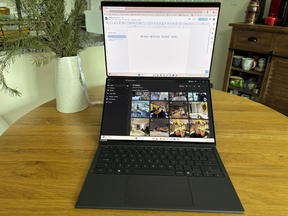 I tested the ASUS Zenbook DUO (UX8407). Photo by Kate Mendonca/PostmediaArticle content
Reviews and recommendations are unbiased and products are independently selected. Postmedia may earn an affiliate commission from purchases made through links on this page.
When deciding between a laptop and a desktop, there are pros and cons to be considered. Laptops offer a portable and lightweight option, while desktops often offer more in terms of customization and larger screen sizes.
Advertisement 2
This advertisement has not loaded yet, but your article continues below.
Article content
Now, the 2026 ASUS Zenbook Duo gives users the best of both worlds with a lightweight design that doubles the screen capacity of a standard laptop. It’s the latest in the brand’s Zenbook Duo lineup, and I’ve had the chance to test one of the devices out over the past several weeks.
Article content
Article content
If you’re considering upgrading your own laptop, here’s what you should know before investing in the 2026 ASUS Zenbook Duo UX8407 for yourself.
What: 2026 ASUS Zenbook Duo (UX8407)
Cost: $2,899
Release date: April 8, 2026 (Preorders begin March 23, 2026)
Where to buy:ASUS
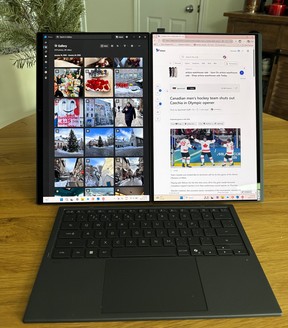 The ASUS Zenbook Duo 2026 in Desktop Mode. Photo by Kate Mendonca/Postmedia2026 ASUS Zenbook Duo quick facts Double the screens: Dual 14” OLED touchscreen laptop with integrated kickstand for multitasking on the go. Screen orientation can be used in portrait or landscape modes. Updated hinge design: New hinge design reduces gaps between the two screens to just 7.66mm.Durable construction: Like the other Zenbook models, this laptop has a Ceraluminum chassis (a ceramic-aluminum hybrid material that’s lightweight, durable and scratch-resistant). Detachable keyboard: A magnetic, detachable bluetooth keyboard offers up to 52 hours of use per charge. Battery life: Up to 18 hours of battery life with dual screens, up to 32 hours with a single screen.Microsoft Copilot: Built-in AI software enhances productivity, search abilities. Powered by Intel: Intel Core Ultra X9 Series 3 processor delivers higher performance with less power consumption. Dolby Atmos audio: Dual speakers provide a crisp listening experience.

Shopping Essentials
Article content
Advertisement 3
This advertisement has not loaded yet, but your article continues below.
Article content
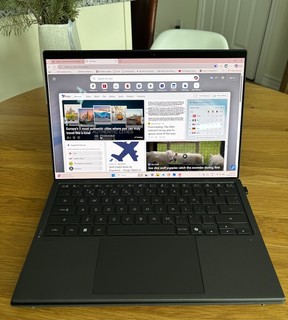 The ASUS Zenbook Duo 2026 in Laptop Mode. Photo by Kate Mendonca/Postmedia2026 ASUS Zenbook Duo reviewPros👍Cons👎Double touchscreen surfaceLong battery lifeMultiple ports for connectivityCamera quality isn’t the bestExpensive
Powered by an Intel Core Ultra X9, Intel’s top-of-the-line mobile chip, and featuring the new Xe-cores and XeSS 3, this Zenbook Duo gets a major hardware upgrade over the previous model – read our review of the 2025 Zenbook Duo here. The laptop also boasts two 14-inch 3K OLED touch display screens so it’s easier than ever to view multiple windows without distraction or play games in full 1080p. While I’m not a gamer, these upgrades have come in handy while I’m multitasking during my workday.
Other features that enhance the day-to-day experience of using this laptop include anti-reflective Lumina Pro displays to reduce screen glare, a detachable Bluetooth keyboard with smart gestures and a built-in Windows Copilot AI assistant to boost productivity. Despite all of the technical upgrades, this laptop still weighs in under five pounds (1.65 kg/3.64 lbs to be exact), making it a top choice for busy professionals or creatives on the go.
Advertisement 4
This advertisement has not loaded yet, but your article continues below.
Article content
This laptop runs on the latest Microsoft operating system, Windows 11 Home, but it’s worth noting that access to Microsoft’s suite of desktop applications (Word, Excel, PowerPoint, and the rest) is not included with this device. Upon startup, you’ll receive a one-month free trial of Microsoft 365 instead. After the trial runs out, you’ll either need to pay a monthly subscription that starts at $11.50/month or $115 annually to continue to access the software.
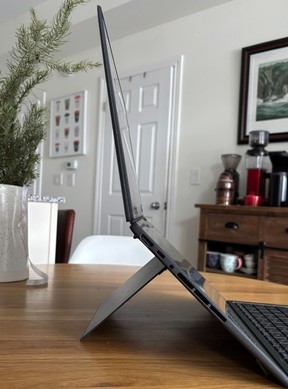 The Zenbook Duo 2026 has a built-in kickstand. Photo by Kate Mendonca/PostmediaFavourite features: Dual screens, battery life
Dual screens: As a writer, I spend a lot of time on my laptop writing and researching articles. I normally use an external monitor hooked up to my laptop to maximize screen size and minimize hunching over a laptop screen, which means I’m often stationed at my desk. However, with the double screens of the Zenbook Duo, I’ve had more flexibility in terms of where I can set up my workspace during the day.
Advertisement 5
This advertisement has not loaded yet, but your article continues below.
Article content
The laptop can be used in five different modes: single screen laptop mode, dual screens in landscape mode (with or without the keyboard), dual screens in portrait mode (which ASUS calls “Desktop Mode”) and laid flat for “Sharing Mode.” I like using the laptop in dual screen mode with the top screen for my documents and the bottom for messaging apps, emails or streaming music.
The dual screens minimize switching between tabs, so it’s easy to stay organized and see what’s most important at a quick glance. I also appreciate that there’s a button to swap the screen displays with just a tap.
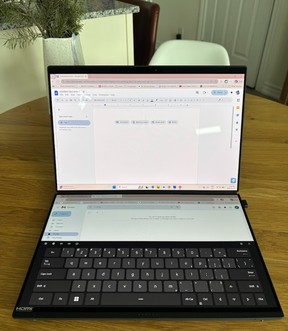 ASUS Zenbook Duo 2026 dual touchscreens. Photo by Kate Mendonca/Postmedia
Battery life: This laptop boasts up to 32 hours of use on a single charge (up to 18 hours with both screens) – a significant increase over the previous model, which clocked 13.5 hours of single-screen and 10.5 hours of dual-screen use. I put the laptop through my regular workday with a mix of video calls and document use (plus YouTube background music in play) on both screens, and found that one charge easily covered a full day’s use with a couple hours of charge left over. In single-screen mode, the battery was even more impressive and had several hours of battery life left after a full day of use.
Advertisement 6
This advertisement has not loaded yet, but your article continues below.
Article content
Least favourite features: Camera quality, virtual keyboard
Camera quality: Below, I’ve attached two screenshots from Microsoft Teams on the 2026 Zenbook Duo, taken just a few minutes apart. In the one on the left, I was sitting in fairly bright indoor lighting on a sunny afternoon, and my background and I still looked blurry on calls.
The resolution is slightly better in the image on the right when I sat in front of a window with more direct natural light. However, given that the device is brand new, the quality of the images on this laptop’s front-facing camera left me a little disappointed.
 The camera quality on the ASUS Zenbook Duo leaves something to be desired. Photo by Kate Mendonca/Postmedia
Virtual keyboard: This laptop can be used with or without the included Bluetooth keyboard, though I can’t think of many reasons why you’d choose to go without it. The virtual keyboard option is less responsive than the Bluetooth version and can accidentally activate other features by touch if you’re not careful. I’ll likely only use the feature in a pinch if my physical keyboard dies and I’m not able to recharge it right away.
Advertisement 7
This advertisement has not loaded yet, but your article continues below.
Article content
Who should consider the 2026 ASUS Zenbook Duo
If you travel frequently or you often work between offices and feel like a single laptop screen doesn’t cut it, I would recommend the 2026 ASUS Zenbook Duo as an option worth considering. It’s priced around the same as Apple’s MacBook laptops, but comes with an additional screen that I find makes it more enjoyable to work on the go. No more hunching over a small screen, and the flexibility to configure your laptop display in a way that suits your workflow.
What: 2026 ASUS Zenbook Duo (UX8407)
Cost: $2,899
Release date: April 8, 2026 (Preorders begin March 23, 2026)
Where to buy:ASUS
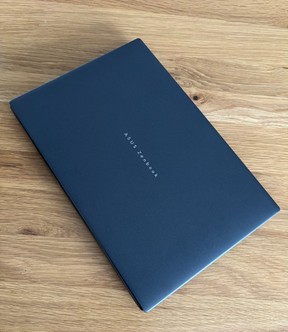 2026 ASUS Zenbook Duo (UX8407). Photo by Kate Mendonca/PostmediaASUS Zenbook Duo UX8406 spec summary
Size: 31.01 x 20.86 x 1.96 ~ 2.34 cm (12.21″ x 8.21″ x 0.77″ ~ 0.92″)
Weight: 1.65 kg/3.64 lbs
Colour: Moher Gray
Display: (2) 14-inch ASUS Lumina Pro OLED displays, touch screens with stylus support
Processor: Intel Core Ultra X9 Processor 388H 2.1 GHz (18MB Cache, up to 5.1 GHz, 16 cores, 16 Threads); Intel NPU up to 50TOPS
Operating system: Windows 11 Home
Camera: FHD camera with IR function to support Windows Hello
Audio: Smart Amp Technology, Built-in speaker and array microphone with Cortana support
Storage: 1TB M.2 NVMe PCIe 4.0 SSD
Battery: 99 Whrs — Up to 13.5 hours of uninterrupted entertainment and productivity (10.5 in dual-screen mode)
Ports: (1) USB 3.2 Gen 2 Type-A, (2) Thunderbolt 4 with support for display/power delivery, (1) HDMI 2.1, (1) Audio jack
What’s in the box: (1) ASUS Zenbook Duo UX8407 laptop screen, (1) Ultra mini adapter, (1) soft keyboard
Read More

We got early access to Apple’s most affordable MacBook ever
We reviewed 2026’s most ambitious gaming laptop yet
Shopping Essentials, a category written by research-obsessed shopping fanatics, is now on Canoe. Explore in-depth product reviews, expert recommendations and exciting collaborations — plus get behind-the-scenes info on your favourite brands and trending products — learn more here or sign up for our newsletter.
Article content
Share this article in your social network