

I spent the last 24 hours testing Google’s AI Edge Gallery to see if local AI is finally ready for everyday use. As someone who relies on tools like ChatGPT and Claude for brainstorming, planning and life’s random questions, I’ve always accepted a specific trade-off of convenience in exchange for sending my data to a server.
When I found out Google had quietly released an app that runs LLMs entirely on-device, I decided to see if I could finally cut the cord. Here’s what happened.
Setting up the app was easy
(Image credit: Shutterstock)
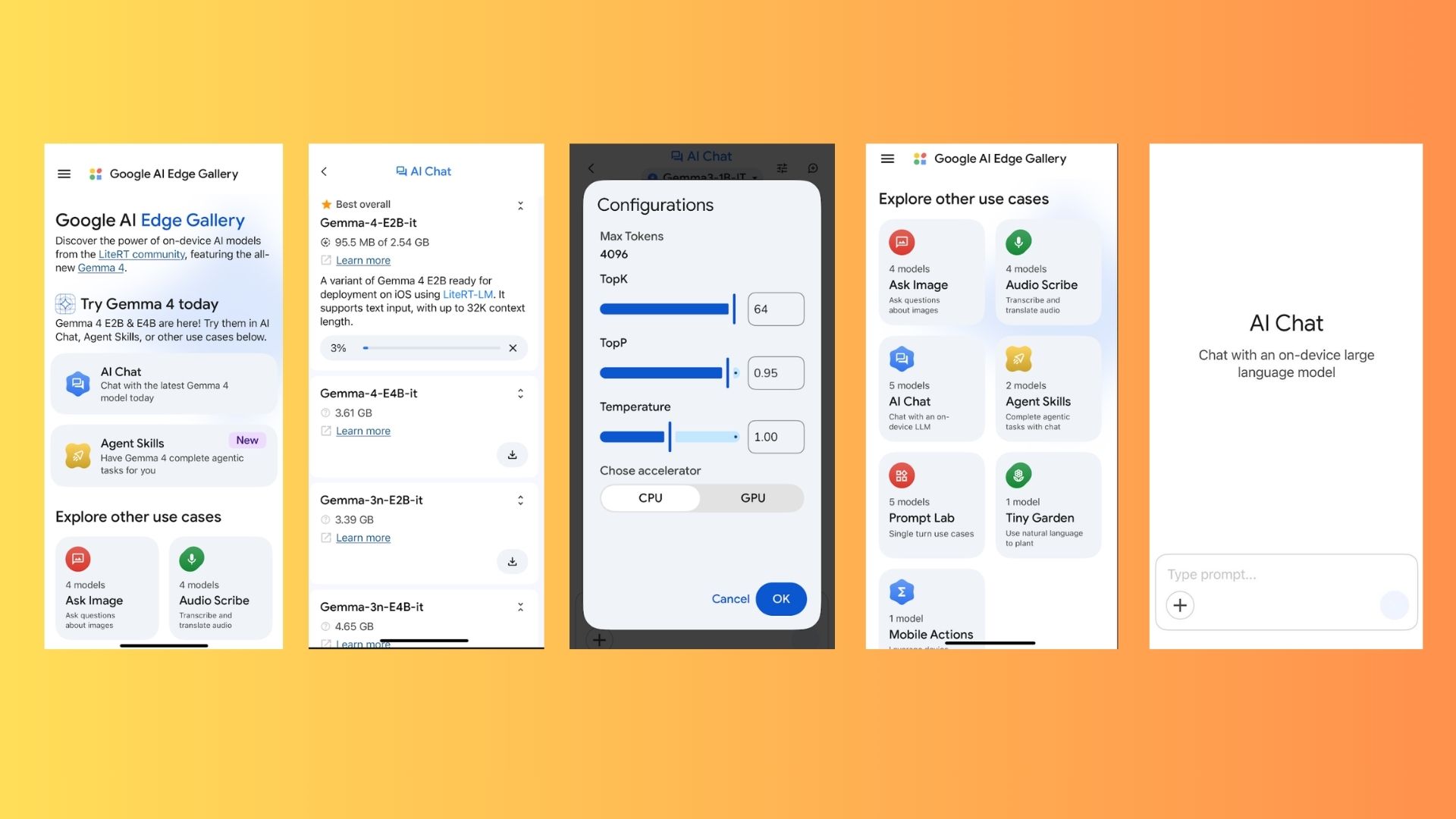
Getting started with Google AI Edge Gallery was surprisingly simple I downloaded the app (App Store or Google Play), opened the AI Chat section and selected Gemma 4 E2B — a 2.5GB model that lives entirely on my phone’s hardware. If you’re thinking about downloading the app, you’re going to want to be sure your phone has the free space available. There are smaller models if you don’t have the space or simply prefer going smaller.
Article continues below
You may like
Gemma 4 E2B is the “recommended” model with a text input of up to 32K context length. For reference, Claude offers 1 Million token context, so that’s just something to keep in mind if you prefer longer conversations.
Unlike ChatGPT or Gemini, there was no login screen or “agree to terms” for data sharing. No syncing spinning wheel, either, which was both odd and reassuring.
I started off by toggling on “Thinking Mode” (which shows the AI’s step-by-step reasoning) and then did the unthinkable when using a chatbot: I turned on Airplane Mode. That’s right, no internet required.
Total privacy at a different speed

(Image credit: Shutterstock)
For me, the biggest shift with Google AI Edge Gallery was probably psychological. There’s a distinct “quietness” to using local AI. While it’s something you sort of have to experience, I’ll say there’s just something unique about knowing that a rough draft, a messy brain dump or a private medical question never leaves the physical realm of your phone. It just feels much safer and the results are pretty good.
One feature I didn’t expect to love was “Agent Skills.” This moves the app beyond a standard chat interface and into a mini offline toolkit. Without a data connection, I could still use:
Restaurant roulette: For local decisions when you’re “hangry” and indecisive.Interactive maps: Localized utility without the tracking.QR code generator: A handy tool that usually requires a data-hungry third-party app.Performance was good, not great
(Image credit: Future)
I’d be lying if I said that local AI was anything close to using Gemini or ChatGPT. Local AI is good, but it’s not “Claude” good.
Because the phone is doing all the heavy lifting in Google AI Edge Gallery without a massive server farm, responses took longer, especially with Thinking Mode enabled. While it handled simple prompts with ease, complex tasks like layered creative writing or nuanced project planning felt a bit more limited. The smaller context window makes using local AI feel more like something I would use if I was asking a very personal question, not very everyday use. As a power user, the speed and sub-par responses just don’t feel adequate enough.
What to read next
When it comes to memory, the cloud still wins. The biggest hurdle for me wasn’t the intelligence of the model, it was the history/memory.
In Google AI Edge Gallery, if you close a thread, the full conversation doesn’t “stick around” the way it does in ChatGPT or Gemini. You can see sent messages, but the persistent, long-term memory we’ve grown used to in the cloud isn’t there yet. For power users who revisit prompts from weeks ago, this is a significant downgrade.
How to try offline AI yourself

(Image credit: Future)
If you want to test the limits of what these models can do, here is the setup:
Download: Get Google AI Edge Gallery from the App Store or Google PlayDownload a model: I recommend Gemma 4 E2B Enable “Thinking Mode”: Tap the settings icon in the top-right to see the AI’s “logic” as it works.Go Ooffline: Switch to Airplane Mode and start chatting. You don’t have to do this, but it’s pretty cool.Pro Tip: Explore “Agent Skills” instead of just “AI Chat” to see how local models can handle specific utility tasks without an internet connection.The takeaway
Could I fully replace ChatGPT today with Google AI Edge Gallery? Not yet. For deep research, high-speed output and cross-device syncing, the cloud is still king. I also don’t like using all the free space on my phone for one app.
But for the first time, local AI felt like a useable tool for personal questions, private brainstorming and offline productivity. And while this is not a ChatGPT killer, it was nice to explore what AI can do locally, offline.

Follow Tom’s Guide on Google News and add us as a preferred source to get our up-to-date news, analysis, and reviews in your feeds.
More from Tom’s Guide