
SammyGuru is reader-supported. We have affiliate and sponsored partnerships, so we may earn a commission when you buy through links on our site, at no extra cost to you. Posts may contain sponsored or affiliate link placements. Learn more.
October 11, 2026 • 3 min read
Add as preferred sourceAdd SammyGuru as a preferred source and Google shows more of our articles in Top Stories when we have fresh coverage of what you search for. You still see other sites, and you can change your picks at any time.Follow on Google Discover
Galaxy owners with a Googlebook are finally getting the phone features Pixel owners have had since launch. Google’s Mishaal Rahman announced today on the Googlebook subreddit that Better Together support is rolling out to Samsung phones running One UI 9 (Android 17), along with a simpler first-time setup. Droid Life spotted the post first.
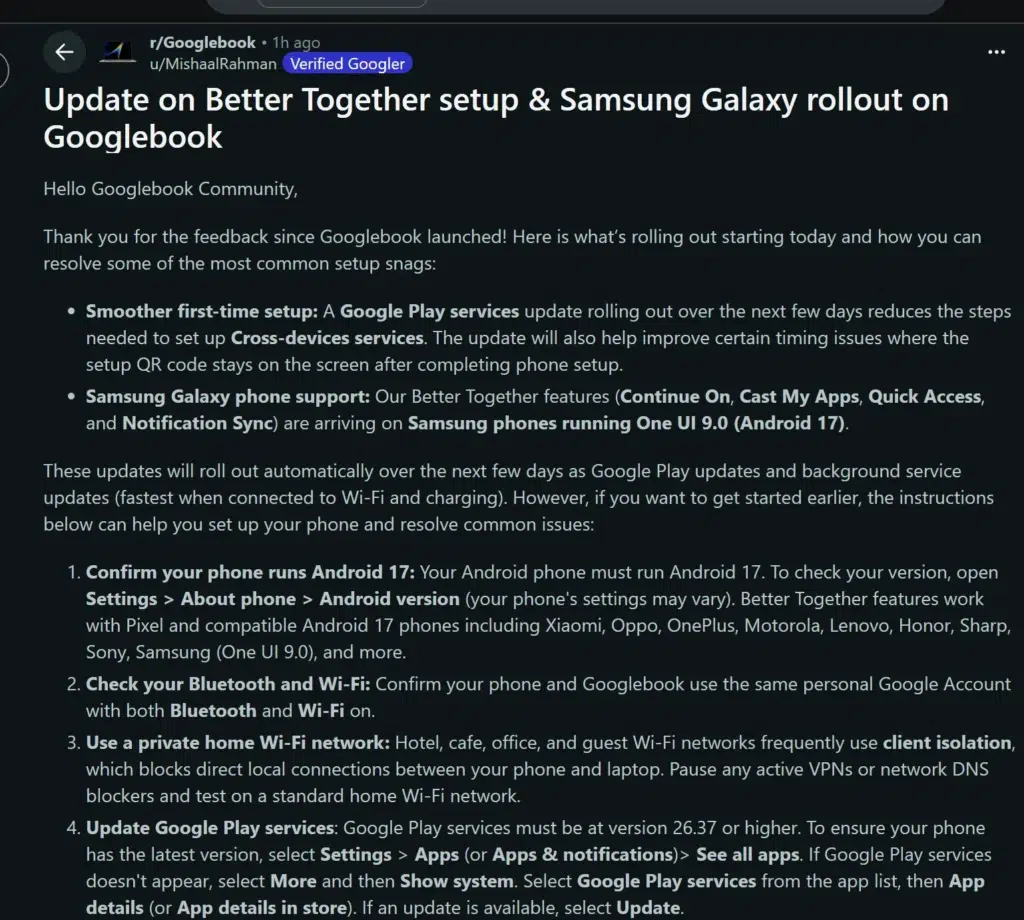 Source: r/Googlebook
What Galaxy owners are getting
Better Together is Google’s name for the features that connect a Googlebook to your Android phone. Four of them are coming to Galaxy phones:
21 days left
SammyGuru October 2026 Giveaway
Smartwatch of your choice, up to $499
1,967 entries so far.
Continue On lets you pick up a task on the Googlebook that you started on your phone.
Cast My Apps opens your phone’s apps in a window on the laptop.
Quick Access puts content from your phone within reach on the Googlebook.
Notification Sync keeps your notifications in step on both devices.
Googlebooks went on sale in the US on October 4, and Samsung phones couldn’t use these features at launch, even on Android 17. Rahman said five days ago that support would reach all Android 17 Samsung devices over the coming weeks, and it’s arriving sooner than that, so Google acted quickly here. Samsung also wasn’t among the first Googlebook makers, as we noted at launch.
How the update rolls out
Google says the updates arrive automatically over the next few days through Google Play and background service updates, and they install fastest when your phone is on Wi-Fi and charging. The same Google Play services update also cuts the number of steps it takes to set up Cross-device services, and it fixes a timing issue where the setup QR code stayed on screen after you finished setting up your phone.
🎁 SammyGuru Rewards
Get free Bonus Gear with your next Galaxy
Join SammyGuru Rewards for free. Every Galaxy you buy through SammyGuru comes with Bonus Gear: real accessories matched to your device, sent free to US members. Everyone earns Guru Points for visiting, posting in the forums and buying through us, and you get a hand-picked wallpaper free every week.
Join Rewards, it’s free →
How to get it working now
If you don’t want to wait, Google’s post lists the steps that get Galaxy phones going sooner and fix the most common setup problems:
Check that your phone runs Android 17. On a Galaxy phone, go to Settings > About phone > Software information and look at the Android version. If you’re still waiting for One UI 9, our One UI 9 rollout tracker shows where each model stands.
Use the same personal Google account on both devices, with Bluetooth and Wi-Fi turned on.
Set it up on your home Wi-Fi. Hotel, cafe, office and guest networks often stop devices on the network from talking to each other. Pause any VPN or DNS blocker while you set things up.
Update Google Play services to version 26.37 or newer. Go to Settings > Apps, find Google Play services (you may need to show system apps), then open App details in store and tap Update if one is available.
Update Cross-device services to version 1.0.1346 or newer the same way.
Turn on the Continue activity options. Search Settings for Continue activity under Cross-device services and make sure Tasks, Apps, Notifications, and Files & media sharing are all on.
Restart your phone and your Googlebook.
Google says Better Together works with Pixel phones and other Android 17 phones, from Samsung and Xiaomi to OnePlus, Motorola, Lenovo and Sony. For more on where Google is taking these laptops, see our look at Googlebook OS and the Chromebook update timeline. If you’re using a new Googlebook with your Galaxy phone, let us know how it’s going over on our forums.

Written by
Jeff Springer is the Founder and Managing Editor at SammyGuru. Pursuing his passion for mobile tech, he started covering Samsung and Android on his Youtube channel in 2014 and continues to post daily Samsung tutorial videos. As a past staff writer at XDA Developers and Android Police, Jeff has a wealth of experience managing written content as well. In 2023, Jeff started SammyGuru to offer a different type of Samsung news site. He firmly believes that providing great value to readers is the core mission of our coverage. Jeff lives in Phoenix, AZ with his wife and two kids. In his small amount of free time, he collects fountain pens, stationery, and Pokémon cards.