
Article content
Prime Members in Canada can now use a new feature that is perfect for those who remember an item after the order has already been placed.
Article content
“Add to Delivery” lets customers update existing orders by adding eligible items to an upcoming delivery without having to go through checkout again or pay additional shipping fees – it’s literally just the click of a button.
Article content
Available to use now, I’ve already tested out the feature. Here’s what to know about it.
Who can use the new Amazon ‘Add To Delivery’ feature?
The Amazon “Add to Delivery” feature is exclusively available to Prime members on the Amazon app or website.
If you don’t have a Prime membership yet, any Amazon shopper can sign up at any time. Memberships come with a handful of perks, which you can learn more about here.
How does Amazon ‘Add to Delivery’ work?
“Add to Delivery” will show up automatically for Prime members.
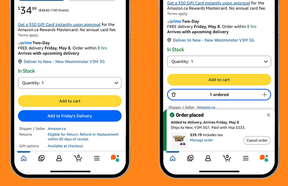
 Amazon Canada Add to Delivery Photo by Amazon Canada
When you’re shopping for products, you’ll see a small “Add to Delivery” button on product pages. Once you click it, that item will then be added to your existing upcoming delivery so you don’t have multiple orders coming in.
Article content
In case of accidental purchases, those who use “Add to Delivery” can easily cancel the added item immediately or any time before it ships.
My experience with ‘Add to Delivery’
If you can believe it, I used Amazon’s newest feature by accident.
This past weekend, I ordered something for my boyfriend on my Amazon app, and about 12 hours later the next day, I realized I needed something, too.
I saw the “Add to Delivery” button, but didn’t know about the feature yet, so I thought I was just adding the new items to my cart.
To my surprise, once clicking the button, I was taken right to an order confirmation page. While this was an easy and seamless shopping experience, it might result in people who don’t know about the feature yet mistakenly making purchases.
As I mentioned before, you can cancel if you need to, but the feature definitely took me by surprise.
Luckily, I did want the item I added, and both orders ended up coming in the same box together, which was great.
Share this article in your social network