
Freeing up storage space on my phone can be a task, and doing it manually can be time-consuming.
Plenty of utility apps can remove app junk, duplicate images, and other large files, but many rely on ads that ruin the experience.
I came across an open source utility app that let me delete three other apps, and I saved 12GB of storage space.
Related
I tested open source Android storage tools; this app reliably freed 5GB of system space
My analyzers kept pointing at the apps I was trying to save
Managing storage space feels like a game of Jenga, but an app solved the problem
One app to rule them all
Earlier, I ran three apps that targeted duplicate files, images, and other large downloads to free up storage space.
The irony was that a storage cleaner app, an image-organizing app, and a media compression tool were taking up storage space too.
My workflow became more time-consuming than it should have been, and some of the apps weren’t even great at what they advertised.
That’s when I found Amaze File Utilities, an open source app from the same team that made Amaze File Manager.
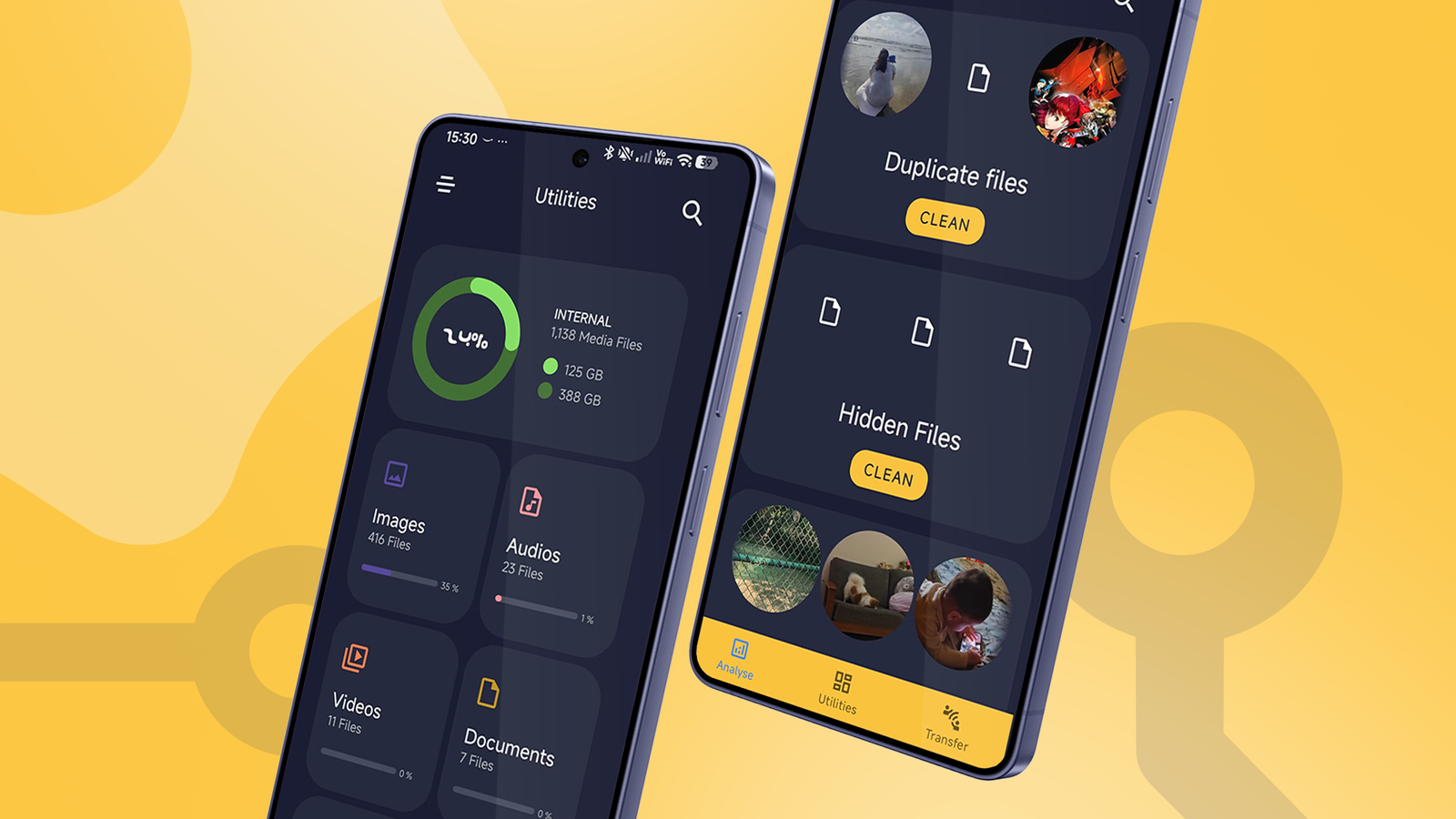
The “aha” moment came when I realized this open source app could do the job of all three apps I used before. The app can analyze images, remove duplicates, and compress media files when I need to.
Amaze File Utilities (AFU) also has built-in media playback, so I could delete VLC Media Player if I wanted to. But if I looked closer, it could also replace another app many Android users use.
While I don’t use Wi-Fi Direct to transfer apps because I have a Synology NAS for backups, many people like to transfer images and videos across devices.
AFU also has built-in Wi-Fi transfers, so a dedicated app for this purpose is redundant.
How Amaze Files Utilities helped me save 12GB of storage space
Freeing up storage space has never been this easy
When I try to find an app to free up storage, search engines always recommend SD Maid 2/SE to purge storage junk.
But when it comes to analyzing images, videos, and duplicate files, I prefer AFU because its scanning feature and overall experience are superior.
The app scans your phone’s storage and organizes images, videos, and other media into easier-to-review categories.
For example, it can identify screenshots, duplicates, blurry images, cluttered videos, and old downloads I had forgotten about.
What’s neat is that the app puts old screenshots and downloads into a separate category I can delete, since I probably won’t need them anymore.
It can also scan images used by messaging apps and other app data that grows over time.
If you thought SD Maid 2/SE was the only app that could scan leftover APKs and uninstalled app junk, you couldn’t be more wrong.
Amaze Files Utilities can do the same job, but with a much cleaner, easier-to-use interface.
To make freeing up storage stress-free, AFU lets me take bulk actions and search, sort, or group images in list or grid view. If I don’t want to delete media but still want to free up space, I can compress it.
Compressing media reduces quality, but I only apply it to old videos I don’t need right now.
After using these features, I got back at least 12GB of storage after the app deleted duplicate images, APKs, and junk files I’d been ignoring for a long time.
On top of the freed-up storage, I deleted the three apps I was using earlier. That let me get 700MB to 800MB of storage space back.
The app also does more than manage images and junk files. I can also free up RAM to make my phone snappier and delete the apps I use least.
One major caveat, though: Amaze File Utilities isn’t free. You get 20 days to use the app, but to keep using it, you’ll pay a small fee or subscription to support the developers.
Amaze File Utilities costs $1 per year or $3 for a lifetime membership. The trial period doesn’t paywall any features and lasts 20 days.
In my opinion, the subscription or lifetime license is worth it; it doesn’t cost a leg and genuinely makes my life easier. AFU has no telemetry, ads, or cloud storage subscriptions, and since it’s open source, I didn’t mind paying for the lifetime license.
What’s cool is that I got to test out the app for 20 days for free, and it gave me enough confidence to support the developers.

Related
I replaced my expensive Android apps with free open source apps; I didn’t miss much
The good, bad, and unexpected
One app was more than enough to help me get storage back
The combination of powerful image scanning, media compression, junk/large-file analysis, and the ability to free up RAM in one app was a life changer.
Amaze File Utilities might be a relatively unknown open source app, but it does a fantastic job of identifying redundancies unlike any other app I’ve used.
I highly recommend trying the trial to see if it makes a meaningful difference. If it does, upgrading doesn’t cost much.