
If you use the YouTube app on your TV often, you might notice a surprise the next time you open it. YouTube has updated the watch screen on its TV app with a redesigned layout, moving and refreshing several user interface elements to create what it calls a “more intuitive experience with easier navigation.”
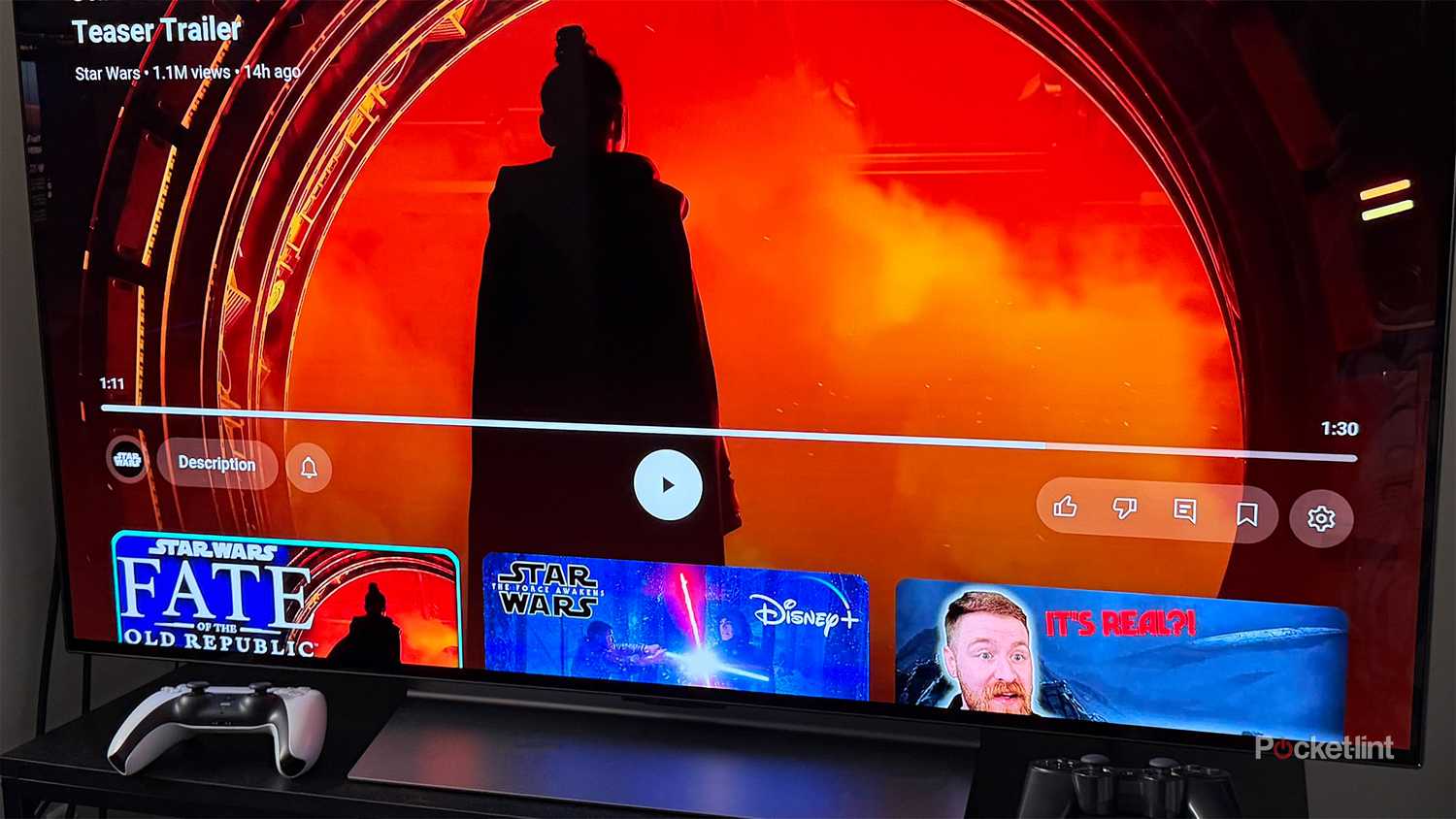
One of the biggest changes is where video titles now appear. Previously, titles sat just above the video timeline and were clickable to open channel information. In the new layout, they’ve been moved to the top of the screen and are no longer clickable.
To replace that functionality, YouTube has added a new “Description” button. According to the company, it “replaces the clickable title to view video metadata, comments, and creator details.” You’ll find the Description button in the bottom-left corner of the watch screen, just below the timeline.
“We’re excited to announce that we’ve refreshed the look of the YouTube watch page on TVs,” YouTube said in a blog post. “Enjoy a smoother, more intuitive experience with easier navigation, better control accessibility, and fewer interruptions. Engagement features are also more accessible and visible, allowing fans to better engage with their favorite channels.”
YouTube has also reorganized the controls on its TV watch screen, grouping them into three sections below the video timeline. On the left are the Channel, Description, and Subscribe buttons. In the center are the Previous, Play/Pause, and Next controls. And on the right, you’ll find the Like, Dislike, Comment, Save, Closed Captions, and Settings options.
YouTube
notable shows
Kitchen Nightmares, Merlin
notable movies
Clueless, Terminator 3: Rise of the Machines, How to Train Your Dragon, Mean Girls, Star Trek
Premium Subscription
Yes, $13.99 per month
Originals
No
The new watch screen is rolling out now
Overall, I’m a fan of the changes
If you want to try the new watch screen, YouTube is currently rolling it out, so it should appear on your TV soon if it hasn’t already. To get the update, make sure automatic app updates are enabled on your TV or streaming device. If not, you may need to manually update the YouTube app via your TV’s app store. On my Fire TV Stick 4K Max and LG TV running webOS, the update is already live. If you don’t see it yet, even with the latest version, it’s likely because it’s still rolling out, and you should see it very soon.
I’ve watched a few videos with the new watch screen, and I’m a fan. It feels more streamlined than before, and the overall layout looks cleaner.
There are a couple of other changes that YouTube has also added with this update, including what it calls an “Enhanced Subscribe Button,” which, according to the company, “is now always visible and will adapt for pay-gated content and ‘Notify Me’ for upcoming live streams.” There are also new controls, including a new “Multiview” option for live sports, and Music and Premium subscribers will see an option for “Display Mode.”
It’s worth noting that these changes are arriving pretty late, as back in April, YouTube said its “TV viewing upgrade” would roll out “this summer,” but instead it’s rolling out two weeks before Christmas. Better late than never, I suppose.
I’ve watched a few videos with the new watch screen, and I’m a fan. It feels more streamlined than before, and the overall layout looks cleaner. Moving the title to the top of the screen works well, and the new Description button makes it much clearer where to find that info, since it was previously tucked away behind clicking the title. The reorganized controls also make sense, with each group neatly separated rather than everything crammed together. Overall, it’s a solid update, and if you watch YouTube on your TV as much as I do, I think you’ll appreciate the improvements.