
Leica has released firmware version 4.0.0 for both the SL3 and SL3-S mirrorless cameras. This major update introduces direct Camera-to-Cloud connectivity via Adobe Frame.io, AI-enhanced autofocus with expanded subject recognition, a 241MP Multi-Shot mode for the SL3, 3:2 open-gate recording, anamorphic lens support with in-camera de-squeeze, additional video format options, and substantial improvements to the tracking algorithm and user interface.
The firmware represents one of the most significant updates in the SL-System’s history, fundamentally enhancing both the photography and videography capabilities of these L-Mount cameras. Leica has focused this release on professional workflow integration, particularly for video production environments where cloud-based collaboration has become essential. We tested the SL3-S earlier this year, so watch our Leica SL3-S review if you missed it. (Here at CineD, the consensus is that the Leica SL3-S is the one to go with if video is your main interest.)
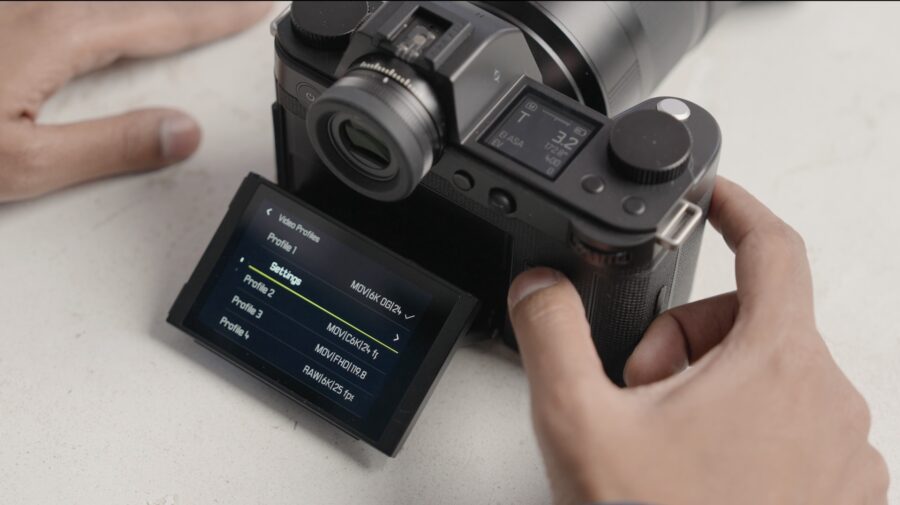 6K Open-Gate support on the SL3-S. Credit: Leica Anamorphic lens support and de-squeeze
The SL3-S now supports aspect ratios of 4:3 (3.5K, 3536×2656, external recording) and 3:2 (6K, 5952×3968 open-gate internal recording) for anamorphic and standard shooting, expanding creative possibilities beyond the conventional 16:9 video format. When using manual anamorphic lenses, the camera can de-squeeze distorted images during playback, providing an accurate preview of the final image composition in the viewfinder or on the rear display.
The new Lens Profiles menu offers de-squeeze factors of 1.25, 1.3, 1.33, 1.5, 1.6, 1.65, 1.8, 1.85, and 2.0, covering the full range of common anamorphic squeeze ratios used in cinema production. This in-camera correction allows assessing framing and composition accurately during shooting without requiring external monitoring equipment configured for de-squeeze preview. The feature only activates when using manual anamorphic lenses in Video mode, remaining grayed out when autofocus lenses are attached.
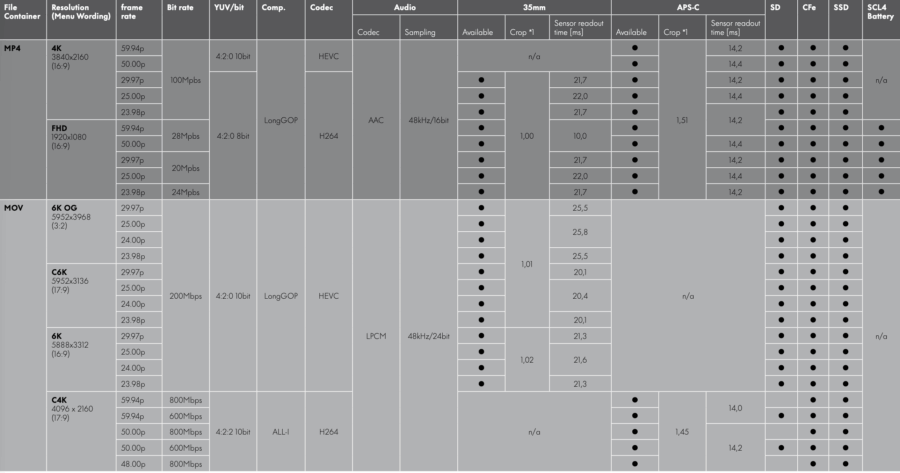 Leica SL3-S recording formats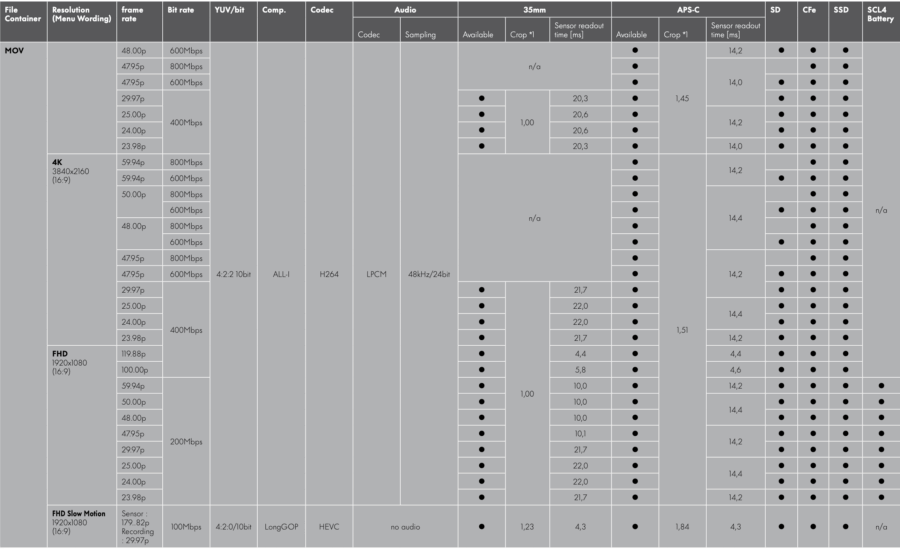
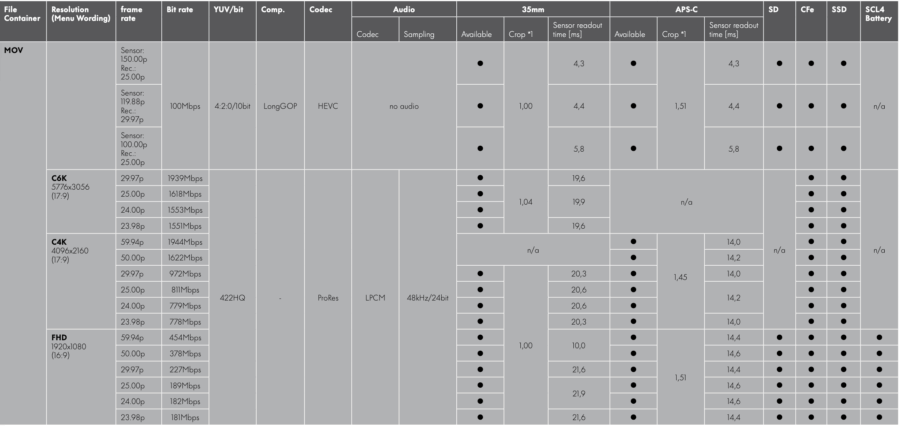 Expanded video format options
Additional video formats with lower bit rates have been introduced, providing more flexible recording options for productions where file size management is a priority. These new format options balance quality against storage requirements and post-production workflow considerations, allowing cinematographers to select appropriate codecs based on project delivery specifications rather than being constrained to maximum-quality recording modes.
The aspect ratio expansion to include 4:3 and 3:2 alongside the existing 16:9 provides format versatility for different distribution channels and creative intentions. The 4:3 anamorphic aspect ratio specifically supports traditional anamorphic lens workflows, while 3:2 matches the native sensor dimensions for open-gate recording scenarios. This format flexibility ensures the cameras can adapt to diverse production requirements without requiring external recorders or format conversion in post.
On top, starting a video recording no longer cancels a previously set autofocus lock, maintaining the focus setting during the transition from photo to video mode. This behavior change improves operational consistency for hybrid shooters who switch between stills and motion capture, eliminating the need to reacquire focus after initiating video recording. The focus setting persistence ensures deliberate focusing decisions carry through mode transitions rather than being reset by the camera.
The icon for active Perspective Control now displays correctly in Review mode, providing accurate visual feedback about which corrections are applied to captured images. This interface refinement ensures photographers can verify perspective correction settings when reviewing images in the field.
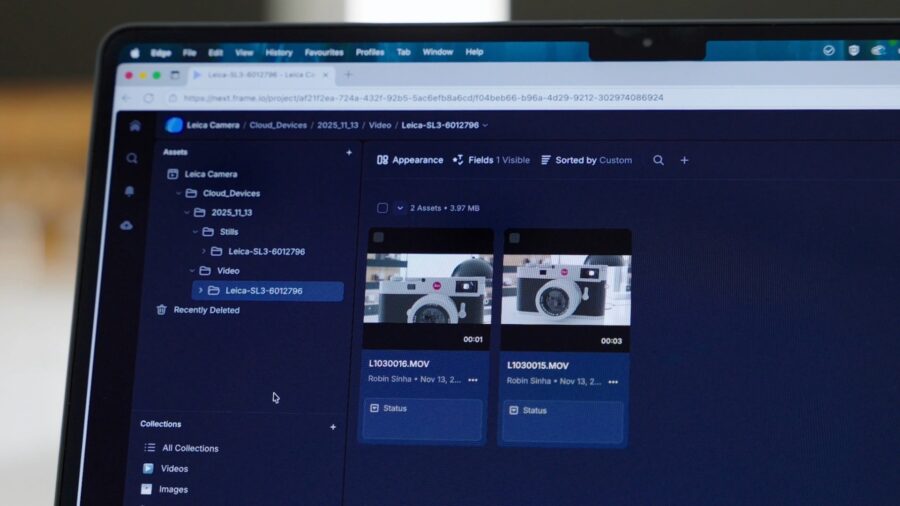 Frame IO workflow. Credit: Leica Camera-to-Cloud integration with Adobe Frame.io
The headline feature in firmware 4.0 is native Camera-to-Cloud connectivity through Adobe Frame.io. The SL3 and SL3-S can now establish direct WLAN connections to Frame.io, enabling photographers and cinematographers to upload photos and proxy videos straight from the camera to the cloud without intermediate steps or external hardware. This integration eliminates the traditional workflow bottleneck of physically transferring media files before post-production teams can begin working.
Leica has restructured the camera’s connectivity architecture to accommodate this feature, introducing a new Connectivity menu where both Leica FOTOS and Frame.io connections are now managed. The system ensures secure transmission and immediate availability of recordings for further editing or team sharing. For proxy video uploads, the camera requires both a CFexpress card and an SD card to be inserted simultaneously, with the Proxy option enabled in the video profile. This dual-card configuration allows the camera to record full-resolution footage to one card while generating proxy files for cloud upload on the other.
A simultaneous connection with Leica FOTOS and Frame.io is not possible, requiring users to select their connectivity mode based on current workflow requirements.
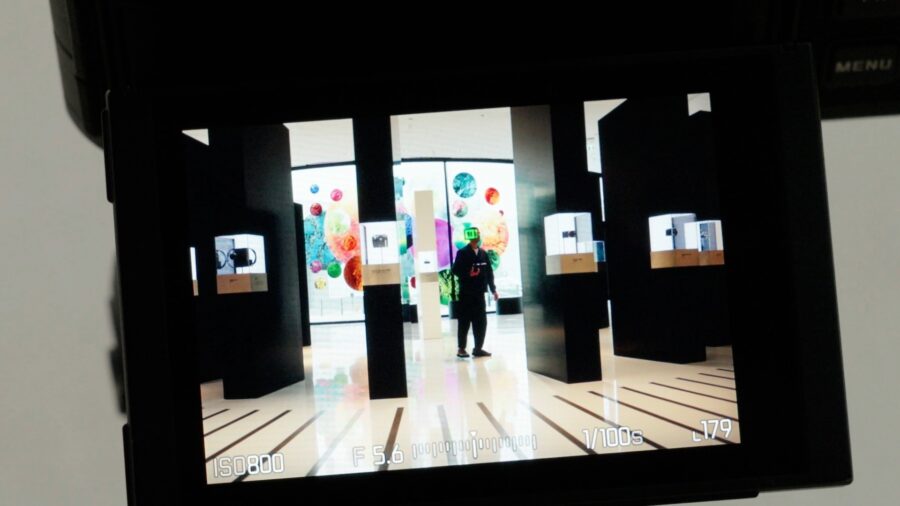 AI-enhanced autofocus. Credit: LeicaAI-enhanced autofocus and expanded subject recognition
Firmware 4.0 brings substantial improvements to the autofocus system through AI-assisted models. Automatic focusing on human features, including eyes and faces, has been significantly enhanced, with the tracking algorithm now automatically adjusting both the size and shape of the focus field during subject tracking. This adaptive behavior results in more stable and reliable performance over extended shooting periods, particularly when working with moving subjects or in documentary situations where subject distance and framing continuously change.
The AF mode has been completely revised with a simplified menu structure. Leica consolidated the previous Multi-Field and Spot metering methods into unified menus, now labeled Zone/Multi-Field and Field/Spot. A new AF Acquisition menu appears in both the function list and Control Center, providing faster access to focusing parameters during active shooting. This streamlined approach reduces menu diving and improves operational efficiency when switching between different autofocus strategies.
Subject recognition capabilities have been expanded to include a broader range of animals beyond the previous implementation. The camera now recognizes birds, dogs, wolves, cats, and big cats in addition to the existing human detection for eyes, faces, and bodies. This enhanced animal recognition addresses a frequent request from wildlife and nature photographers who need reliable subject tracking across diverse species. The system combines Phase Detection AF, Object Detection AF using depth mapping, and Contrast Detection AF to maintain focus on recognized subjects even during brief obstructions or rapid movement.
The AF Detection menu now offers more granular control over subject recognition modes, allowing users to select between Off, Human (Eye/Face/Body), Human (Eye/Face), Animal (Body), and Animal (Eye/Body). This flexibility enables photographers to optimize autofocus behavior for specific shooting scenarios, whether prioritizing eye detection for portraiture or body tracking for action photography.
Multi-Shot mode for maximum resolution
The SL3 gains a new Multi-Shot mode capable of capturing images up to 241 megapixels for maximum detail rendering. This pixel-shift functionality combines multiple exposures with sensor movement to create ultra-high-resolution files that exceed the camera’s native 60MP sensor resolution. The feature proves particularly valuable for commercial photography, product photography, architectural documentation, and any application where extracting maximum detail and resolving power justifies the static subject requirement and extended capture time.
Multi-Shot mode works by precisely shifting the sensor between exposures, allowing each photosite to capture color information from multiple positions. The resulting composite image delivers resolution and color accuracy beyond what single-shot capture can achieve, even with high-megapixel sensors. This computational photography approach leverages the SL3’s sensor-shift IBIS mechanism for the precise movements required between frames.
The 241MP output provides substantial cropping flexibility and enables large-format printing at native resolution without interpolation. For photographers working on projects where detail preservation is paramount, this mode transforms the SL3 into a technical camera alternative while maintaining the operational flexibility of a mirrorless system.
 Filming with anamorphic lenses and having real-time desqueeze. Credit: Leica Leica Looks optimization and intensity control
The Leica Looks menu has been optimized with a new Intensity setting option added to the color profile system. This enhancement provides finer control over the strength of applied looks, allowing users to dial in the exact degree of stylization rather than working with fixed presets. The Intensity parameter works alongside the existing Contrast, Highlight, Shadow, Sharpness, and Saturation controls to provide comprehensive creative control over in-camera image rendering.
For the Vivid, Natural, and Monochrome High Contrast looks, users can now adjust intensity from 10% to 100% in addition to the standard ±2 range for other parameters. This expanded control enables subtle look variations without requiring custom look creation, streamlining the workflow for photographers and cinematographers who want to fine-tune Leica’s predefined color science to match specific project requirements.
The optimization also improves the menu structure for downloading additional Leica Looks via Leica FOTOS, making the process of expanding the available look library more intuitive. Only customizable Leica Looks can be reset to default settings, preserving user customizations while allowing experimentation without permanent changes to core looks.
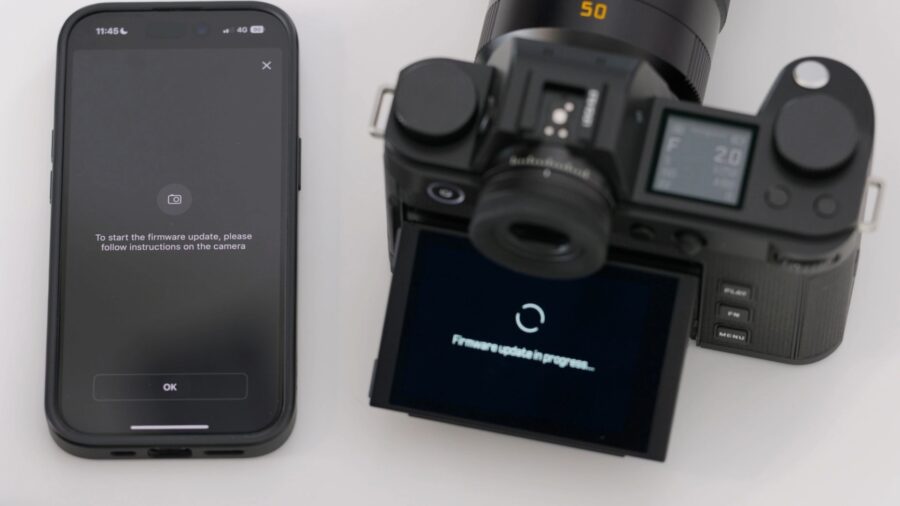 Leica’s new firmware update for the SL3 and SL3-S. Credit: Leica Monitor refresh rate control and power management
A new monitor refresh rate setting allows users to select between 30fps and 60fps for the rear LCD display. Selecting 30fps reduces power consumption in Live View mode, extending battery life during extended shooting sessions where the higher refresh rate isn’t necessary. This power management option proves particularly valuable for documentary work, event coverage, and other scenarios where maximizing shots per charge takes priority over the smoothest possible display performance.
The addition of a Battery Condition menu for the BP-SCL6 battery provides visibility into the overall health of the power system. When inserting an aged or low-performance battery, a warning message now appears indicating reduced battery condition. This proactive monitoring helps photographers anticipate battery replacement needs before experiencing unexpected power failures during critical shooting situations.
The warning message regarding limited functionality when using the older BP-SCL4 battery has been revised with a “Don’t show again” option. After eight weeks, the reminder automatically reappears to indicate battery condition, balancing user convenience with the need for awareness of reduced performance. The message displays only when switching the camera on, not when waking from standby, minimizing workflow interruption.
Interface refinements and operational improvements
The behavior of the Auto ISO display in Live View and Control Center when using flash has been revised to eliminate confusion caused by incorrect ISO value previews. Previously, the camera sometimes displayed inaccurate ISO values in flash mode because the actual ISO value is only determined during the pre-flash. With firmware 4.0, if a flash is connected and required for the shot, the Auto ISO value remains hidden in Live View and Control Center. If a flash is connected but not ready or not required, a preview value is displayed. If no flash is connected, the Auto ISO value displays as usual.
Default settings in the Control Center have been adjusted, with AF Detection now enabled by default. This change reflects professional workflows where subject recognition typically improves focusing success rates, making the feature active out of the box rather than requiring manual enablement. The default flash mode has also changed from Auto to On, providing more predictable flash behavior for users working in controlled lighting environments.
The camera now starts significantly faster after extended inactivity, reducing the delay between powering on and being ready to shoot. This improved startup time addresses a common frustration with professional cameras that can experience multi-second boot delays, particularly important when unexpected photo opportunities arise requiring immediate camera response.
The File Format and Compression menus have been consolidated into a single File Format menu item, simplifying navigation through recording options. Grayed-out settings now always show current values in Live View and in the menu, improving visibility of why certain options are unavailable and what settings are currently active, even when they cannot be changed due to mode conflicts.
Resolved issues and stability improvements
Several significant bugs have been resolved in firmware 4.0. The false “No memory card inserted” message that briefly appeared when switching on the camera, despite a card being present, has been eliminated. This error occurred with both SD and CFexpress cards, causing unnecessary confusion during camera startup. The camera now recognizes inserted memory cards without displaying erroneous warnings.
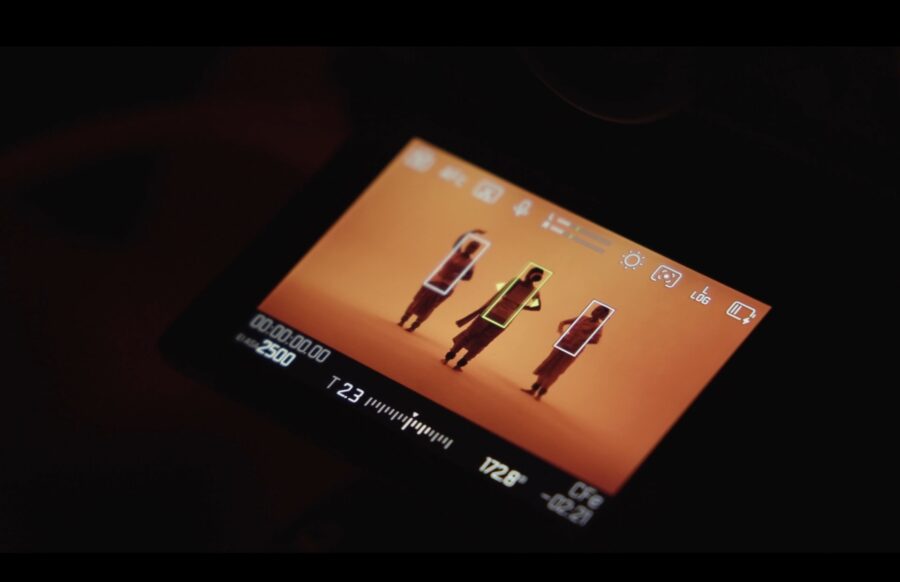 Autofocus performance is now enhanced. Credit: Leica
Autofocus performance with Leica SL lenses now operates significantly more reliably and consistently, especially when paired with the SL3-S. This improvement addresses focusing inconsistencies that could occur in certain shooting scenarios, providing more predictable AF behavior across the full range of native L-Mount optics.
In tethered shooting mode with JPG+DNG files, Leica Content Credentials data was previously not stored properly. This issue has been resolved, with Content Credentials information now properly embedded in both file formats. This fix ensures authentication metadata remains intact throughout tethered workflows, maintaining the integrity of content verification systems.
A note regarding EU Cybersecurity Requirements: when updating from firmware version 3.1.1 or earlier, the camera must be re-paired with the Leica FOTOS app to maintain secure connectivity.
Firmware installation and availability
Firmware 4.0.0 for the Leica SL3 and SL3-S is available for free download here (SL3) and here (SL3-S). For additional information about the Leica SL3-S video recording capabilities, please head here. Additional information and “how-to” videos can be found here.
Do you have a Leica SL3 or SL3-S, and do you use it for any video work? If so, how is your experience working with it in the field? Please share your thoughts with us in the comment section below.