
Despite my best efforts, I still spend way too much time on my phone. Some of that time is genuinely useful, such as dealing with work issues or responding to important messages. However, we all have plenty of bad smartphone habits that waste our precious time.
Unlocking your phone for no reason
We’re all guilty of it. I see my phone, and even though there’s nothing specific I need to do, I pick it up and unlock it anyway. The trouble is, once I’ve unlocked my phone, I end up going down a rabbit hole of dealing with notifications, reading and replying to messages, or just doomscrolling. Before I know it, another hour of my life has been wasted.

Credit: Tero Vesalainen/Shutterstock.com
You can minimize this by adding a bit of friction to the process. For example, instead of using your face or fingerprint to quickly unlock your phone with minimal effort, try using the longest passcode your phone will allow. It may annoy you initially, but it may also be enough to stop you from unlocking your phone quite so often.
Related
Tempted to get a dumbphone? Try this first
The best feature phone may already be in your pocket.
Letting notifications rule your life
Notifications are meant to serve you, not the other way round. If your phone pings or vibrates to indicate that a new notification has appeared, it’s very hard not to pick it up to see what it says. Once you do, you often end up in a spiral of replying to messages or reading social media posts.

Credit: Adam Davidson/How-To Geek
Try setting your notifications to be delivered silently so that you’re not constantly bombarded with nudges to pick up your phone. It can also help to limit your notifications to only the most important apps, such as banking apps, or to use scheduled summaries to stop them arriving throughout the entire day.
Keeping the most tempting apps on your home screen
Sometimes you pick up your phone to do something genuinely useful, and then spot the Reddit app icon on your home screen. That’s the next hour of your life gone in a haze of doomscrolling.

Credit: Joe Fedewa / How-To Geek
Keeping apps that suck up time on your home screen is a recipe for disaster. Try moving them off the first home page screen so that you don’t see them every time you open your phone.
Responding instantly to every message
When you get a message, it can be tempting to reply immediately. Then the person you’re responding to does the same, and before you know it, you’re in a full-blown back-and-forth, having a conversation about truly important topics like the ending of Stranger Things.

Credit: Lucas Gouveia/How-To Geek | insta_photos/Shutterstock
You don’t have to respond immediately to messages that aren’t important. You could try muting notifications from chats that aren’t time-sensitive, so that you only see that you have a new message when you go into the app.
Keeping your phone out when you’re not using it
Using your phone can give you a dopamine hit, and the interesting part is that some research suggests that the dopamine levels can spike more during the anticipation of a reward than when you’re experiencing the reward itself. If you leave your phone in plain view, when you spot it, this could cause a dopamine hit that makes you want to give it a quick check. You’ll then end up constantly picking up your phone throughout the day.
Keeping your phone out of sight keeps it out of mind. You’re less likely to be constantly checking your phone if it’s stashed away. For fewer distractions, try placing it in a drawer or somewhere else where you can’t see it.
Opening apps the hard way
My phone tells me that I picked it up 95 times yesterday. On many of those occassions, I opened specific apps. If you open your apps by swiping through page after page full of every app you’ve ever downloaded, it can take several seconds to find the app you want, and those seconds can soon add up.
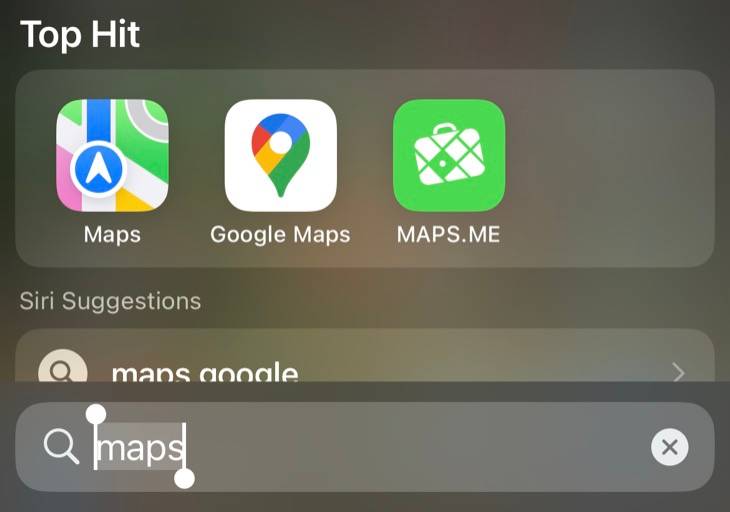
You can save yourself a lot of time in the long run by opening apps the easy way. On an iPhone, swiping down on the home screen brings up Spotlight Search. Not only can you quickly type the name of an app to find and open it, but the Siri Suggestions include icons for the apps that you’re most likely to want to use, which you can open with a single tap.
Android phones have a similar gesture to search for apps, which usually involves swiping up from the bottom of the home screen to access the app drawer, although the gesture may be different depending on the UI on your phone.
Keeping too many tabs open
Naming no names, I know people who regularly bump up against the limit of 500 open tabs in Safari on their iPhones. This is a sure-fire recipe for lost time. Trying to find the tab you want among 499 others isn’t going to be quick, and if you want to open a new tab, you then have to waste time deciding which of your precious tabs you’re going to have to say goodbye to.
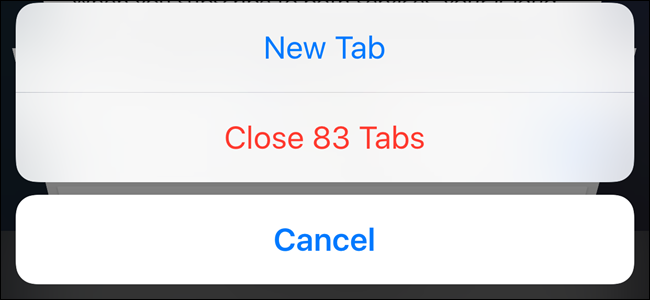
There’s no need to have 500 tabs open at once. If there are pages or sites you want to save for later, you can add them to the reading list. You can then reopen these pages whenever you want, without having to keep hundreds of tabs open.
Smartphones can eat up time like almost nothing else. If you want to reclaim a small portion of your life from your phone, you can try curbing some of the bad habits listed above. Even small wins can soon add up in the long term. Now I’m off to bury my phone in the yard for an hour.