

Key Takeaways:
Microsoft Defender now lets analysts organize and pre-stage scripts before live investigations.
Centralized management reduces delays, errors, and fragmented workflows.
Security Copilot provides insights and risk context for faster, safer responses.
Microsoft has introduced a new Library Management experience in Microsoft Defender. This new feature is aimed at transforming how security analysts manage scripts and tools during live response investigations.
Security analysts have long struggled with a fragmented, inefficient process for using scripts and tools during live threat investigations. Assets had to be uploaded in the middle of an active session, which slowed response times, created inconsistency across teams, and increased the risk of errors. Analysts lacked centralized visibility and control because scripts were scattered across personal devices, shared drives, or ad‑hoc locations. This problem made it difficult to prepare effectively or maintain an organized, auditable set of investigation resources.
“With this centralized and streamlined interface, analysts no longer need to wait for an active session to organize their investigation tools everything can now be managed proactively, directly from the portal. This enhancement in Defender’s live response tooling improves operational readiness, enhances visibility and control, and helps streamline response workflows across SOC teams,” Microsoft explained.
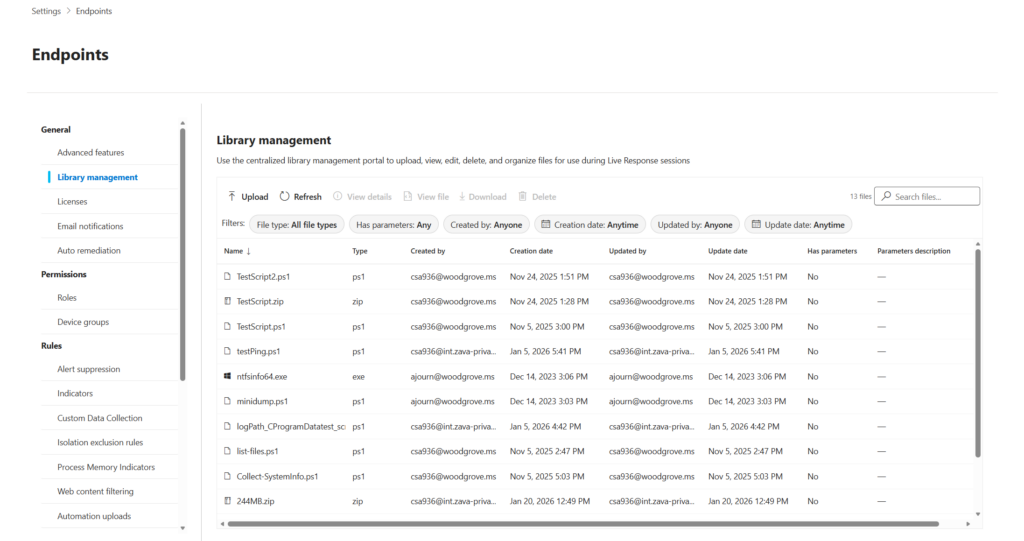 Library management (Image Credit: Microsoft)
What are the benefits for SOC teams?
Microsoft highlighted various benefits of this new Library Management experience in Microsoft Defender. Security teams can now upload, organize, and maintain all scripts and files before starting a live response session. This eliminates the previous requirement to upload tools only during active investigations.
Security analysts can pre‑stage PowerShell scripts, batch files, and other investigation utilities so they are immediately available when needed. This reduces delays during urgent investigations. Moreover, administrators can now preview and review script contents within the Microsoft Defender portal. This feature helps validate functionality without switching to external editors or tools. Security teams can also easily remove redundant or outdated scripts.
Microsoft Security Copilot integration for smarter insights
Microsoft Security Copilot automatically analyzes scripts and provides behavioral summaries, security insights, and risk context. This helps analysts understand unfamiliar scripts and reduces the chance of errors during execution.
Microsoft notes that the Library Management experience is available directly on the live response page. This feature allows security analysts to quickly upload tools, preview scripts, and leverage Copilot insights.