

Key Takeaways:
Microsoft has introduced automatic rebalancing to keep VMSS instances evenly spread across availability zones.
This feature uses a create-before-delete approach to maintain workload stability during redistribution.
Configuring automatic zone balance also activates instance health repair for added resilience.
Microsoft has announced a public preview of automatic zone balance for Azure Virtual Machine Scale Sets, expanding its resiliency toolkit for enterprise cloud deployments. The capability is built to proactively safeguard workloads by maintaining balanced VM distribution and minimizing the impact of unexpected availability zone failures.
Azure Virtual Machine Scale Sets (VMSS) provide a way to deploy and manage large groups of identical virtual machines. This service automatically distributes them across infrastructure to improve availability, simplify management, and support dynamic scaling based on demand. It allows administrators to centrally configure, update, and load‑balance thousands of VMs while ensuring high uptime through features like availability zones, auto‑scaling, and integrated orchestration tools.
How does automatic rebalancing protect against zone failures?
Azure VM Scale Sets aim to keep virtual machines evenly spread across availability zones for better resilience. However, real‑world factors like scaling activity or limited capacity can gradually create uneven distributions that raise the risk of one zone failure affecting more of an organization’s workload than intended. Automatic zone balance addresses this by continuously checking for these shifts and quietly redistributing VMs in the background to restore an even, resilient layout.
“Automatic zone balance addresses these challenges by continuously monitoring your scale set for zonal imbalances and tracking capacity in under-provisioned zones. When capacity becomes available, VMs are automatically created in the under-provisioned zone, eliminating the need for manual trial-and-error,” Microsoft explained.
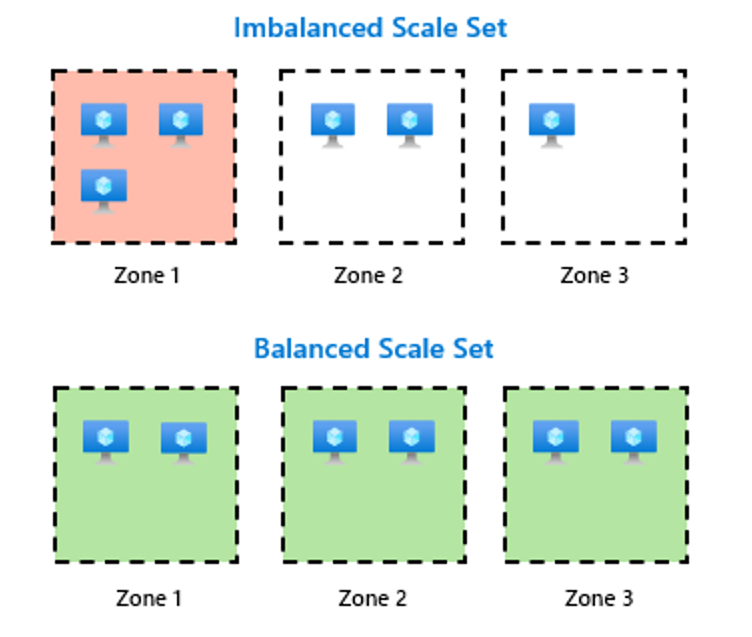 Balanaced vs Imbalanced Scale Set (Image Credit: Microsoft)
How does automatic zone balance work?
Automatic zone balance helps keep Virtual Machine Scale Sets evenly distributed across two or more availability zones by continuously watching for uneven placement of VM instances and correcting it with minimal impact. When it detects that one zone has fewer VMs than others, it restores balance by adding a new instance to the zone with the lowest count and verifying its health before making any changes elsewhere.
Once the newly created VM is confirmed healthy, the system removes an instance from the zone with the highest VM count. It helps to ensure that only one VM is shifted at a time and that the running workload remains stable throughout the process. This method uses a create‑before‑delete workflow and always provisions new VMs using the latest SKU defined in the scale set model. It allows the environment to remain consistent and resilient as it rebalances.
How to get started?
Microsoft mentioned that enabling automatic zone balance also automatically turns on automatic instance repair, which combines zone-level resilience with instance-level health monitoring. This results in more resilient workloads with lower operational overhead and reduced exposure during zone failures.
To participate in the public preview, administrators will need to enable the AutomaticZoneRebalancing feature flag in their subscription via Azure portal, CLI, or PowerShell. The scale set needs to meet a few requirements first: it should run across at least two availability zones, be configured to use the best‑effort zone balancing mode, and have application health monitoring enabled.