

My phone had been throwing the same low storage warning for weeks, so I went straight to the gallery. That is always where I check first, because photos, videos, and screenshots are usually the first things that eat up space. But this time, the gallery didn’t account for all of it. The numbers were pointing somewhere else, and it was not a place I had ever thought to look in.
I almost cleared my camera roll
One tap away from the wrong fix
Digvijay Kumar / MakeUseofCredit: Digvijay Kumar / MakeUseof
I opened the gallery and started with the easiest things to remove: old screenshots, duplicate photos, and videos I wouldn’t miss if they were gone. But before I deleted anything, I checked the storage breakdown to see how much space it would free up.
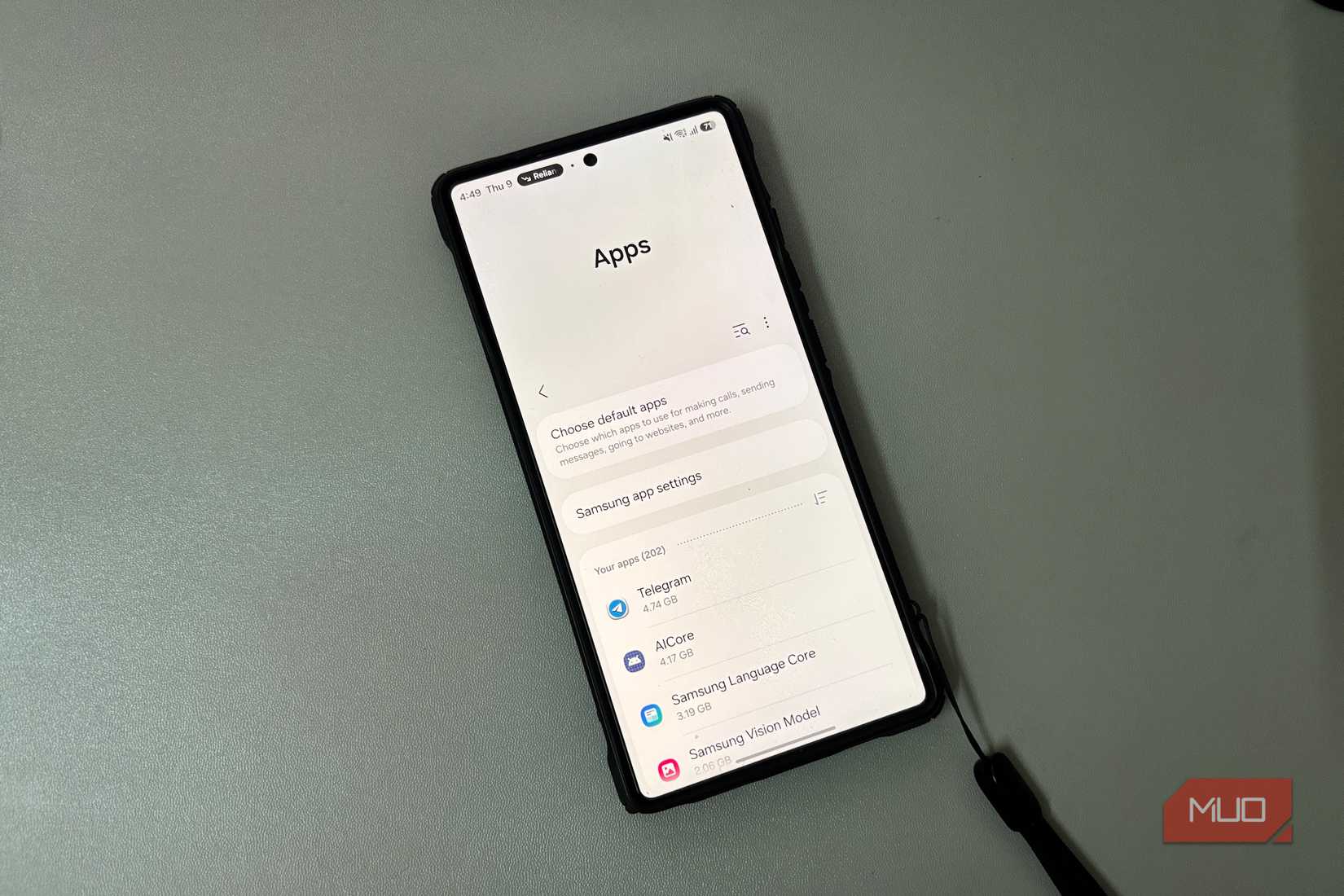
The gallery was using space, but it was clearly not the whole problem. Telegram was sitting on 4.74GB, with WhatsApp not far behind. Prime Video, Netflix, and even Google Maps were using a surprising amount of storage. I used all of those apps regularly, so they never looked like the problem. I was ready to cut into my camera roll before I realized I was about to fix the wrong problem.
Related
Android’s Private Space is the the best security feature you’re not using
Private Space is the ultimate way to hide sensitive apps and files on your phone.
My apps were making the mess
Saving everything, asking nothing
The apps alone were not what filled up my storage. It was what they had left behind. Telegram was full of voice notes, forwarded files, and sticker packs I had downloaded once and never thought about again. WhatsApp had its own pile of old attachments buried inside chats I had not opened in months. Document downloads, GIFs, and old videos were all still sitting there.
A similar buildup had happened in my streaming apps as well. Prime Video and Netflix were carrying old downloads, including episodes I had already watched and never removed. Google Maps was in there too, with offline areas from months ago that I had completely forgotten were there. None of it was in my gallery, and it was easy to miss in my files.
Gigabytes back in minutes
I cleared junk, not memories
Once I knew where the storage was hiding, the cleanup got much simpler. I opened Settings and checked the storage page for each app. On Android, that screen breaks things into three parts: the app itself, its data, and its cache. Cache is usually the safest thing to clear first. It is temporary data that the app keeps to load things faster, and clearing it doesn’t remove anything important. App data is different because it includes your account, settings, and saved content. Clearing that resets the app entirely, so most people are better off leaving it alone.
Telegram was the first place where space really started coming back. Clearing its cache alone recovered 862MB. But the cache was only part of it. I opened the file manager, went into Internal Storage, then Android -> media. That is where many apps keep their media folders. Inside, I found separate folders for audio, documents, images, sticker packs, and voice notes. WhatsApp also kept a similar structure there. Deleting files from those folders freed up much more space than clearing the cache alone.
Streaming apps and Maps had to be handled from inside the apps themselves. Their downloads usually sit under a Library or Downloads section, so I went into those lists, removed old files, and then cleared any remaining cache from Settings. For Google Maps, I opened the app, tapped my profile picture, went into Offline Maps, and deleted the saved areas from there.
I also found around 4GB sitting in the recycle bin from files I had already deleted but never permanently cleared. The last thing I did was turn off auto-download in Telegram and WhatsApp, so the same mess would not start piling up again. By the time I finished, I had recovered just over 14GB in under ten minutes without deleting a single photo.
Why this clutter builds up so fast
Apps are built to save data locally so they can work faster the next time you open them. Messaging apps keep media and shared files ready, so chats load quickly. Streaming apps store downloads, playback data, and cached files so browsing and playback feel smoother. Browsers do the same with page data, images, and scripts. The more you use these apps, the more data they store, and a lot of that data stays on your phone until you manually remove it.
Apps also refresh in the background, pulling in new content even when you are not actively using them. Android generates thumbnail previews for photos and videos so galleries and apps can load them faster. That means storage keeps growing even when you are not consciously saving anything.
Android usually makes the problem visible only after storage is already running low. A warning appears when free space is low, but there is no signal while individual apps keep getting bigger. Because the storage is spread across different places, it is easy to underestimate how much has built up. By the time the warning appears, an app like Telegram may already be using 5GB of storage, yet Android still has not clearly shown it as the problem.