
I didn’t switch to a minimalist launcher because I wanted to be more productive. Either I have some digital detox fantasy, or I wanted to turn my phone into a monk-like slab of glass. Actually, I was just tired. Tired of picking up my phone to check something important and then spending 15–20 minutes on everything except for what I actually wanted to do. Those endless notifications, colorful icons always vying for attention, and that muscle memory that pulled me into apps that I didn’t even want to use.
That is when I tried a minimalist launcher, and I expected it would just be an experiment. Something I would try for a few days and then eventually uninstall it in the search for something more exciting. But let me tell you that didn’t happen. Instead, it has transformed the way I use my phone, and I have no plans to go back anytime soon.
The first few days were uncomfortable
Yes, it took time
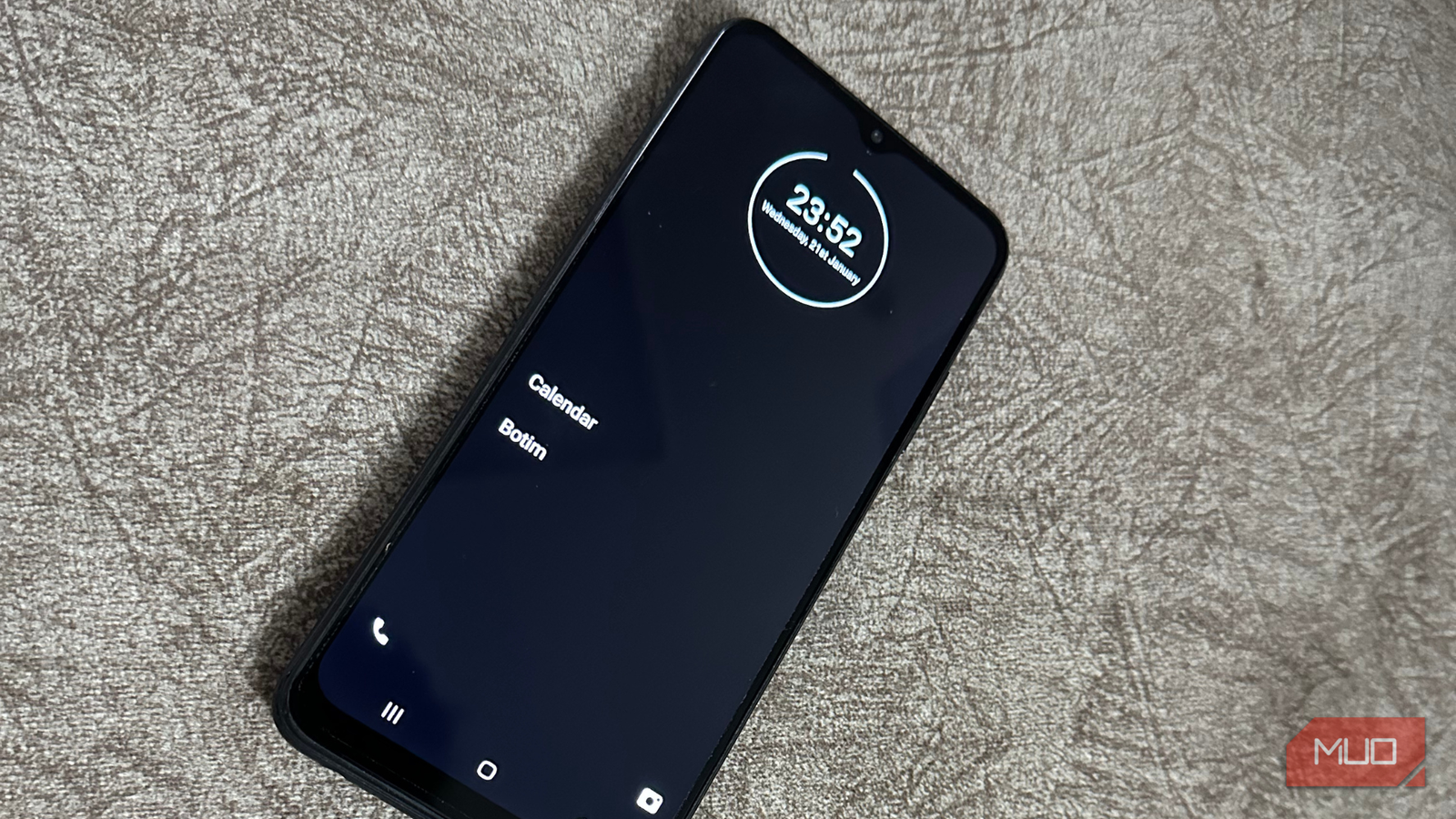
I won’t lie, but the first few days with the minimalist launcher weren’t fun at all. The moment I installed the launcher, my familiar home screen disappeared. No colorful app icons, no folders, no widgets fighting for space. There was just white text and a short list of apps on a black background. It felt empty and very different.
Every time I unlock my phone, I’d expect Samsung’s classic visual cues, but all I could see was stark simplicity. My thumb was unsure where to go. I had to think about what I wanted to do and which app I had to open, instead of just letting my old habit take me where it wanted to. For the first few days, even basic things took longer. Opening Instagram and watching Reels wasn’t my reflex anymore. I had to scroll or search for it, and it was annoying at first. I felt as if my brain was screaming: why are you making things harder for me?
But that discomfort had a point. After all, minimalist launchers remove catchy visual shortcuts that make us scroll mindlessly. Without those unwanted notifications and flashy icons waiting to be opened, my phone stopped feeling like an entertainment hub.
That said, those first few days were difficult, and I kept asking myself if this is actually worth it.
The launcher that made me stick: Minimalist Phone
Why this one clicked for me
After a week, something interesting happened. I stopped using my phone out of boredom. I’ve tried several minimalist launchers in the past, and I’ve genuinely liked some of them. For instance, Niagara launcher gave a brand-new feel to my phone, and I absolutely loved it. But the Minimalist Phone launcher actually made me stick.
A distraction-free home screen that actually works
Minimalist Phone launcher thoughtfully replaces my cluttered home screen and colorful icons with a simple, distraction-free background, white text, and neutral colors. I can pin a small list of essential apps to my home screen while everything else lives neatly in an alphabetical list.
Now, instead of seeing 10–15 apps at once, I see a handful of apps that I often use, such as phone, messages, music, and maps. This might feel limiting at the start, but this is what makes everything effective. Except for the important apps, everything else requires deliberate action, which makes you thoughtful of what you’re doing.
Built-in app hiding and usage limits
One of the standout features of the Minimalist Phone launcher is app management. I can hide or block distracting apps like social media and games. That’s not all. I can even rename or customize my apps to focus better. Sometimes, I also set daily limits for specific apps and once I hit that limit, the launcher doesn’t remind me gently; it just blocks it until I override the limit consciously.
This turned out to be an effective way to cut out social media droomscrolling. I haven’t deleted Instagram or YouTube from my phone, I’ve just started using them more intentionally.
Customizations to reduce screen time
Despite its minimalist philosophy, this launcher offers enough customization tools so that your phone feels more personal. You can tweak themes, fonts, gestures, and home screen layouts without turning your home screen back into that visual clutter. After all, it’s not about restricting everything, but to reduce screen time and impulsive app opening.
Notification filtering to reduce clutter
This phone launcher also encourages me to rethink notifications. By default, it nudges you to filter out non-essential notifications, so you can focus on the ones that actually matter. Without a stream of uninterrupted notifications lighting up my screen, my phone became quieter. It also ended mindless scrolling for me. I no longer feel that I’m always behind on something important.
Why I can’t go back to a traditional launcher
Now, my phone has become a useful tool again
Every time I tried to switch back to a traditional launcher, just out of curiosity, it felt overwhelming. It packs so many dopamine traps into one screen with dozens of icons and colors. After all, traditional launchers are designed to increase user engagement. They want to attract you with apps, widgets, notification badges, and more. Once I tried the Minimalist Phone launcher, that design language felt exhausting.
The prime reason I don’t want to go back is that I know how quickly my old habits can return. The moment I get back to my older and familiar home screen, muscle memory will take over in no time. I would open apps, scroll unintentionally, and spend time without realizing it. Minimalist launchers break this cycle for me.
Now, my phone feels like a useful tool, and not just an entertainment screen. Without a fancy and overstimulating home screen, my phone didn’t pull me for random checks. Now, when I pick up my phone, I have something specific in mind like checking a notification or replying to a message.
That constant loop of unlock, scroll, app hop, quietly disappeared. Not because I’m forcing myself, but because my phone has now made distraction less rewarding. I don’t feel the urgency to tap every notification. Now, I check things on my term, and not just because my phone is buzzing.
Related
I made my phone dumb and finally broke my screen-time habit
Switching to a dumb phone wasn’t practical, so I did the next best thing.
I didn’t expect a launcher to change the way I use my phone
I always assumed that productivity comes from better apps, better routines, and willpower. Turns out, you see the biggest change when you remove unwanted distractions. The Minimalist Phone launcher didn’t make my smartphone less capable. It just gently pushed me to do better without feeling restrictive. The first few days were uncomfortable, but then I got back a sense of control that I didn’t realize how I lost.
Now, when I pick up my phone, it works for me, not the other way around.