
SammyGuru has affiliate and sponsored partnerships, we may earn a commission.
If you’re upgrading to the Galaxy S26 Ultra and planning to trade in your S25 Ultra, there’s one small detail that could quietly cost you $30 if you overlook it. Samsung now charges a $30 surcharge if your trade-in device originally included an S Pen and you fail to send it back with the phone. This policy was implemented in January 2025 and is now fully enforced under Samsung’s updated trade-in terms.
What Samsung’s policy says
Samsung’s trade-in agreement includes a clause stating that a $30 chargeback applies if the original S Pen included with your trade-in device is missing or not fully functional. This means you must physically include the S Pen when you send in your device, and it needs to work properly. If it is damaged or non-functional, the surcharge can still apply.
This charge is separate from other possible adjustments related to cracked screens, device condition, or eligibility requirements. Even if your phone qualifies for full trade-in value otherwise, the missing S Pen alone can trigger the fee.
It is also important to understand how enforcement works. Samsung inspects trade-in devices after they arrive. If the S Pen is missing or defective, the $30 is charged back to the original payment method used for your Galaxy S26 Ultra purchase. You authorize this when agreeing to the trade-in terms at checkout.
Why this matters for those upgrading to Galaxy S26 Ultra
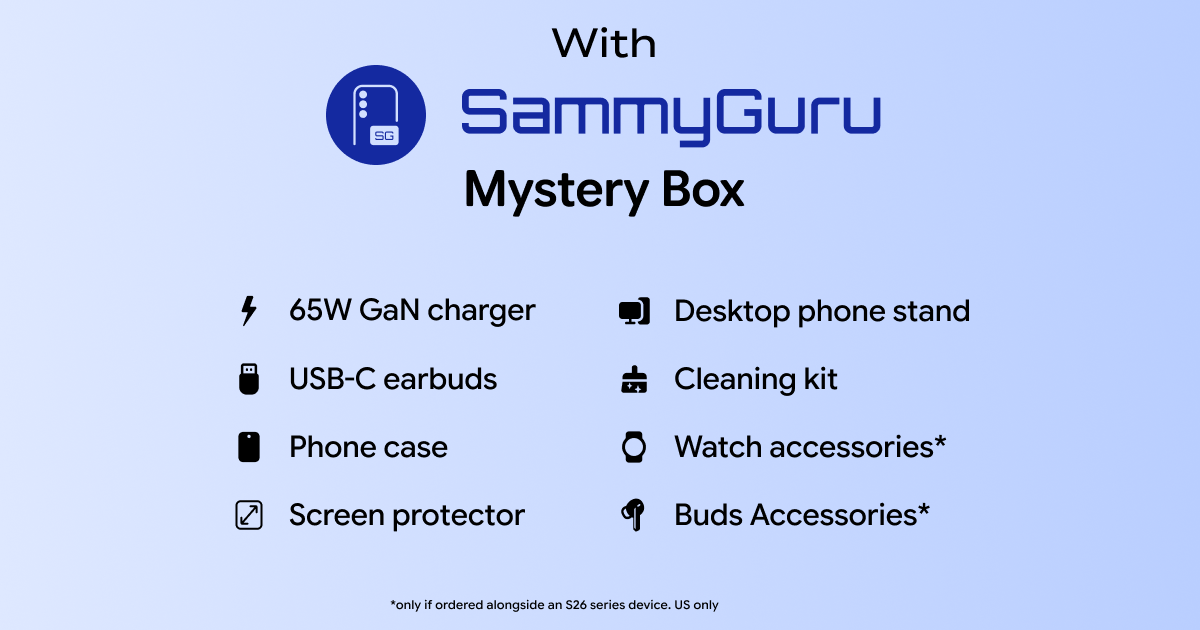
Many SammyGuru readers stack multiple incentives during launch season. Between enhanced trade-in credits, pre-order bonuses, Samsung Rewards, and the SammyGuru Mystery Box, small details can have an outsized impact.
Losing $30 over a stylus is completely avoidable. It may not seem massive in the context of a flagship purchase, but it still reduces the value of your upgrade. That $30 could instead go toward accessories or simply lower your total out-of-pocket cost. The key is making sure you are not caught off guard after your device has already been shipped.
What you should do before shipping your S25 Ultra
Before sealing the box, take a moment to run through this checklist:
Insert the original S Pen back into the device
Confirm it clicks in securely and sits flush
Test writing input in Samsung Notes
Verify Air Actions respond normally
Complete your factory reset only after confirming functionality
This quick verification step takes less than a minute and can prevent an unnecessary charge later.
What if you lost the S Pen or if it’s non-functional?
If your Galaxy S25 Ultra’s S Pen is missing, you have two realistic choices. You can purchase a replacement and include it with your trade-in, or you can accept the $30 surcharge.
In some cases, buying a new S Pen costs more than the fee itself. If that is true at the time you upgrade, it may not make financial sense to replace it solely to avoid the charge. The important thing is making a deliberate decision rather than being surprised weeks later.
Final reminder for SammyGuru readers
If you are upgrading through our affiliate links to qualify for the SammyGuru Mystery Box, make sure your trade-in is fully compliant with Samsung’s updated terms. The goal is to maximize your trade-in credit and preserve every dollar of launch value. Our Mystery Box already includes a bunch of free accessories.
In short: If you are trading in a Galaxy S25 Ultra, include the S Pen and make sure it works. This policy has been active since January 2025, and Samsung is enforcing it. A quick double-check before shipping can save you an unnecessary $30 charge after the fact.