
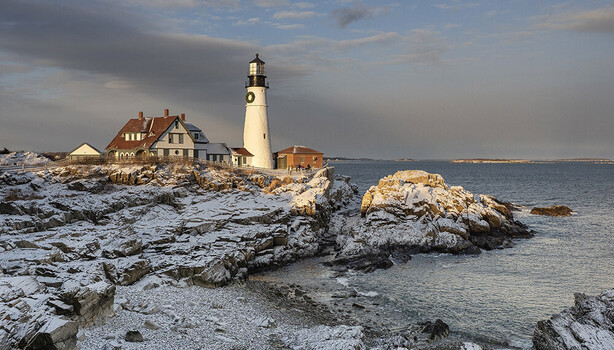
I love sitting outside with my camera on a tripod, catching a scenic view of the sunrise or sunset over a great landscape (usually with a lighthouse included). While great photos are always the goal, there’s one tool that can help you with a side quest that you perhaps hadn’t thought of.
One of the mantras you will often hear photographers say is to “go early and stay late” in all things. For landscapes, that can often mean arriving before sunrise or sunset, and staying until well after the sun has actually risen or set. If you only have one camera, this can often mean a limit to what you can capture of the beautiful changeover from dark to light and vice versa. That’s where the hot shoe phone mount comes in handy.
In this case, the specific tool I’m talking about is the SmallRig Metal Phone Holder with Cold Shoe Mount, which retails for under $20. Mounted on top of your DSLR or mirrorless camera with the average iPhone 16 Pro, the whole setup looks like this:
I often scout out a location and keep my camera parked in one spot, locked in on the composition I want to get the photo. Usually I’m using heavy ND filters, so I’m taking long exposures and generally not doing much, so I put my phone to work for me. Instead of having it in my pocket, I have it mounted on top of the camera with roughly the same composition as the camera, or at least as close to it as I can get with one of the native iPhone lenses.
While this is great for creating phone/mirrorless camera comparison photos for this very site, it’s even more handy for timelapses. Here’s what I was able to get with the phone while I was otherwise engaged in making photos like the one at the top of this post:
Using only the built-in timelapse feature of the phone, I was able to get a beautiful timelapse of clouds rolling over these historic lighthouses (all in Maine, in case you wanted to check them out for yourself). While I like the no-fuss nature and cheap price tag of this particular SmallRig model, there are plenty of others that avail themselves of MagSafe technology and offer quicker mounting possibilities.
Some tips if you plan on giving this a try: Heavy winds or even your own hands tripping the shutter can cause the timelapse to shake a bit. Weighing down the tripod with sandbags or a heavy backpack can help, but adding a touch of stabilization in iMovie or Adobe Premiere, or whatever video editing software you use, can also mitigate this. A remote trigger of some sort can minimize shaking from the shutter button.
You’ll also want to put your phone in airplane mode so that an incoming call doesn’t end the timelapse, and don’t forget to record a few minutes of audio at the scene in case you need some sound.
These are all small enough to fit in a camera bag, so there’s no reason not to give this a try on your next shoot.