
Summary
Copilot explains selected slide text in PowerPoint Live within Teams, privately per attendee.
Attendees can highlight terms or acronyms to get on-demand explanations without interrupting the presenter.
Feature rolls out mid-late May; no more frantic Googling during meetings.
We’ve all been there; you’re watching a presentation, you zone out for a little bit, and when you tune back in, the presentation has moved on, and you have zero idea what the presenter is talking about. You want to understand what on Earth is going on, but at the same time, you don’t want to raise your hand and admit you’ve been thinking about cats for the last five minutes.
Well, Copilot is about to make these embarrassing little moments a thing of the past. The company has confirmed in a message that it plans to add AI-powered descriptors for terminology and concepts to PowerPoint presentations in Microsoft Teams, so if anything catches you off guard, you can send it to Copilot for full context.
PowerPoint presentations in Microsoft Teams will get a handy Copilot assistant
No more awkward questions
Credit: Microsoft
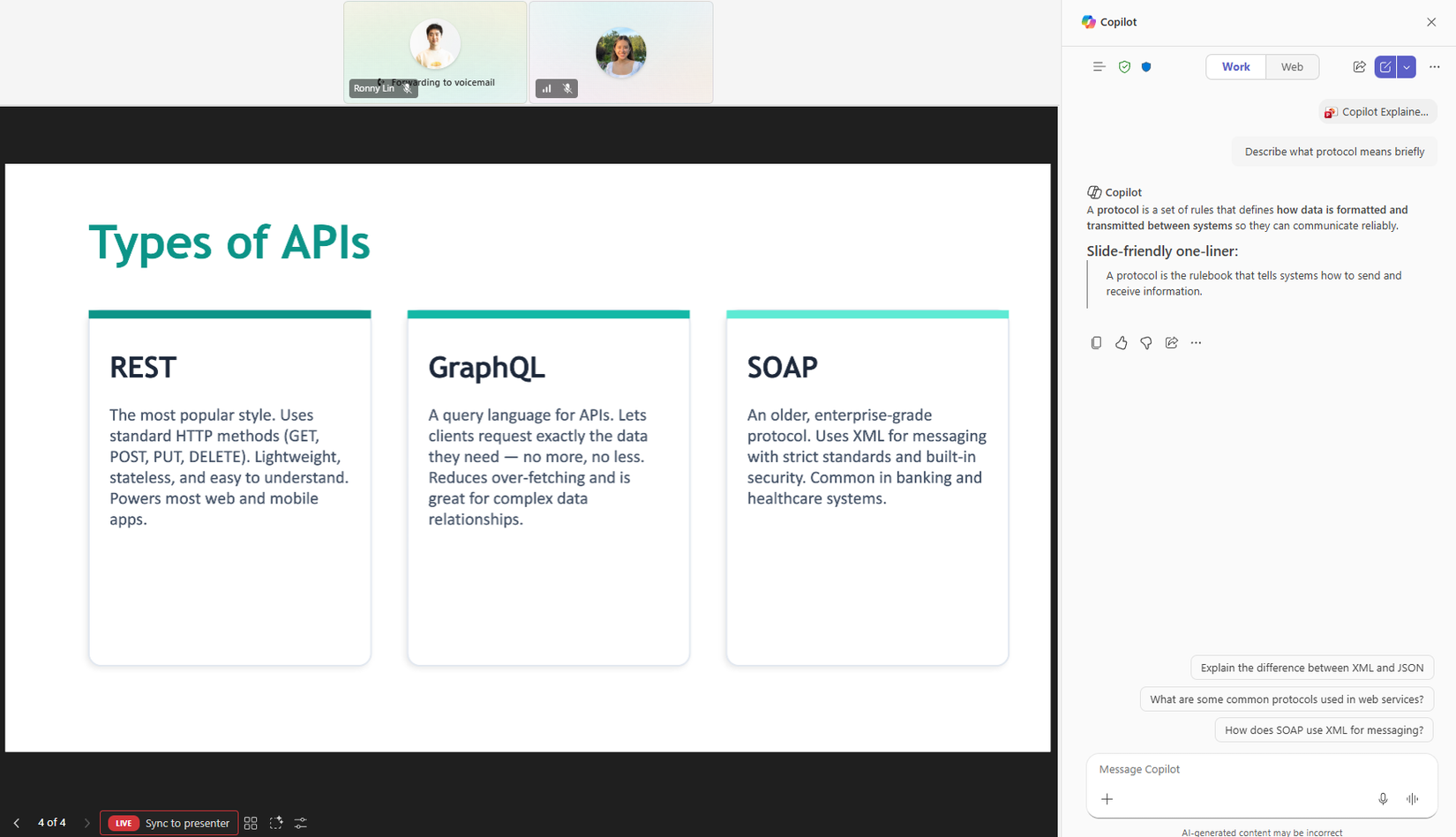
The Redmond giant confirmed on the Microsoft 365 Message Center that this handy Copilot-powered feature is currently in the works and should be released soon. Titled “Use Copilot to explain selected slide content in PowerPoint Live,” this tool aims to make understanding the material in a presentation a lot easier:
We’re enhancing the PowerPoint Live experience in Microsoft Teams by introducing slide text selection with Copilot explanations for meeting attendees. This update helps users quickly understand unfamiliar terms, acronyms, or complex concepts directly within a live presentation—without interrupting the presenter or asking questions in chat.
Here’s how it works: as you’re presenting something over Microsoft Teams using PowerPoint, people can click on elements on your slides. If they’re confused by something you added to your slides, they can highlight it and pull up Copilot on their side to explain what the terminology means. That way, they don’t need to raise their hand or ask in chat. Fortunately, the Copilot instance only shows for the user who asked for it, so nobody else sees that someone wants to learn what “SaaS” means for the third time that week.
Microsoft plans to get this feature out the door in mid-late May, so if you’re tired of having to frantically Google specific terms during a meeting, keep an eye out for this feature rolling out in the near future.
Related
Microsoft wants Copilot to run like OpenClaw, autonomously managing your inbox around the clock
It’s claws out time for big AI companies.