
USB ports are undeniably useful, but they’re very limited on Android phones. The most obvious reason for this is that you only get one. The vast majority of people are fine with one USB port, but your imagination might be bigger. So, let’s add more ports.
Android phones are quite literally mini computers—they have gigabit modems and desktop-class processors. Yet they’re bottlenecked by a single, solitary USB-C port. The good news is that this limitation only applies to the phone itself. Thanks to the magic of USB-C, we can easily expand upon it.
A small USB dongle is an easy upgrade
If you own a modern laptop, you’re probably already living the dongle life. For your Android phone, a USB-C “hub” can be equally as useful. In many cases, the same USB hubs that work for computers can work for phones. These compact, multi-port adapters can turn that lone USB-C port into a buffet of connectivity.
What you’re really buying here isn’t just extra ports—it’s a way to transform your phone into something more. There are a handful of ports that you’ll want to make sure your hub has. If you’re a photographer or someone who works with media, a microSD slot will be a nice quality-of-life upgrade. You should also get some extra USB-C ports and a standard USB-A slot for peripherals like flash drives, mice, and keyboards.
That’s right, I said mice and keyboards. Coupled with a video output port, like HDMI or DisplayPort, many Android phones can transform into desktop computers. You can connect a monitor, keyboard, and mouse just as you would with a PC. For these more power-hungry functions, you’ll want something a bit bigger with Power Delivery (PD) Pass-through. This will allow you to plug your phone’s charger into the hub, which then powers the phone and all the connected accessories simultaneously.
Ports
7
USB-C Power Delivery
85W Max Power Delivery
Weight
67g
Dimensions
5.17 x 1.46 x 0.47 inches
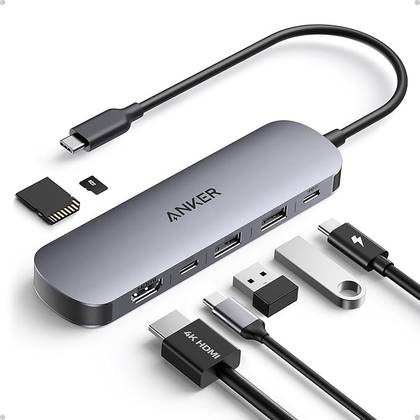
The Anker 7-in-1 USB-C Hub expands your laptop with HDMI, two USB-A ports, a USB-C PD port, a USB-C data port, and SD/TF card slots. It supports up to 85W power delivery for quick charging, all in a compact and sleek design.
Magnetic hubs are great for on-the-go situations
A USB-C dongle with a few extra ports is great for travel, but you can get a little fancier if your phone has magnetic charging built in, such as the Pixel 10, or if you use a magnetic case. There are a few MagSafe-style USB hubs on the market now. Rather than having a dongle sticking out from the bottom of your phone, these hubs are slapped onto the back.
The magnetic hubs are essentially the same idea as a dongle. They snap onto the back of your phone and connect with a short, sometimes retractable, USB-C cable. They can include slots for microSD cards, USB-C, USB-A, and even HDMI or DisplayPort. One benefit to this type of “dongle” is that there’s less pressure on your phone’s port. The accessories are connected via a flexible cable rather than in one solid piece.
Your phone is more modular than you think
Your Android phone’s limitations don’t have to be defined by the one USB-C port on the bottom. Many companies have tried to make “modular” phones, but in reality, we have the ability to make our phones modular on our own. You get to choose the solution that fits your needs:
A simple dongle for moving photos from a flash drive to your phone.
A powered hub for transforming your phone into a desktop replacement.
A magnetic hub for convenience and long-term durability.
By adding one of these handy accessories, you can start building the customizable, fully-connected workstation that your phone was always capable of being. If you don’t believe me, check out the many editorials by my colleague, Bertel King, on using his phone as his primary computer. It’s not as absurd as you might think.