
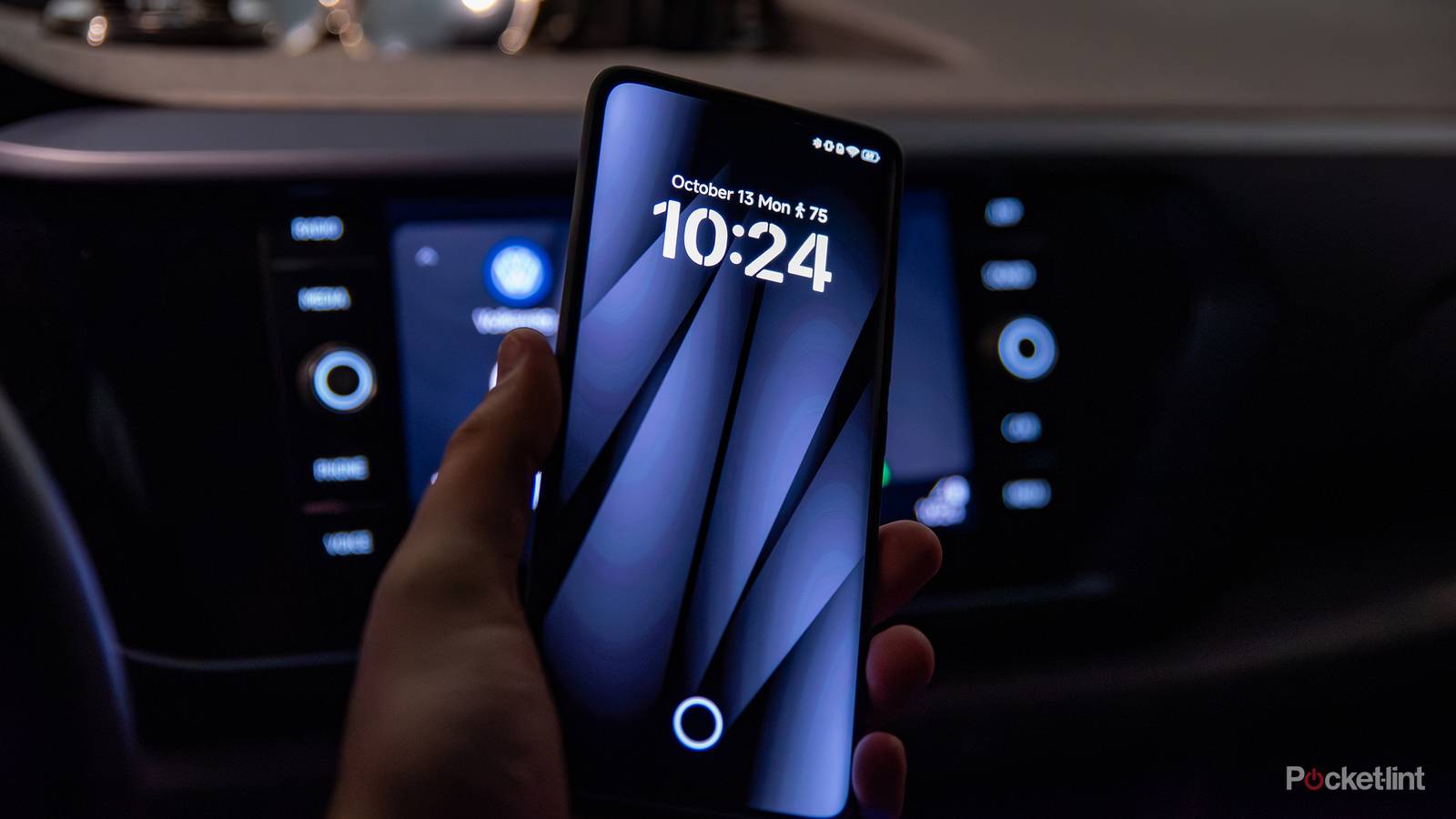
I love the Android Auto experience, especially in its wired, USB-powered form. Out of the box, the feature is preconfigured quite well, but as ever with Android, a bit of customization goes a long way. Whenever I initially connect a new Android smartphone to my vehicle, I always tinker with a variety of settings to make things look and feel just right.
By and large, there are three overarching settings I always adjust on Android Auto right from the get-go. Even if I leave all the other options in their default state, these three customization settings are non-negotiable in my eyes. Here are all three main changes I make to unlock the absolute perfect auto dashboard configuration.

Quiz
8 Questions · Test Your KnowledgeAutomotive infotainment apps
Trivia challenge
From Apple CarPlay to Android Auto — how well do you know the apps powering your dashboard?
CarPlayAndroid AutoStreamingNavigationConnectivity
Begin
Which company developed Apple CarPlay, and in what year was it officially launched?
AApple, 2012BApple, 2014CApple, 2016DApple, 2013
Correct! Apple CarPlay was unveiled at the Geneva Motor Show in March 2014, with Ferrari, Mercedes-Benz, and Volvo among the first manufacturers to support it. It replaced Apple’s earlier ‘iOS in the Car’ branding.
Not quite. Apple CarPlay launched in 2014, debuting at the Geneva Motor Show alongside initial support from Ferrari, Mercedes-Benz, and Volvo. It was Apple’s rebrand of its earlier ‘iOS in the Car’ initiative.
Continue
Which music streaming app was notably absent from Android Auto at launch but was later added after widespread user demand?
ATidalBSpotifyCYouTube MusicDAmazon Music
Correct! Spotify was conspicuously missing from Android Auto at its 2015 launch, frustrating many users. Google eventually added support, and Spotify is now one of the most widely used audio apps on the platform.
Not quite. Spotify was the notable absentee from Android Auto at launch in 2015, despite being the world’s most popular music streaming service at the time. Its eventual addition was welcomed by millions of users.
Continue
Which navigation app, known for its community-based traffic reporting, is officially supported on both Apple CarPlay and Android Auto?
ATomTom GoBHERE WeGoCWazeDMapQuest
Correct! Waze, which Google acquired in 2013, is fully supported on both CarPlay and Android Auto. Its crowdsourced hazard and traffic reporting makes it a favourite among commuters who want real-time road intelligence.
Not quite. The answer is Waze, Google’s community-driven navigation app. Acquired by Google in 2013, it integrates with both CarPlay and Android Auto and is beloved for its real-time, user-reported traffic and hazard alerts.
Continue
What wireless technology allows Apple CarPlay and Android Auto to connect to a car without a USB cable?
ABluetooth 5.0BNFCCWi-FiDUWB
Correct! Wireless CarPlay and Android Auto use Wi-Fi for the high-bandwidth data connection, while Bluetooth is used to initiate the handshake. This combo allows seamless connectivity without ever plugging in your phone.
Not quite. Wi-Fi is the technology behind wireless CarPlay and Android Auto. Bluetooth handles the initial pairing and handshake, but the bulk of the data is transmitted over a Wi-Fi connection for the speed needed to run apps smoothly.
Continue
Which podcast app was one of the first third-party podcast platforms to gain official Apple CarPlay support?
AOvercastBPocket CastsCCastboxDStitcher
Correct! Pocket Casts was among the earliest third-party podcast apps to launch with native CarPlay support, giving drivers a clean, distraction-free interface. Its CarPlay integration became a selling point for the app.
Not quite. Pocket Casts was one of the pioneers of native CarPlay integration among third-party podcast apps. It offered a purpose-built dashboard interface that made it easy and safe to browse episodes while driving.
Continue
At WWDC 2022, Apple announced a major overhaul of CarPlay. What was the headline feature of this next-generation version?
ASupport for augmented reality windshieldsBThe ability to control vehicle systems like climate and speed across multiple screensCFull integration with Apple WatchDA built-in ChatGPT assistant
Correct! Apple’s next-generation CarPlay, teased at WWDC 2022, promised to extend across all of a car’s screens and take control of vehicle functions like climate, speed display, and radio — a massive leap beyond mirroring a phone.
Not quite. The headline feature of next-gen CarPlay announced at WWDC 2022 was its ability to spread across all in-car displays and integrate with native vehicle systems such as climate controls and the instrument cluster — far deeper than standard phone mirroring.
Continue
Google replaced the original Android Auto phone screen experience with a new app in 2019. What is that app called?
AGoogle Drive ModeBAndroid DashboardCGoogle Assistant Driving ModeDAndroid Auto Go
Correct! Google replaced the standalone Android Auto phone UI with Google Assistant Driving Mode, accessible through Google Maps. It offers a simplified, voice-forward interface designed to minimise distraction while driving.
Not quite. Google introduced Google Assistant Driving Mode as the replacement for the old Android Auto phone screen experience. It lives within Google Maps and is designed around voice commands to keep drivers’ eyes on the road.
Continue
Which automaker was the first to offer a fully embedded Google-built infotainment system, known as Google built-in, powered by Android Automotive OS?
AFordBPolestarCVolvoDGeneral Motors
Correct! The Polestar 2 was the world’s first production car to ship with Android Automotive OS with Google built-in, launching in 2020. This is distinct from Android Auto — it’s a full operating system embedded in the car itself, not a phone projection.
Not quite. The Polestar 2, launched in 2020, was the first production vehicle to feature Android Automotive OS with Google built-in. Unlike Android Auto, this is a fully embedded OS running natively in the car, independent of a smartphone.
See My Score
Challenge CompleteYour Score
/ 8
Thanks for playing!
Try Again
Customize the launcher
Reorder your dashboard home screen
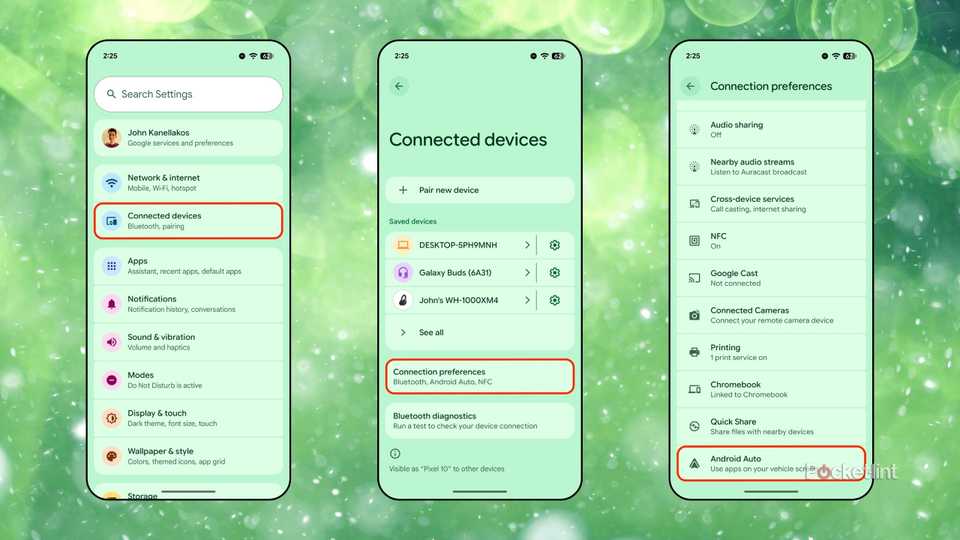
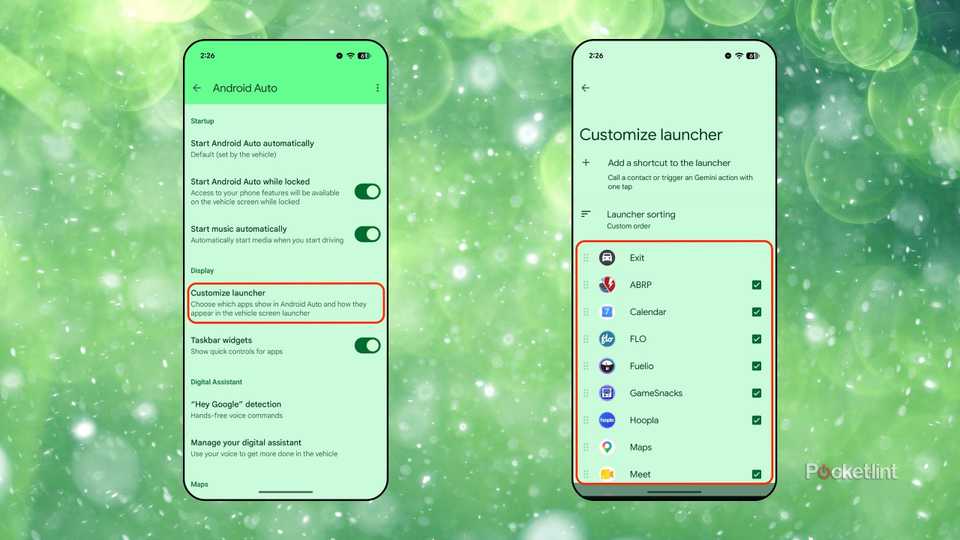
Right of the bat, the first thing I adjust within my Android Auto setup is the home screen itself. I like to organize my apps based on how frequently I use them, while opting to hide the apps I don’t ever interact with. This helps streamline the entire dashboard, while, importantly, allowing me to keep my eyes on the road at all times.
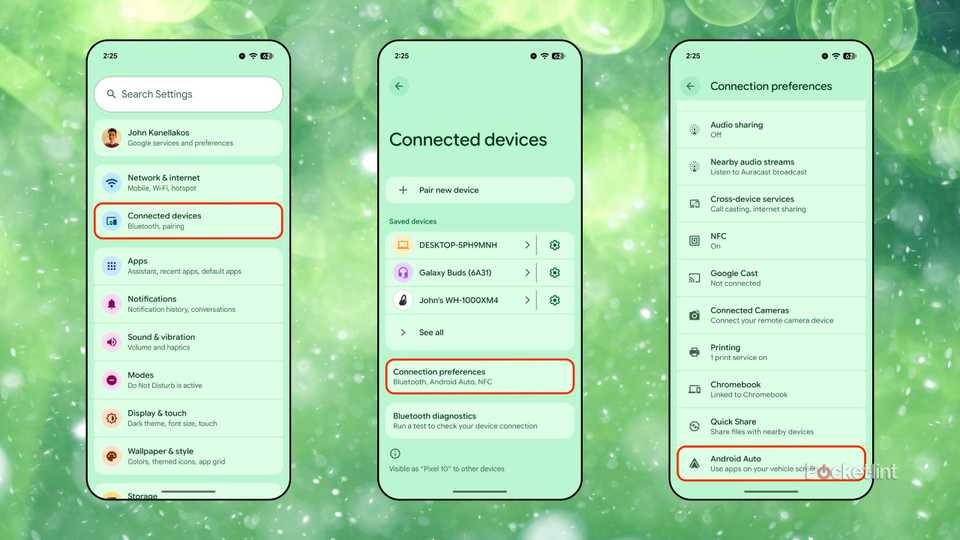
Customizing the Android Auto launcher is something you have to do through your phone, and it can only be done while stationary and disconnected. To organize your apps, follow these steps:
Launch Settings.
Navigate to Connected devices > Connection preferences > Android Auto.
Next, go to Display > Customize launcher.
From here, you can rearrange, enable, or disable all compatible Android Auto apps with ease. You can also choose to sort the launcher alphabetically if you prefer that setup.
Quick controls for your favorite applications
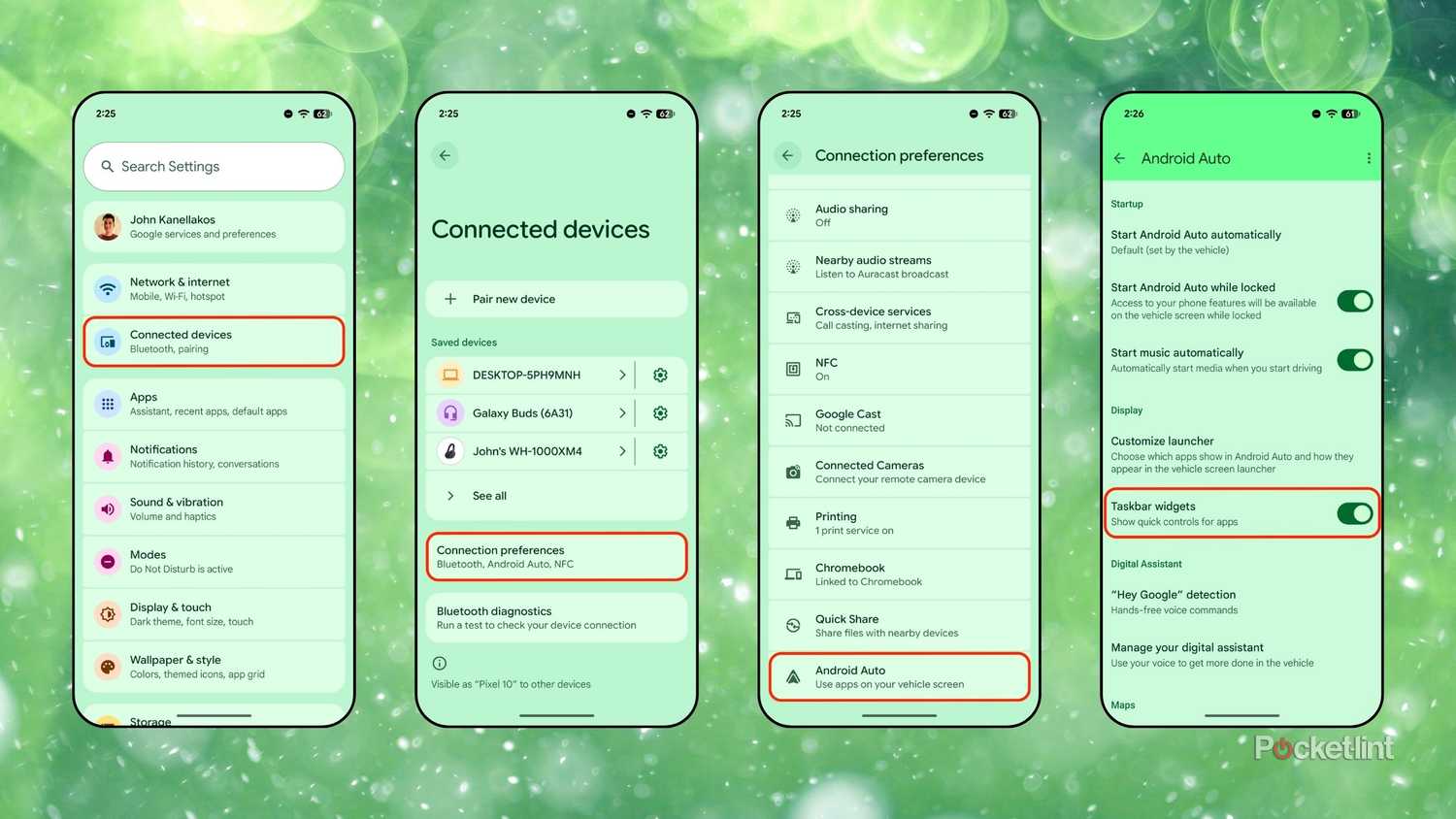
I love Android home screen widgets, and they’re just as useful within Android Auto as they are on mobile. Widgets offer glanceable snippets of information right on your dashboard, all without the need to launch directly into applications themselves. To enable taskbar widgets within Android Auto, follow these steps:
Launch Settings.
Navigate to Connected devices > Connection preferences > Android Auto.
From here, go to Display and then toggle on Taskbar widgets.
With taskbar widgets enabled, it’s easy to control music playback while within, say, a full-screen navigation app. The feature set is rather limited at the moment, but Google is reportedly working on bringing full-fledged pinnable app widgets to the dashboard in a future update.
Add a shortcut to the launcher
Call a contact or invoke a Gemini action
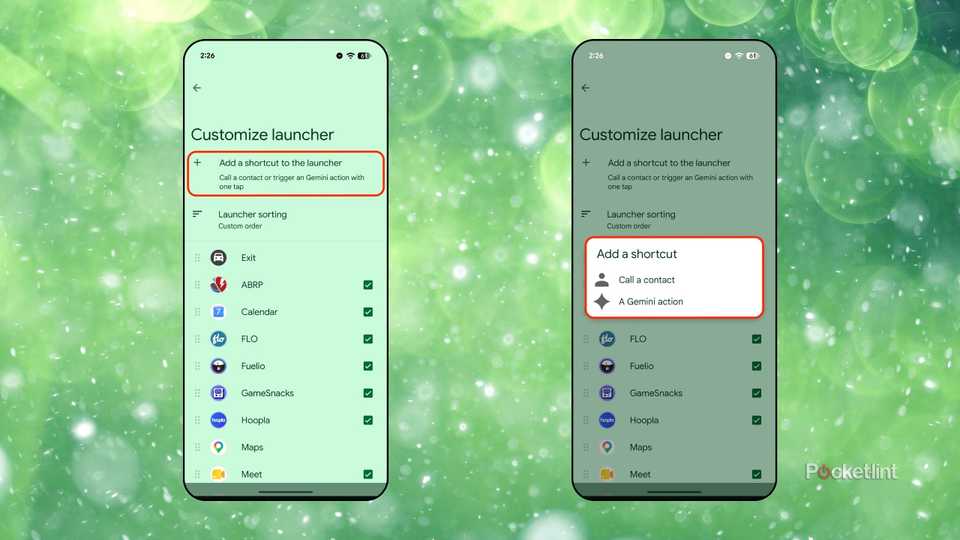
Aside from basic app icons, you can also pin shortcuts to the Android Auto home screen launcher. In particular, you can pin a favorite contact for quick access, or pin a Gemini action (such as ‘open garage’ or ‘read my messages’). These shortcuts then live conveniently on your car’s infotainment display at all times, which, without question, can come in handy while out on the road.
To set up launcher shortcuts within Android Auto, follow these steps:
Launch Settings.
Navigate to Connected devices > Connection preferences > Android Auto.
Next, go to Display > Customize launcher.
From here, tap or click on Add a shortcut to the launcher.
A prompt will appear on-screen, allowing you to pick between Call a contact and A Gemini action.
Developer
Subscription cost
No
Android Auto is a platform that works with Android smartphones. It integrates into your car’s infotainment system to display compatible software applications on your screen.