

For months, a quiet storm has been brewing among owners of older Pixel devices. What started as sporadic reports of Google Wallet failures has blossomed into a concerning issue for users of the Pixel 4, Pixel 4 XL, Pixel 4a, Pixel 4a 5G, and potentially Pixel 5 and 5a. While many initially dismissed these errors as routine software bugs, new evidence suggests a server-side lockout likely triggered by a fundamental shift in how Google verifies device integrity on some of these devices.
The timing lines up uncomfortably well with Google’s December 2024 announcement on the Android Developers Blog about overhauling the Play Integrity API. Google said the changes would make integrity verdicts “faster, more resilient, and more private,” with automatic rollout to all integrations in May 2025. That rollout window has now passed, and users are starting to feel it.
At the core of the changes is a stricter definition of “meets-strong-integrity.” On devices running Android 13 and above, the strong verdict now requires a security update within the last year. Google explicitly said this was aimed at high-security apps such as banking and finance, and recommended that developers provide fallback options if the strong label isn’t available.
“We’re updating the “meets-strong-integrity” response to require a security update within the last year on devices running Android 13 and above. This update gives apps with higher security needs, like banking and finance apps, governments, and enterprise apps, more ways to tailor their level of protection for sensitive features, like transferring money. When the strong label isn’t available for the user, we recommend that you have a fallback option.”
For some devices, however, that fallback doesn’t seem to exist.
Pixel 4 series suddenly failing certification
Several threads across forums describe a similar pattern on Pixel 4, Pixel 4 XL, and Pixel 4a devices. Owners report Google Play Store showing “Device not certified”, Play Integrity API checks failing across the board, and Google Wallet losing tap-to-pay functionality. These devices are stock, locked, and not rooted. Factory resets and full re-flashes via Android Flash Tool reportedly do nothing.
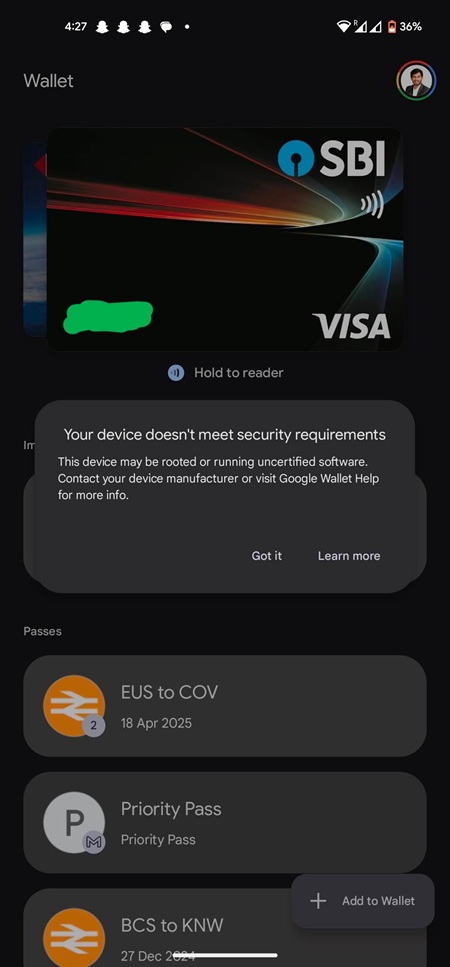
While Google Wallet is the most visible casualty with the dreaded “Your device doesn’t meet security requirements” error, the impact is broader. A ChatGPT user reported “Play Integrity verification failed” during login. Long-time Pokémon GO players on Pixel 4 XL hardware are finding the game suddenly incompatible.
The issue isn’t strictly limited to Pixels, either. Reports from OnePlus 8 owners suggest that any device past its one-year security patch window is potentially “blacklisted” from high-security API verdicts.
Earlier this week, the subject re-emerged in the Google Support forums. In Case ID 8-6106000040238, a developer using a stock Pixel 4 XL was allegedly told by a supervisor named “Sanem” that the issue is a known, unfixable bug.
“Some older Pixel phones (Pixel 4, 4XL, 4a, 5 and some 5a models) have a bug that prevents contactless payments. This is affecting 17k users, and there’s no way to fix it.”
Here’s a screenshot of their exchange shared in the forum:
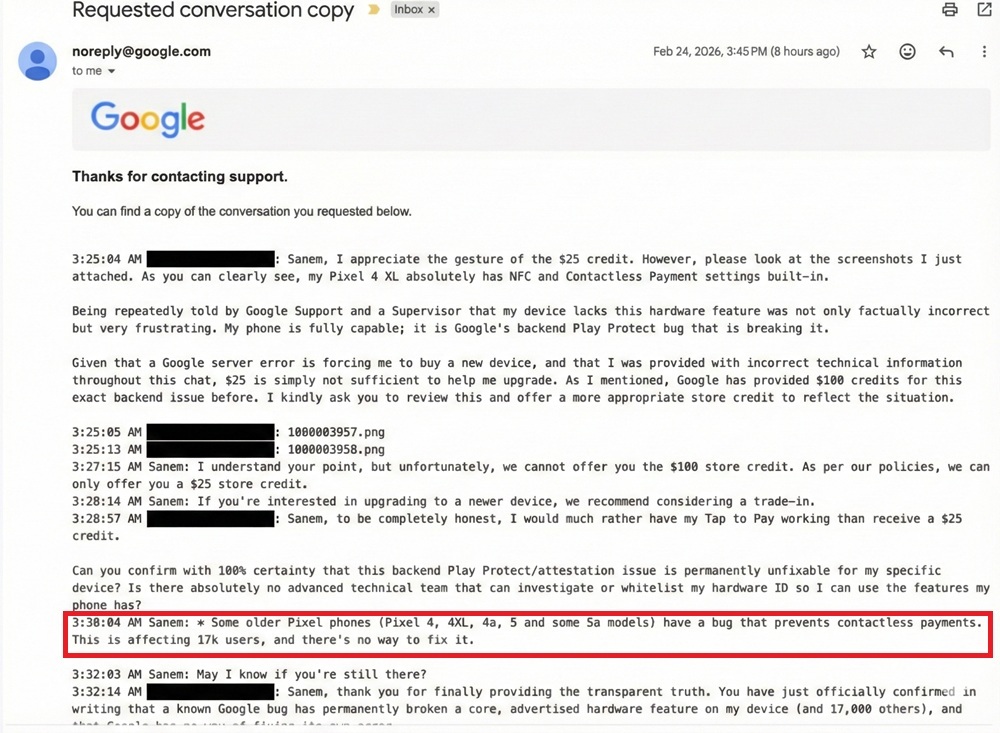
If true, this suggests that rather than a simple policy change, there is a specific technical failure in how Google’s servers handle the cryptographic trust for these specific models. A Diamond Product Expert in the forums further alleged that Google found “severe security issues” specifically with the Pixel 4 range, leading to their cryptographic trust being “revoked” entirely. We found the first mentions of these claims in May 2025 and another less than 24 hours ago, both from the same product expert.
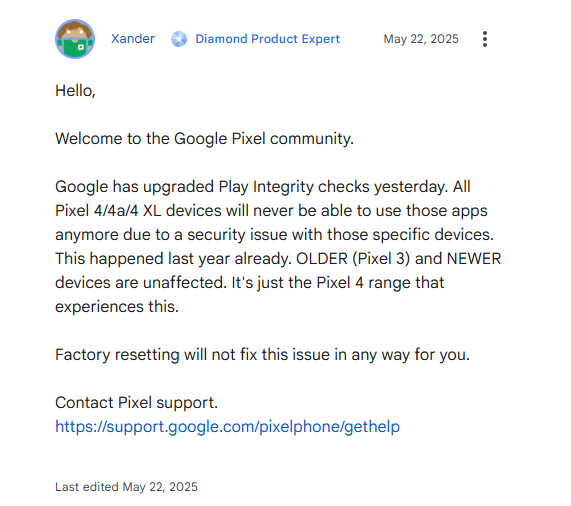
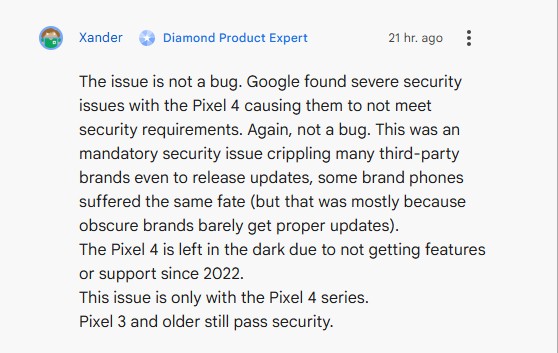
But it’s worth noting that frontline support reps and forum product experts may not be authoritative sources. Still, separate anecdotal evidence suggests compensation has been offered in some regions.
On Reddit, one user shared what appears to be an official support response offering €95 off a new Pixel device. The response also noted that “a small number of Pixel 4, Pixel 4 XL, Pixel 4a, Pixel 4a 5G, Pixel 5, and Pixel 5a devices will no longer support contactless payments” since Google has implemented stricter requirements for contactless payments in order “to ensure the highest level of security” for Pixel and Wallet users.
End of life meets stronger integrity
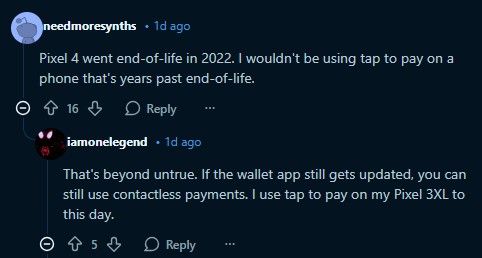
The Pixel 4 series reached end of life in October 2022. It no longer receives security updates. This is also true for the Pixel 5 and 5a. Under the updated Play Integrity rules, that becomes highly relevant.
Google’s blog post was explicit: on Android 13 and above, “meets-strong-integrity” now requires a security update within the last year. For a device frozen in 2022, that requirement is impossible to satisfy.
For apps like Google Wallet, which sit at the intersection of hardware-backed key attestation, banking compliance, and fraud prevention, strong integrity may now be effectively mandatory. Interestingly, some reports claim that Pixel 3 and older devices still pass integrity checks. That complicates the narrative and suggests this may not be a blanket “old phone” problem, but something specific to certain hardware, attestation paths, or security model changes in the Pixel 4 generation.
In some cases, clearing cache and data for Google Play Services and Google Wallet, uninstalling Wallet updates, rebooting, and reinstalling the app can resolve temporary glitches. But if the device consistently fails strong integrity due to outdated security patches, there may be no software fix available.
For now, if you’re on a Pixel 4, 4 XL, 4a, 4a 5G, 5, and 5a and still using Google Wallet without issues, it may be wise to check your Play Protect certification and integrity status before your next grocery run becomes an awkward experiment in cryptographic attestation.
And if this is indeed limited to around 17,000 devices, as one support message claims, that number may soon get a lot more attention.