

Soon after truly opening up Google Play and embracing third-party app stores, Google is now turning its attention inward and implementing something that it promised last year.
In April last year, the tech giant announced that it was starting a new “multi-year plan” to provide developers with more relevant tools and data to better understand their app’s resource consumption, which would in turn help reduce battry drain.
Related
Google wants to put an end to battery-hungry Android apps
About time!
Fast-forward to November, Google was spotted testing a new Play Store warning to alert users about apps that may use up more battery than normal. The same warning is now going live for users (via Android Authority).
For reference, Google started rolling out ‘wake lock technical quality treatments’ to decrease app-related battery drain on March 1. The ‘treatments’ will rollout to apps that keep your phone’s processor engaged while the screen is off. Basically apps that occupy a lot of resources in the background.
Said apps will see “tangible impacts on their store presence,” complete with “warnings on their store listing and exclusion from discovery surfaces such as recommendations.” You likely wont see said apps randomly on Google Play. You’d only see them if you explicitly search for them.
Targeting the vampire apps
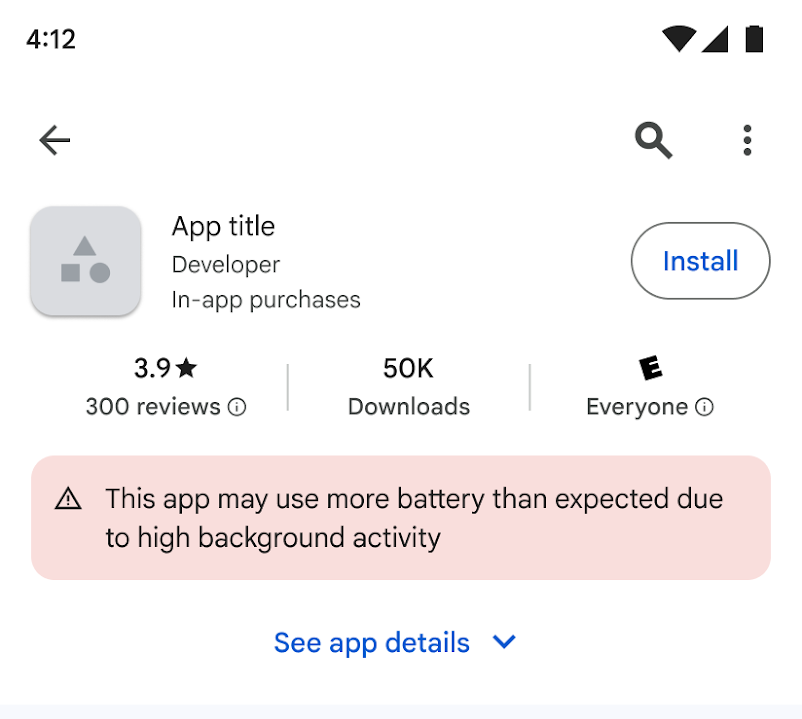
Credit: Google
“This app may use more battery than expected due to high background activity,” reads the warning that will show up right under the app’s star rating.
The warning is meant to dissuade users from installing said app, and to encourage developers to build more battery-efficient applications. It’s worth noting that the change will not flag each and every app. For reference, fitness apps that cache location data in the background, or food delivery apps that pull location data at a high frequency, will only be told to optimize and reduce wake locks.
The new warnings, on the other hand, will only show up on apps that keep chugging your device’s resources in the background for no good reason.
Related
I added hours to my phone’s battery life by changing these 6 settings
Thankfully, it doesn’t have to be so complicated