
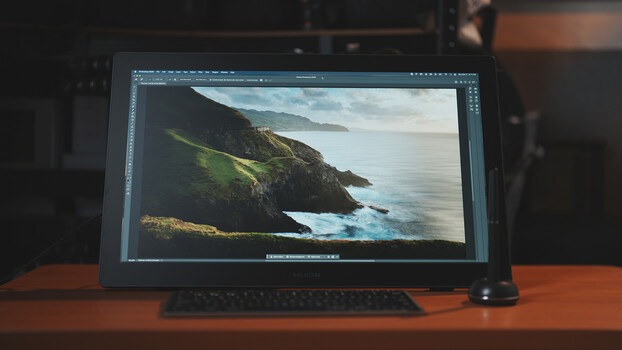
For detail-oriented creative work, the experience is just as important as the process itself. This new-generation pen display from Huion showcases refined features and capabilities.
Using a dedicated pen display for editing and retouching doesn’t just make the process more straightforward and ergonomic, but also gives the user the feeling of immersing themselves in the details of the project they are working on. Pen displays are generally designed for digital illustrators, which makes them even more capable of handling what a photographer would require of them. This next-generation Huion Kamvas 22 (Gen 3) pen display elevates that experience with better resolution, color, and even aesthetics.
The Huion Kamvas 22 Gen 3
The Huion Kamvas 22 (Gen 3) is a 21.5-inch (diagonal) IPS pen display with a resolution of 2.5K, which is a jump over its previous generation that only had full HD resolution. It comes in as a large 527.7 x 324.7 x 36.7 mm display that has an active area of 475.4 x 267.4 mm, which is taken up by the 21.5-inch IPS panel housed within a new generation of anti-glare glass.
Display and Resolution
This display has a maximum brightness of 250 nits and a contrast ratio of 1,000:1, which is typical of its panel. The maximum resolution of 2,560 x 1,440 pixels offers a 33% higher pixel density at 137 PPI, which offers finer details in relation to its size.
Another remarkable enhancement of this pen display is its high color accuracy rating. Overall, it is rated at Delta E <1.2 on average; however, each unit comes with a unique factory calibration report that provides information on the average and peak variance of the color output. For this unit in particular, it has an impressive average Delta E of 0.82, which translates to very little and imperceptible color variation. The display covers 99% of sRGB, 94% of DCI-P3, and 90% of Adobe RGB.
Enhanced Anti-glare Glass
A subtle but undeniable change in the user experience is the fact that it indeed does have less glare and sparkle on the surface of the glass. Typically, because of how users would position the display, it becomes more prone to reflections from nearby indoor lighting, particularly those placed on the ceiling. This new version of the Canvas Glass 2.0 reduces such distractions and provides a more comfortable view.
Buttons and Ports
The button layout of this pen display is very minimal — in fact, it is probably too minimalistic, as it only has a single button, which serves as a power button. The entire surface area of the front and even the sides do not have any customizable shortcut buttons. While the interface of the display does have a virtual keyboard, it would have still been more efficient if it had actual buttons on the sides of the display.
Behind the display is an input interface that comes with a rear shell that keeps the cables tidy. The Kamvas 22 (Gen 3) only has a single AC power port, a single USB-C port, and a full-sized HDMI port. It is important to note that Mac users can connect the display to their computer with just the supplied USB-C to USB-C cable. For Windows users, the display input has to go through the HDMI port, which is just one extra cable to consider.
Ergonomics and Aesthetics
Around the inner rim of the rear of the pen display is an LED strip that can be customized in terms of color, brightness, and breathing effect. While it doesn’t have any functional advantage to the display, it does look good in dimly lit rooms. However, it’s important to note that color accuracy is all about perception, and the light it casts on the background may affect the user’s perception when it comes to color-intensive work. A nice feature they could add would be to match the dominant color of whatever is on the display with the background, which could potentially reduce color perception distortion.
Out of the box, a variable-angle stand comes pre-installed on the VESA-compatible mounting ports of the display. This allows for additional flexibility when it comes to viewing angles. However, since the panel is pretty thick — much like most other large pen displays — it requires either a taller chair or a lower desk to achieve a natural working posture. Alternatively, it can be used with a VESA-compatible arm that would allow it to extend beyond the desk.
Pen Features
The Kamvas 22 (Gen 3) is equipped with Huion’s PenTech 4.0, which offers increased pressure sensitivity of up to 16,384 pressure levels and is sensitive up to 60 degrees of tilt in any direction, which is 15 degrees more than most. It has sensitivity to force from as little as 2 grams up to 500 grams, which translates to more precise strokes. It comes with three side buttons and an improved rubber grip that is less prone to collecting dust.
Setting Up
Configuration and setup are pretty straightforward, considering that input only comes from the pen. Using the downloadable driver, the user can adjust the orientation to any direction if preferred, as well as select among multiple displays if necessary. Much like other tablets and pen displays, the pressure range and curves can be adjusted to fit the user’s style. However, in my personal use as a photographer, this doesn’t have much bearing. Lastly, an added page in the driver interface controls the rear RGB light, allowing you to set the color and strength of the light.
User Experience
Right off the bat, the most striking attribute of this display is the fact that it offers 2.5K resolution in a 21.5-inch panel. Since pen displays involve working up close with the surface, this increased pixel density gives a satisfying sharpness to the output. That, combined with the color accuracy it offers when properly calibrated in its lighting environment, should contribute a lot to the comfort and efficiency of illustration or creative work. One thing I believe could significantly improve the experience would be customizable buttons on the sides, since there is a lot of space around the display. While switching between tools might not be as common in illustration work, editing and retouching certainly requires a lot of it, and having buttons on the side of the display instead of relying on a separate remote or keyboard would offer a great deal of convenience. Overall, the Kamvas 22 Gen 3 offers a highly improved display with a smoother, more precise, and more efficient workflow.
What I LikedLarge 21.5-inch displayColor-accurate output (when calibrated)Improved anti-glare surfaceWhat Can Be ImprovedNo customizable function buttons