
When was the last time you bought a new phone that actually had a new hardware innovation? I’m not talking about a slightly better camera, bigger screens, or all the AI software these days. Aside from folding phones, not much has changed on the hardware front. Some might say innovation has stalled, but Samsung’s new phone just broke that trend.
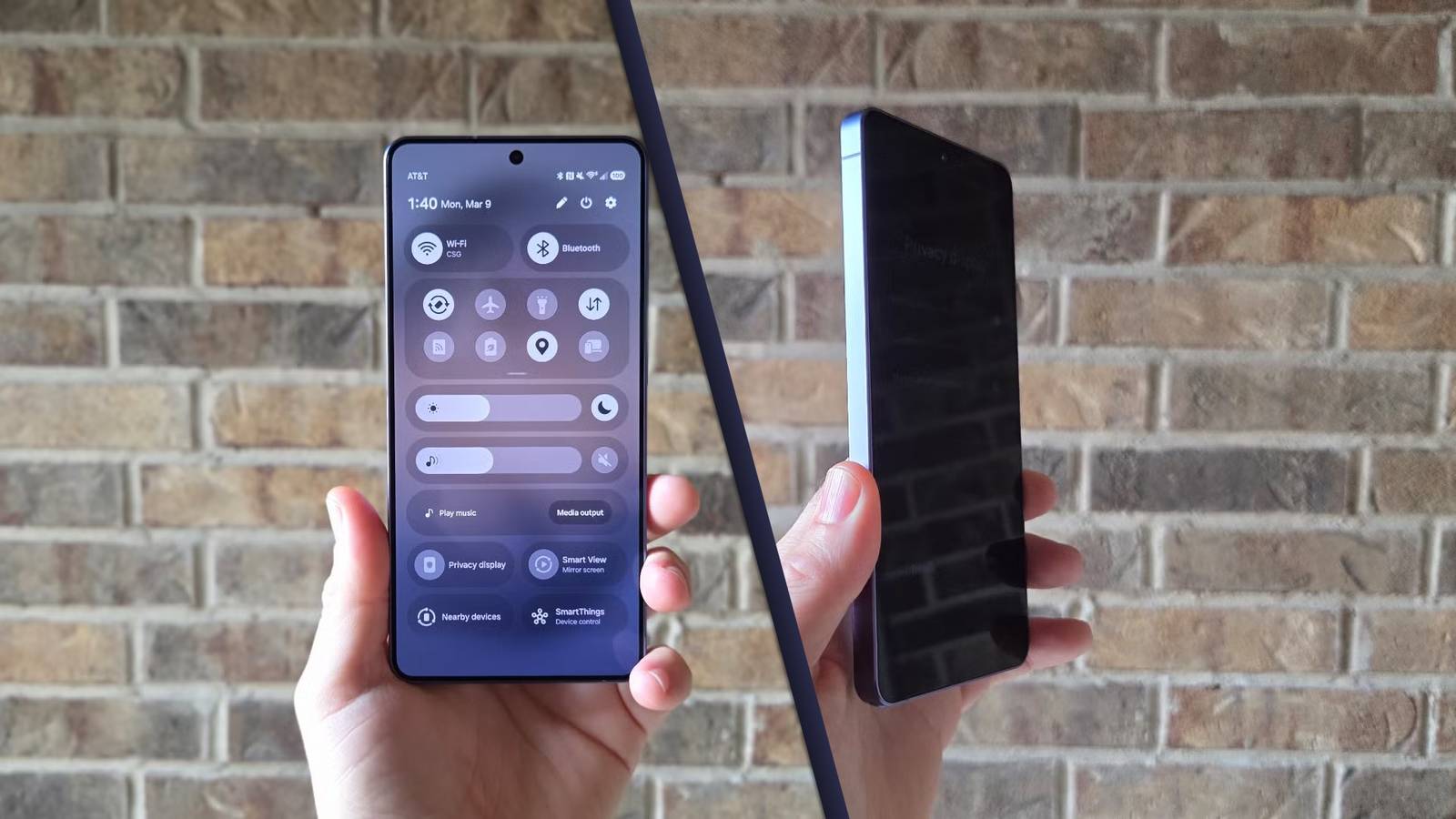
On the latest Galaxy S26 Ultra, Samsung debuted an all-new screen technology it’s calling “Flex Magic Pixel,” which literally turns the screen dark when shoulder surfers try to glance at your phone.
On a hardware level, the screen is physically turning on only narrow pixels, thus limiting the view to preserve your privacy. Better yet, you can turn it on or off with the flip of a switch. Here’s what you need to know, and how to make it even better by tweaking the settings.
How does Samsung’s Privacy display work?
The technology behind the innovation
The way Samsung delivers its privacy display technology is rather technical. It’s not just a software trick, but a physical change inside the OLED panel. Without getting into the nitty-gritty, the Galaxy S26 Ultra uses two different AMOLED pixel types on the inside.
Half of the pixels are similar to the regular type found on the Galaxy S25 Ultra, S26, and other high-end phones, and the other half are narrow pixels that restrict viewing angles from left to right and from up to down.
While using the phone regularly, all the pixels are on, which gives you the stunning screen, vivid colors, and high brightness we’ve all come to expect from Samsung. When you enable Privacy Display mode, only specialized narrow AMOLED pixels turn on, restricting light from scattering in any direction except directly forward. When this happens, the screen turns black and becomes unreable from the sides or from above when someone is looking over your shoulder.
Like a privacy screen protector, but better
Privacy that can be customized for you
If you’ve ever installed one of those third-party privacy screen protectors, you kind of know what to expect from Samsung’s new technology. However, those screen protectors aren’t that great, and in my opinion, they really ruin the display on phones.
Privacy screen protectors reduce display brightness, ruin the stunning high resolution, and cause muted colors and other degradation to the viewing experience.
Unfortunately, there are a few small trade-offs with the Galaxy S26 Ultra, too. The screen is a hair dimmer than the previous S25 Ultra, and, naturally, since half the pixels are narrow, viewing angles aren’t as wide as on past Ultra phones. It’s barely noticeable, and after using the phone for nearly a month, I have no complaints. The screen is still excellent, and it’s a small concession to get such a neat privacy feature.
Either way, Samsung’s new Privacy Display mode is a vastly better experience. Not just because it happens on a hardware level, but because it’s extremely customizable.
You can turn it on or off at a moment’s notice, and set it to only come on when you’re entering a password, when you receive incoming pop-up notifications, or when you’re using banking apps, etc. The choice is yours. Once you buy the Galaxy S26 Ultra, open Privacy Display mode from the pulldown bar or settings menu, then tap on Conditions for turning on.
In this menu, you’ll be able to choose which apps automatically enable privacy display mode, protect incoming notifications, and even shield your passwords, PIN, and other security measures.
Essentially, you’re getting all the benefits of a privacy screen protector, but only when you need it. At all other times, you’ll enjoy the beautiful screen as intended.
There’s even a Maximum Privacy mode
Full strength isn’t always best
You might have noticed an additional option in the screenshots above labeled “Maximum privacy protection.” Samsung didn’t talk about this much during the S26 Ultra unveiling, but it takes the Privacy Display technology to the next level.
Turning on the regular Privacy Display limits visibility and views at certain angles, preserving color accuracy and brightness as you use and enjoy the phone.
When you enable max privacy mode, the phone isn’t just turning on narrow pixels; it’s also dimming the screen a little more and adding a white filter and extra contrast. This severely limits visibility, washes out colors, and makes the screen even harder to see unless you’re looking straight at it.
Max mode works best, but it’s not ideal because it ruins the display’s color and crispness, and some users have reported eye strain or headaches. Personally, I’ve yet to experience any issues.
Samsung’s Privacy Display is the feature I didn’t know I wanted
At the end of the day, for very short bursts while entering banking information or opening sensitive apps, this level of privacy is wildly impressive, and almost feels like spy-level technology.
It doesn’t bother my eyes, and the peace of mind that people can’t see what’s happening on my display in certain situations is a feature I didn’t know I needed but absolutely love.
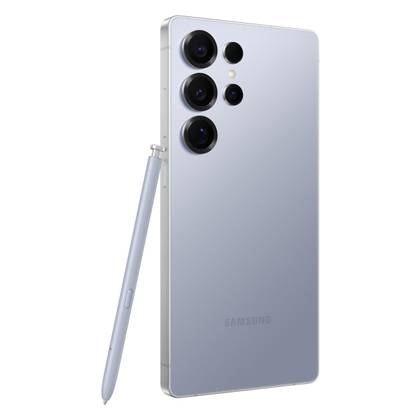
SoC
Snapdragon 8 Elite Gen 5
Display
6.9-inch Dynamic Super AMOLED 2X
Get the new Galaxy S26 Ultra with AI smarts and an all-new privacy display.