
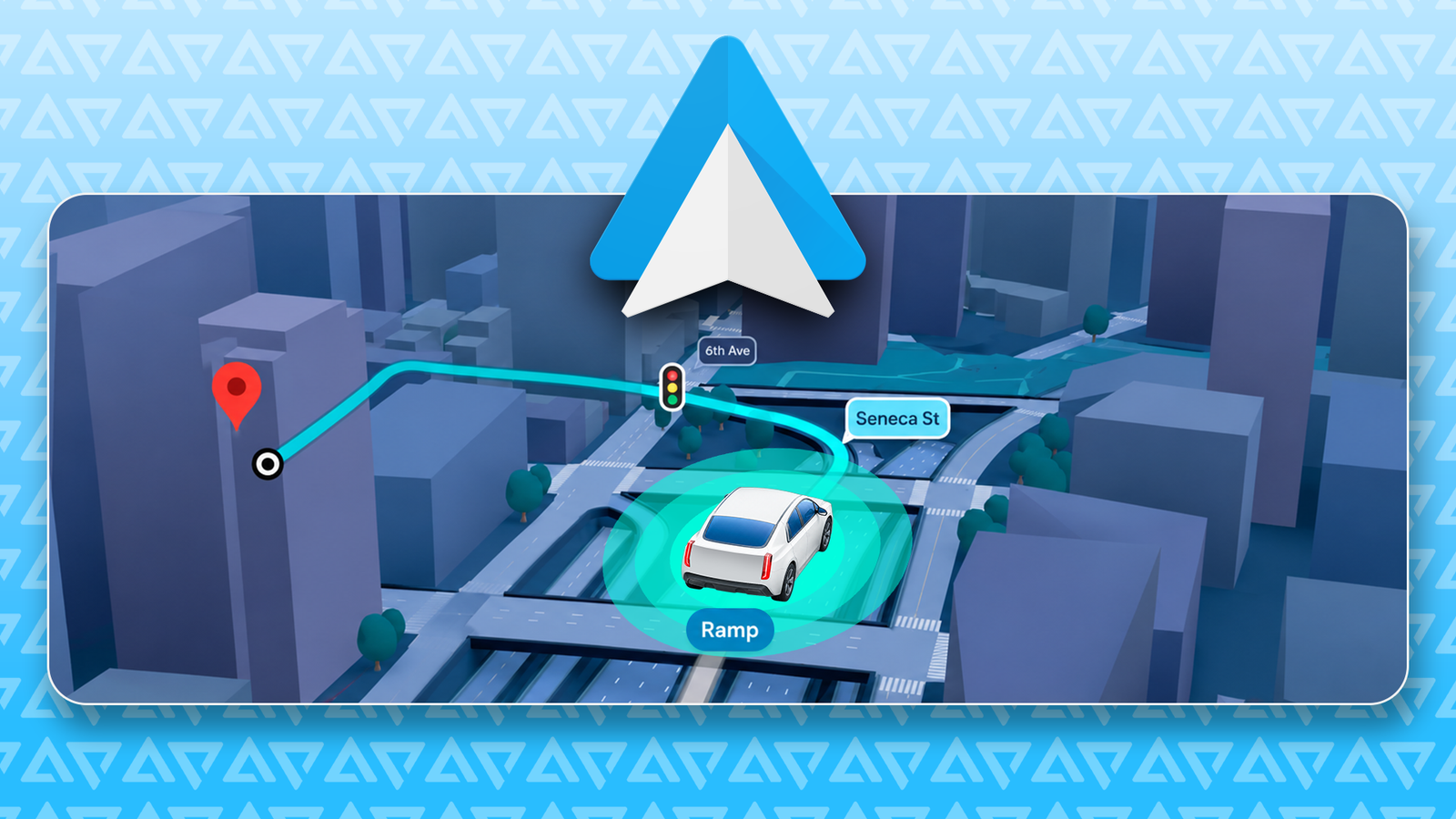
One of the headline features is Immersive Navigation, and it pulls the map out of its top-down abstraction into a detailed 3D view. It might be one of the most practical Android Auto upgrades we’ve had in a while.

Quiz
8 Questions · Test Your KnowledgeAndroid Auto trivia
The ultimate challenge
From launch day to the latest features — how well do you really know Google’s in-car platform?
HistoryFeaturesCompatibilityNavigationApps
Begin
In what year was Android Auto first announced by Google?
A2012B2013C2014D2015
Correct! Android Auto was announced at Google I/O in 2014 alongside Android TV and Android Wear. It was part of Google’s push to extend the Android ecosystem beyond smartphones into cars, wearables, and living rooms.
Not quite. Android Auto was unveiled at Google I/O in 2014, the same event that introduced Android Wear and Android TV. Google was making a big play to put Android into every screen in your life.
Continue
Which car manufacturer was the first to ship a production vehicle with built-in Android Auto support?
AToyotaBFordCHyundaiDVolkswagen
Correct! Hyundai was the first automaker to ship a production car with Android Auto support, arriving in 2015 with the Sonata. It gave Google a crucial foothold in the automotive market right at launch.
Not quite. Hyundai holds the honour of being the first to ship Android Auto in a production vehicle — the 2015 Sonata. This early partnership helped establish Android Auto as a serious contender in the in-car infotainment space.
Continue
What is the name of the feature that allows Android Auto to work without a physical cable connection to the car?
AAuto ConnectBWireless AutoCAndroid Auto WirelessDWi-Fi Link
Correct! The feature is simply called Android Auto Wireless. It uses Wi-Fi to mirror your phone’s Android Auto interface to the car’s screen, eliminating the need for a USB cable while still requiring Bluetooth to initiate the connection.
Not quite. The feature is officially called Android Auto Wireless. It pairs over Bluetooth first and then switches to a Wi-Fi connection for the actual data stream, giving you a cable-free experience in supported vehicles.
Continue
Which of the following navigation apps was NOT officially supported on Android Auto at launch in 2015?
AGoogle MapsBWazeCSygicDTomTom Go
Correct! Waze was not available on Android Auto at launch. Despite both being Google-owned products, Waze only gained official Android Auto support in 2019, several years after the platform debuted. Google Maps was a day-one feature.
Not quite. Waze is the odd one out here. Even though Google acquired Waze back in 2013, it took until 2019 for Waze to become officially available on Android Auto. Google Maps, however, was a core feature from day one.
Continue
What is the minimum Android version required to run Android Auto on a phone as of its standalone app era?
AAndroid 5.0 LollipopBAndroid 6.0 MarshmallowCAndroid 7.0 NougatDAndroid 8.0 Oreo
Correct! Android 6.0 Marshmallow is the minimum version required to run the Android Auto app. This requirement tied into the permission and notification access features that Marshmallow introduced, which Android Auto depends on heavily.
Not quite. Android 6.0 Marshmallow is the minimum required version. Google needed the more granular permissions and notification listener improvements that Marshmallow brought in order to make Android Auto function reliably and safely.
Continue
Which messaging app was among the first third-party apps to be supported on Android Auto at launch?
ATelegramBSignalCWhatsAppDSkype
Correct! WhatsApp was one of the earliest third-party messaging apps supported on Android Auto. Its massive global user base made it a priority integration, allowing drivers to send and receive messages hands-free using voice commands.
Not quite. WhatsApp was among the first third-party messaging apps to land on Android Auto. Given its enormous global popularity, it was a natural early partner, letting users interact with messages safely through voice while driving.
Continue
What major redesign did Android Auto receive in 2022 that changed its visual layout significantly?
AMaterial You overhaulBSplit-screen Coolwalk updateCDashboard View redesignDFullscreen Maps mode
Correct! The Coolwalk update introduced a split-screen layout to Android Auto, allowing multiple apps to appear on screen simultaneously. It was a major departure from the previous single-app full-screen approach and made better use of wider car displays.
Not quite. The answer is the Coolwalk update, which Google rolled out in 2022. It brought a split-screen interface so drivers could see navigation and media controls at the same time, a much-requested improvement for wider infotainment screens.
Continue
Google discontinued the phone-screen version of Android Auto in 2023, replacing it with what product for direct phone use?
AAndroid DashboardBGoogle Drive ModeCAndroid Driving ModeDGoogle Assistant Driving Mode
Correct! Google replaced the phone-screen Android Auto experience with Google Assistant Driving Mode. This simplified interface was built directly into Google Maps and used Google Assistant for voice interactions, though it too was later quietly wound down.
Not quite. Google Assistant Driving Mode was the replacement for the phone-screen version of Android Auto. It integrated into Google Maps and leaned heavily on voice commands via Google Assistant, though it never quite matched the original’s popularity with users.
See My Score
Challenge CompleteYour Score
/ 8
Thanks for playing!
Try Again
What Google is bringing to Android Auto in 2026
Google calls it the biggest update to the Google Maps navigation experience in over a decade.
The update is aimed at Android Auto’s huge installed base. Google says more than 250 million Android Auto-compatible cars are on the road today.
Immersive Navigation populates the dashboard with detailed terrain, 3D buildings, and overpasses. Stop signs, crosswalks, and traffic lights are also highlighted in the navigation view.
When you are dealing with awkward merges and layered interchanges, a flat line is not enough. For once, the screen matches the windshield.
The features differ based on the car. Standard Android Auto users get the 3D map, rendered buildings, intersection details, and visual lane highlighting, powered by a connected phone.
Vehicles running Google Built-in (Android Automotive) get the same map plus Live Lane Guidance made possible by the car’s front camera and deeper sensor integration.
Related
I optimized Android Auto for long drives, and now I can’t go back
A few tweaks made long road trips less chaotic
Google’s 3D landmarks make city driving less confusing

Credit: Lucas Gouveia / Android Police
A 3D skyline sounds like another dashboard decoration. But in practice, Google is giving your brain something to latch onto. Buildings are landmarks, and landmarks help you understand where you are.
Google’s models pull from Street View data and aerial photography to build a spatial understanding of the route.
When a digital skyscraper matches the one outside your window, you can orient yourself in a second. This is most useful in downtown, where one missed turn dumps you into a maze of one-way streets.
Still, more detail on a map raises a question. A 40-story building looks useful until it hides the turn you are supposed to take. Google appears to have planned for that with some guardrails.
The main one is transparency. When a tall building gets in the way of the route line, it automatically goes semi-transparent so you can see through to the path ahead while keeping the spatial context of where the building sits.
The software also handles framing on its own. As you approach complex junctions, the map shifts perspective, pulling the camera back and angling it down to make every lane visible.

Credit: Google
Google Maps wants to stop last-second lane panic
Credit: Lucas Gouveia / Android Police | konstantinos69 / Shutterstock
The update also goes after the smallest mechanics of city driving, where most mistakes happen.
Late merges and missed exits cause a lot of avoidable accidents, and Immersive Navigation explicitly calls out lane-level guidance and traffic lights ahead of tricky junctions.
In supported vehicles, the software taps the car’s forward-facing cameras to read physical road signs and lane markings in real time.
Live Lane Guidance figures out which lane you’re in and tells you to move over with visual and audio prompts before the interchange.
As someone who has been humbled by highways more times than I’d like to admit, this is a lifesaver.
Android Auto is being redesigned for every kind of dashboard
Credit: Lucas Gouveia / Android Police | Nickolya / Shutterstock
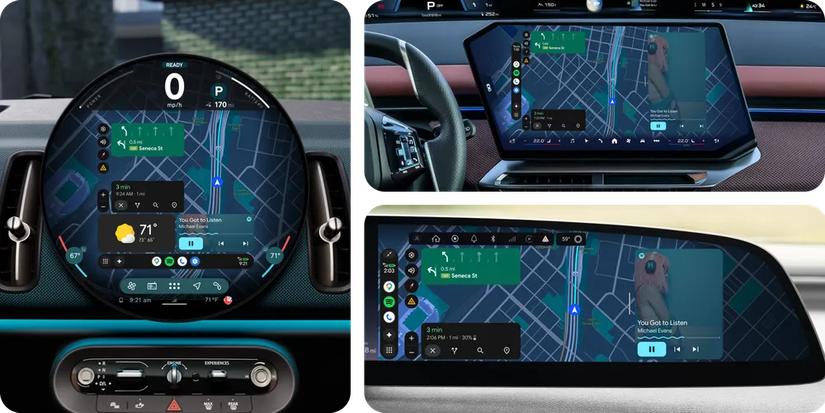
Dense visual data has always been hard to fit onto car screens, and modern dashboards are everywhere.
There’s the circular OLED in the Mini Cooper, ultrawide rectangles, and even BMW’s Neue Klasse-style display shapes.
To handle that, Google moved Android Auto to its Material 3 Expressive design language. The interface scales the edge-to-edge Google Maps layout to whatever shape the car gives it.
This would hopefully remove the letter boxing and dead space problem that haunted older Android Auto builds.
Credit: Google
The open question is what 3D navigation does to your phone
Google’s presentation was full of shiny UI examples, but it skipped over the physical cost of running all of this.
If you use wireless Android Auto, you already know that running standard GPS and Spotify can turn your phone into a pocket-sized space heater.
Immersive Navigation adds spatial data and a 3D-rendered environment while simultaneously processing live traffic data.
What does this do to a phone’s battery during a two-hour commute? Will the sheer processing load cause phones to thermal-throttle on a hot summer dashboard?
It is still too early to know exactly how heavy this tax will be, so we have to watch out for it as the rollout expands.