
One of my favorite columns to write involves finding a really good app that makes life online a little better. Recent pieces about Acme Weather, the return of the team behind the beloved Dark Sky weather app; and WhatCable, which tells you the capabilities of cables plugged into your Mac, are good examples.
This week, I’ve three useful apps for you. Two are for iPhones and iPads and one is for Macs, but I’ve noted where Android/Windows equivalents are available. Two are completely free, and the third has a generous trial period and costs much less than better-known competition.
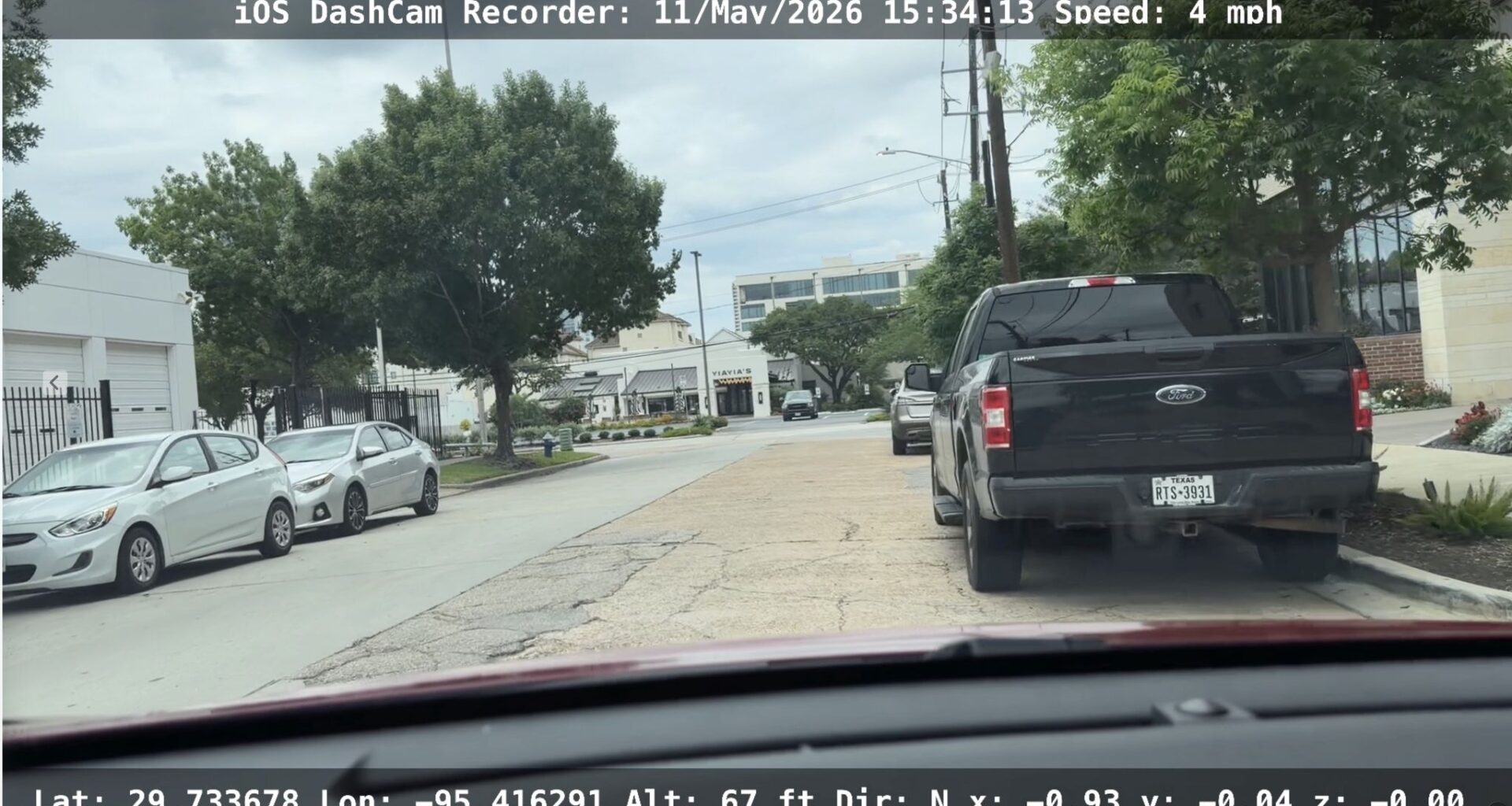
DashCam Recorder, a free app for iPhones, can record your travels around town and save them to your phone. It’s as full-featured as a hardware dash cam.
Screenshot
DashCam Recorder
Article continues below this ad
Houstonians who drive know our streets and freeways are the Wild West of motoring. I recently considered buying a dashcam to capture road incidents. But before I went hardware shopping, I checked for decent iPhone apps that would turn my handset into a dashcam. I’m glad I did, because DashCam Recorder provides nearly all the features of a dedicated cam, yet it’s 100 percent free with no annoying ads.
Dutch developer Jan Nutbroek has been working on the app for a decade, adding features and polish. It does just about everything you’d want a dashcam to do and then some, and it’s very stable.
Put your iPhone on a dash or window car mount and the app will record via the cameras — you can choose either the standard wide or the ultrawide lenses and capture in either HD or 4K resolution. You can record continuously or have DashCam Recorder grab video in a 3-minute loop, which you’d use if your main goal is to capture what happens in an accident. It also grabs GPS settings, speed, altitude and pitch-and-roll data, along with time and date.
A separate app, DashCam-Player, can play back the video along with plotting your recorded drive on a map, showing stops and even bumps in the road. There’s also a Mac version of this app so you can watch the action unfold on a bigger display. Yet a third app, DashCam Recorder PiP, captures video from the front and rear iPhone cameras, so you can see inside the car (and maybe through the rear window) and the road ahead at the same time.
Article continues below this ad
It’s amazing that all three apps are free. Nutbroek told me coding is his hobby and he doesn’t charge to maintain their popularity. (They are also kept separate to ensure each is stable.) He’s got a tip jar on the app’s website at dashcam.cam for those who want to reward his efforts.
There are some downsides, however. Your iPhone is likely to run hot when the app is recording, because there are a lot of computationally intensive processes running — even more if you’ve also got a navigation app going, too. Connecting it to a charger will add more heat. Because your iPhone must be perched where it can see the road, it’ll get even hotter in direct sunlight.
Nutbroek has no plans for an Android version. I was not able to find a dashcam app as full-featured as his for Android that’s 100% free, but Droid Dashcam in the Google Play Store comes closest. The cam features are free but with ads. A one-time fee nukes them.
Designed to help colorblind people identify colors, What Color Is This? is also useful to anyone who needs to know the precise color of an object. Got any paint you need matched?
Screenshot
What Color is This?
Article continues below this ad
I love apps that do one thing, and do it well. What Color Is This? excels at the purpose implied in its name: Identifying colors. Developer Luke Steuber is colorblind, and it’s a great app for those who can’t discern hues. But it’s also very handy for those who need to know precisely what a color is, such as artists, designers or DIY homeowners trying to match paint.
It’s elegant in its initial simplicity, but you can dive deeper for more features. Point your iPhone’s or iPad’s camera at an object, select the color you want to identify, and tap a button. The result comes back instantly with a visual sample and the hex code needed to generate that color on a computer, pulled from a database of 32,000 colors. Tap on the color to get more details about it, including close alternatives. Scroll up to see contrasting colors and more.
The app works on all Apple devices, including a Mac, and for Android and Windows users it’s also available as a website at whatcoloristhis.one. There you can use your device’s camera to select the color, or upload an image. All the technical details about the color are available on the web version.
Why spend money every year on a subscription-based Mac system cleaner when you can pay as little as $9 one time for Mole, which includes five different tools for getting your computer in shape.
Screenshot
Mole
$9 through June 15, then $19
Tw93
Article continues below this ad
System cleaners like CleanMyMac (or CCleaner for Windows) are controversial. Most duplicate maintenance features built into those operating systems, but make getting to them easier. I’ve been a fan of CleanMyMac since reviewing it in 2023, but it’s not cheap, costing $10 a month or $100 a year.
That makes the open-source toolbox app Mole at mole.fit, which can do some things even CleanMyMac can’t, a bargain. Right now it’s available as a one-time purchase for $9, increasing to $19 on June 15, and can be used on two Macs. (A trial period lets you run each tool twice.) Even at the higher price, it’s worth it.
Mole is five tools in one. It can find and remove clutter and unnecessary files on your Mac’s drive; update or remove existing apps; optimize the system’s processes; analyze your drive and find what folders and files are taking up the most space; and provide a detailed status dashboard for the system.
That latter is what sets Mole apart, and in fact can save you more money. The status dashboard can replace monitoring apps like iStat Menus, which costs $12. It shows everything from battery health to CPU and GPU usage to the amount of space left on your drive and more. It can be displayed either as a standalone window or as a drop-down from the Menu Bar.
Mole’s maintenance features are described by the developer as “conservative,” and that’s a good thing. If there’s a chance removing a file considered clutter could cause a problem, Mole demurs. You can remove it later if you like.
Article continues below this ad
The interface is simple but alluring, with each tool’s screen highlighted by a spinning planet that indicates work is being done. For example, removing junk is represented by the Earth, while searching for big files is represented by Jupiter. If you prefer a simpler interface, you can also run scans from the Mac’s text-based Terminal.
On a MacBook Pro with an M5 chip, the scanning process just flies, taking a fraction of the time of CleanMyMac’s scans. Note that Mole lacks a malware scanner, like Moonlock in CleanMyMac.
The developer is working on a Windows version (a beta currently works only in the Windows PowerShell command line). In the interim, consider BleachBit, which has been around almost 20 years and is free, has no ads and is also open source.