

The Android ecosystem is lucky to have a wide selection of excellent, free, open-source apps. These apps are so good that they could easily charge a fee. I started by listing 7 of these apps, then 4 more—now here are another 3 I currently have installed on my phone. They’re free of cost, don’t show any ads, or sell subscriptions.
Unexpected keyboard
An unexpectedly awesome keyboard app
This virtual keyboard looks like your regular Android keyboard but acts like a full-size keyboard. Note that each key has more than one symbol. You can swipe over a key to select which one you wish to type. Swiping up on Q, for example, to type 1. Swipe down to press Escape.
In the bottom corner, notice the key with arrows. You can press any of the four arrows by swiping in the correct direction. Swiping right or left on the space bar moves the text cursor between typed characters. There’s even a function (Fn) key, which you can tap to get the entire Function row. Plus, some extra symbols.
But why would you need a function row on a mobile phone? This Unexpected Keyboard was originally built for people who use the Android terminal emulator app Termux. Termux is the definitive terminal emulator for Android. It has a huge community built around it, which was the original audience for this keyboard.
Termux can do a lot of awesome things on Android, but it is annoying to use regular keyboards with it. It functions like a desktop emulator, so it’s easier (and more fun) to use a keyboard app which emulates a full-size keyboard. It works just fine in other apps too, so I use it as my main keyboard.
These are the available themes.
You can change the layout, language, which keys appear where, add new keys, and so on. Here is the default layout and my layout side by side.
The project is getting regular updates, with the latest release out just this week. It’s pretty lightweight (just one megabyte APK) and fast. I’ve been using it for almost three months, and the performance is always buttery smooth. Even on my old or low spec devices. It’s completely free and uses the GNU General Public License. No subscriptions, ads, or upsells either.
The best part is that it’s totally offline. No keyboard app should be internet-enabled.
You can check out the official GitHub repo here. It’s available on Google Play Store and F-Droid. F-Droid is the definitive open-source Android store.
Canta
Get rid of preinstalled junk apps with one tap
I can tolerate bloatware as long as you can remove it. However, most Android manufacturers make it impossible to do that, leaving me stuck with random third-party apps and games, duplicate tools, and useless data mining cloud services. Beyond just cluttering up your home screen, these things are constantly sucking up resources in the background.
Now there is a standard way to remove this stubborn bloatware. But it involves connecting the phone to a computer and running ADB commands. It’s effective but annoying. Canta simplifies that. It lets you remove those unremovable apps just by tapping a button on the Canta app.
Canta will show a full list of installed apps, including preinstalled system apps. It shows a little badge next to apps which are safe to remove. Apps with the “recommended” tag are usually safe to uninstall. As a rule of thumb, you’ll want to avoid apps with the “expert” and “unsafe” tags unless you know what you’re doing. You can even filter the list by tags. Tap an app to get more information.
You can select multiple apps and then press the little trash icon in the corner to get rid of those apps.
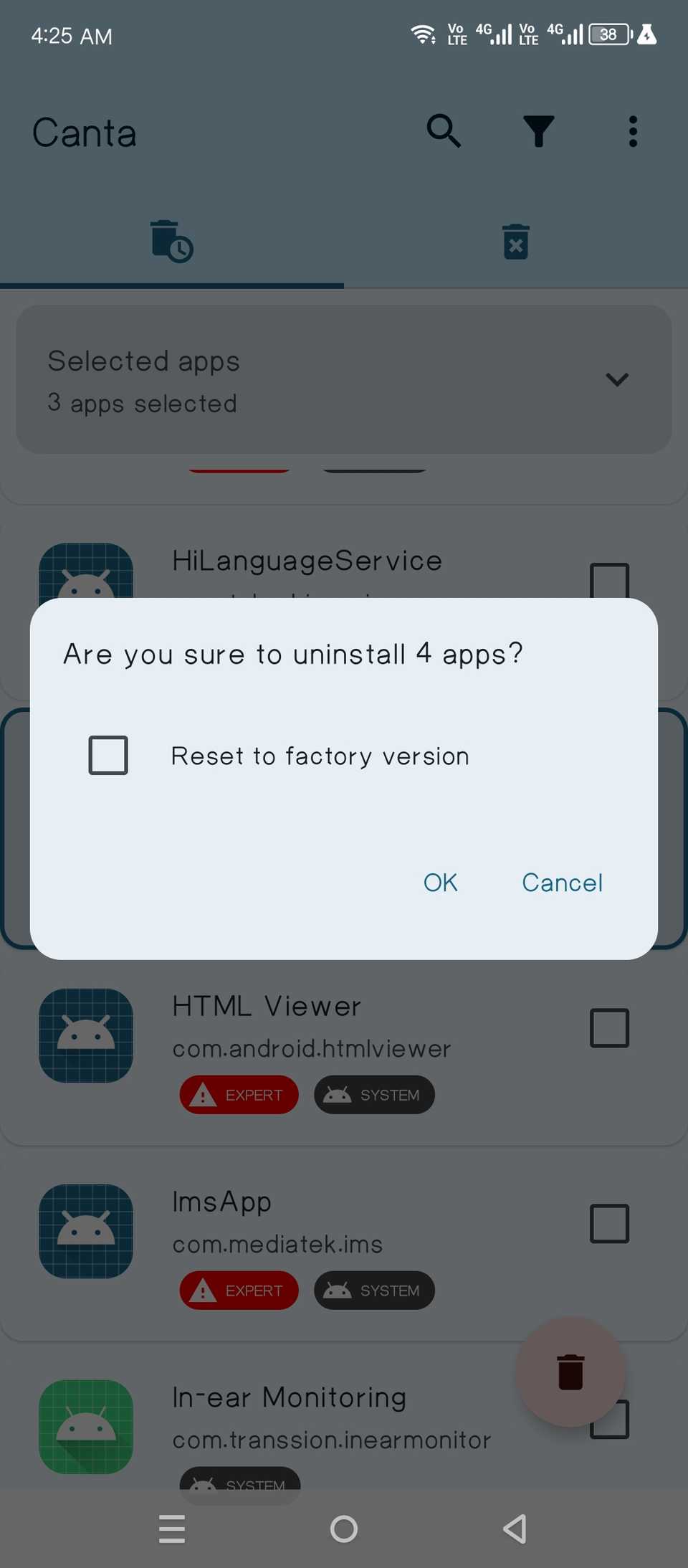
Behind the scenes, it’s faking a PC connection and executing those same ADB commands. Technically, it’s not erasing the apps from the phone; it is uninstalling them just for the “current user.” There’s typically just one user on Android devices, so uninstalling it for the current user effectively kills the app. It doesn’t show up anywhere on the device, and it does not run in the background. All its data is erased too.
I wrote about its setup in detail here. Basically, you need to enable wireless debugging and run what’s called a Shizuku server in the background. Shizuku grants advanced permissions to the Canta app, even without root access
I covered the setup in detail here.
ShizuWall
One of the features that Android is still missing, even in the latest version, is the ability to sandbox apps from the network. You cannot switch off the internet (Wi-Fi or data) on a per-app basis. At least not without rooting the device first.
A workaround is to use an app like NetGuard, which creates a VPN tunnel to cut your selected apps from Wi-Fi, data, or both. The problem is that, one, it takes up the VPN slot. So you can’t use an actual VPN while using this app. Two, it needs to run constantly in the background to work, which just wastes battery.
ShizuWall adds a desktop-like firewall to your Android. It simply applies firewall rules to selected apps. The apps just stay cut off from the internet. The firewall app itself only runs when you need to change the settings.
What can you do with a firewall in place like that? The firewalled apps can’t show you ads or track you when they can’t ping their servers. That also saves battery. And data.
The listing on the Google Play Store for ShizuWall is paid. To get the same app for free, download the APK file from the official GitHub repo.
All three apps are free of cost, no ads, or subscriptions
All three projects are completely free and built by indie devs. They’re actively maintained and getting regular updates. The apps are free of cost, but if you like and use any of them, you can always donate to the projects to keep them going. You can find even more FOSS apps I’d pay for here and here.