
Streamline your AWS infrastructure development with AI-powered documentation search, validation, and troubleshooting
Today, we’re excited to introduce the AWS Infrastructure-as-Code (IaC) MCP Server, a new tool that bridges the gap between AI assistants and your AWS infrastructure development workflow. Built on the Model Context Protocol (MCP), this server enables AI assistants like Kiro CLI, Claude or Cursor to help you search AWS CloudFormation and Cloud Development Kit (CDK) documentation, validate templates, troubleshoot deployments, and follow best practices – all while maintaining the security of local execution.
Whether you’re writing AWS CloudFormation templates or AWS Cloud Development Kit (CDK) code, the IaC MCP Server acts as an intelligent companion that understands your infrastructure needs and provides contextual assistance throughout your development lifecycle.
The Model Context Protocol (MCP) is an open standard that enables AI assistants to securely connect to external data sources and tools. Think of it as a universal adapter that lets AI models interact with your development tools while keeping sensitive operations local and under your control.
The IaC MCP Server provides nine specialized tools organized into two categories:
Remote Documentation Search Tools
These tools connect to the AWS Knowledge MCP backend to retrieve relevant, up-to-date information:
search_cdk_documentation
Search the AWS CDK knowledge base for APIs, concepts, and implementation guidance.
search_cdk_samples_and_constructs
Discover pre-built AWS CDK constructs and patterns from the AWS Construct Library.
search_cloudformation_documentation
Query CloudFormation documentation for resource types, properties, and intrinsic functions.
read_cdk_documentation_page
Retrieve and read full documentation pages returned from searches or provided URLs.
Local Validation and Troubleshooting Tools
These tools run entirely on your machine
cdk_best_practices
Access a curated collection of AWS CDK best practices and design principles.
validate_cloudformation_template
Perform syntax and schema validation using cfn-lint to catch errors before deployment.
check_cloudformation_template_compliance
Run security and compliance checks against your templates using AWS Guard rules and cfn-guard.
troubleshoot_cloudformation_deployment
Analyze CloudFormation stack deployment failures with integrated CloudTrail event analysis. This tool will use your AWS credentials to analyze your stack status.
get_cloudformation_pre_deploy_validation_instructions
Returns instructions for CloudFormation’s pre-deployment validation feature, which validates templates during change set creation.
Key Use Cases
Intelligent Documentation Assistant
Instead of manually searching through documentation, ask your AI assistant natural language questions:
“How do I create an S3 bucket with encryption enabled in CDK?”
The server searches CDK best practic and samples, returning relevant code examples and explanations.
2. Proactive Template Validation
Before deploying infrastructure changes:
User: “Validate my CloudFormation template and check for security issues”
AI Agent: [Uses validate_cloudformation_template and check_cloudformation_template_compliance]
“Found 2 issues: Missing encryption on EBS volumes,
and S3 bucket lacks public access block configuration”
3. Rapid Deployment Troubleshooting
When a stack deployment fails:
User: “My stack ‘stack_03’ in us-east-1 failed to deploy. What happened?”
AI Agent: [Uses troubleshoot_stack_deployment with CloudTrail integration]
“The deployment failed due to insufficient IAM permissions.
CloudTrail shows AccessDenied for ec2:CreateVpc.
You need to add VPC permissions to your deployment role.”
4. Learning and Exploration
New to AWS CDK? The server helps you discover constructs and patterns:
User: “Show me how to build a serverless API”
AI Agent: [Searches CDK constructs and samples]
“Here are three approaches using API Gateway + Lambda…”
Security Design
Local Execution: The MCP server runs entirely on your local machine using uv (the fast Python package manager). No code or templates are sent to external services except for documentation searches.
AWS Credentials: The server uses your existing AWS credentials (from ~/.aws/credentials, environment variables, or IAM roles) to access CloudFormation and CloudTrail APIs. This follows the same security model as the AWS CLI.
stdio Communication: The server communicates with AI assistants over standard input/output (stdio), with no network ports opened.
Minimal Permissions: For full functionality, the server requires read-only access to CloudFormation stacks and CloudTrail events—no write permissions needed for validation and troubleshooting workflows.
Prerequisites
Python 3.10 or later
uv package manager
AWS credentials configured locally
MCP-compatible AI client (e.g., Kiro CLI, Claude Desktop)
Configuration
Configure the MCP server in your MCP client configuration. For this blog we will focus on Kiro CLI. Edit .kiro/settings/mcp.json):
{
“mcpServers”: {
“awslabs.aws-iac-mcp-server”: {
“command”: “uvx”,
“args”: [“awslabs.aws-iac-mcp-server@latest”],
“env”: {
“AWS_PROFILE”: “your-named-profile”,
“FASTMCP_LOG_LEVEL”: “ERROR”
},
“disabled”: false,
“autoApprove”: []
}
}
}
Security Considerations
Privacy Notice: This MCP server executes AWS API calls using your credentials and shares the response data with your third-party AI model provider (e.g., Amazon Q, Claude Desktop, Cursor, VS Code). Users are responsible for understanding your AI provider’s data handling practices and ensuring compliance with your organization’s security and privacy requirements when using this tool with AWS resources.
IAM Permissions
The MCP server requires the following AWS permissions:
For Template Validation and Compliance:
No AWS permissions required (local validation only)
For Deployment Troubleshooting:
cloudformation:DescribeStacks
cloudformation:DescribeStackEvents
cloudformation:DescribeStackResources
cloudtrail:LookupEvents (for CloudTrail deep links)
Example IAM policy:
{
“Version”: “2012-10-17”,
“Statement”: [
{
“Effect”: “Allow”,
“Action”: [
“cloudformation:DescribeStacks”,
“cloudformation:DescribeStackEvents”,
“cloudformation:DescribeStackResources”,
“cloudtrail:LookupEvents”
],
“Resource”: “*”
}
]
}
Example Use Case With Kiro CLI
IMPORTANT: Ensure you have satisfied all prerequisites before attempting these commands.
1. With the mcp.json file correctly set, try to run a sample prompt. In your terminal, run kiro-cli chat to start using Kiro-cli in the CLI.
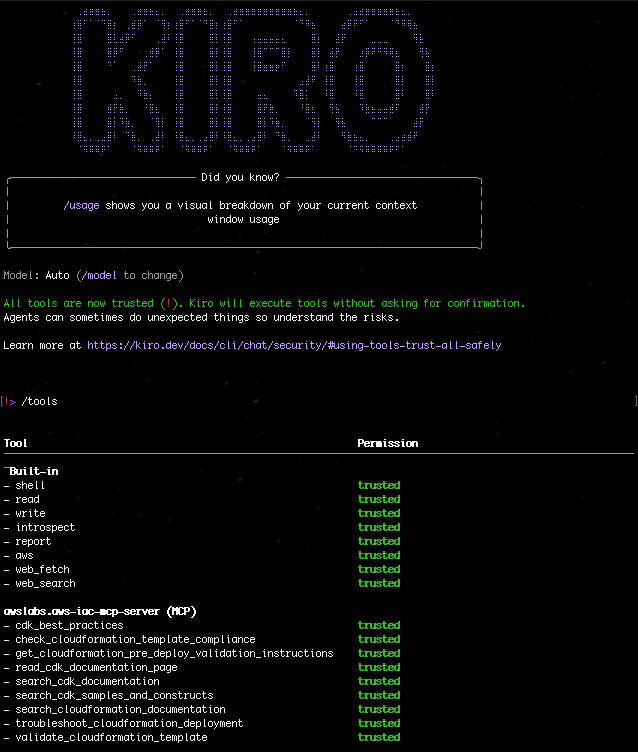
Figure 1: Kiro-CLI with AWS IaC MCP server
Scenarios:
“What are the CDK best practices for Lambda functions?”
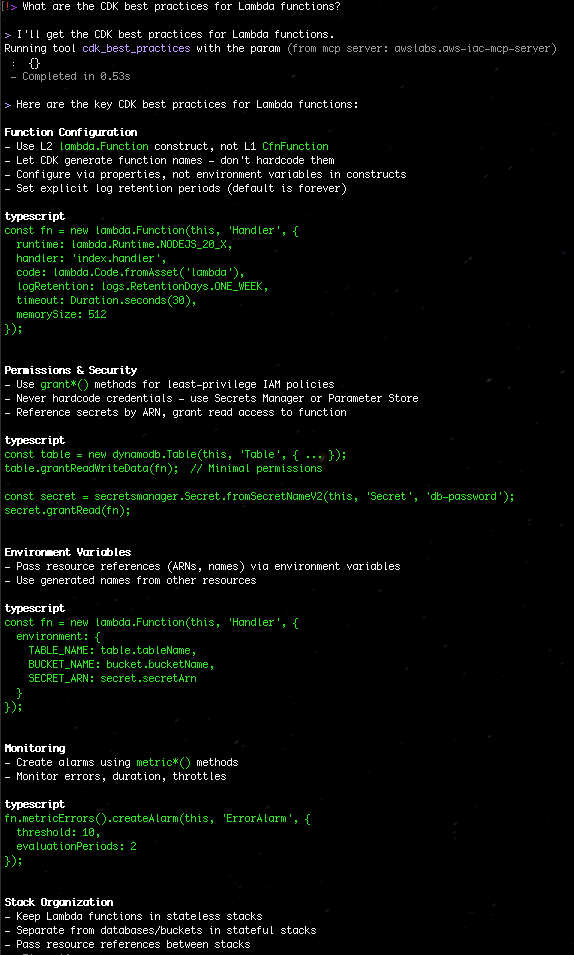
Figure 2: Search the CDK best practices for Lambda functions
“Search for CDK samples that use DynamoDB with Lambda”
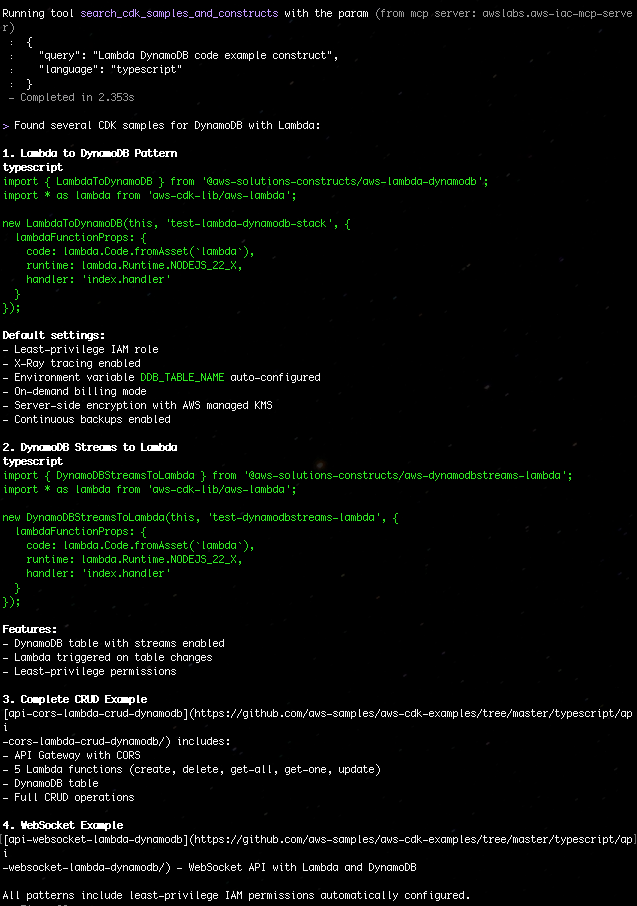
Figure 3: Search for CDK samples that use DynamoDB with Lambda
“Validate my CloudFormation template at ./template.yaml”
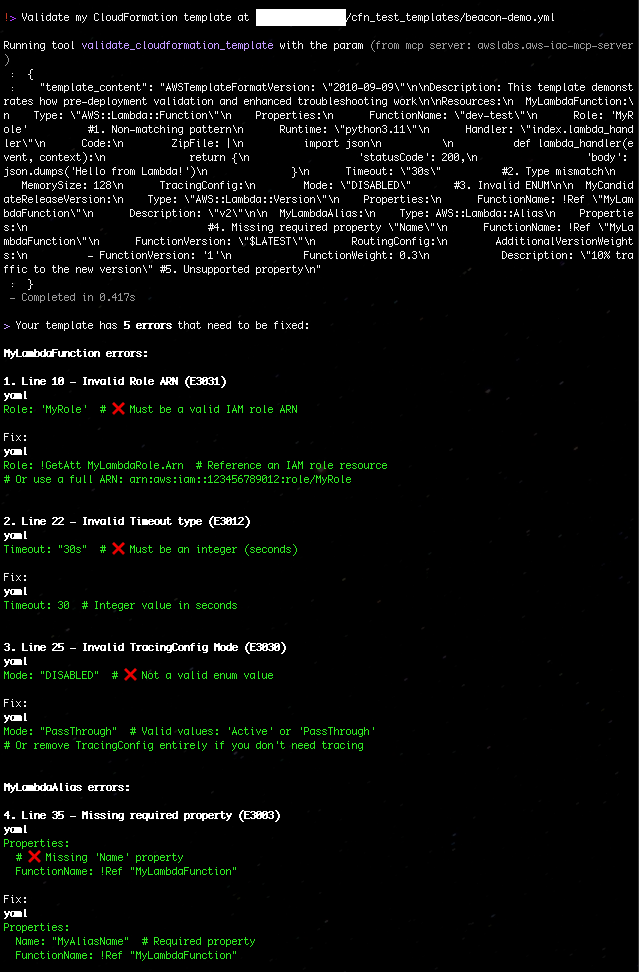
Figure 4: Validate my CloudFormation template with AWS IaC MCP Server
“Check if my template complies with security best practices”

Figure 5: Check if my template complies with security best practices with AWS IaC MCP Server
Best Practices
Start with Documentation Search: Before writing code, search for existing constructs and patterns
Validate Early and Often: Run validation tools before attempting deployment
Check Compliance: Use check_template_compliance to catch security issues during development
Leverage CloudTrail: When troubleshooting, the CloudTrail integration provides detailed failure context
Follow CDK Best Practices: Use the cdk_best_practices tool to align with AWS recommendations
What’s Next?
The IAC MCP Server represents a new paradigm in the AI agentic workflow infrastructure development – one where AI assistants understand your tools, help you navigate complex documentation, and provide intelligent assistance throughout the development lifecycle.
Get Involved
The AWS IaC MCP Server is available now:
Documentation and GitHub Repository: aws-iac-mcp-server
Feedback: We welcome issues and pull requests! Or respond to our IaC survey here.
Ready to supercharge your infrastructure as code development? Install the IaC MCP Server today and experience AI-powered assistance for your AWS CDK and CloudFormation workflows.
Have questions or feedback? Reach out to the blog authors on the AWS Developer Forums.
About Authors

Idriss Laouali Abdou
Idriss is a Sr. Product Manager Technical on the AWS Infrastructure-as-Code team based in Seattle. He focuses on improving developer productivity through AWS CloudFormation and StackSets Infrastructure provisioning experiences. Outside of work, you can find him creating educational content for thousands of students, cooking, or dancing.

Brian Terry
Brian Terry, Senior WW Data & AI PSA, is an innovation leader with more than 20 years of experience in technology and engineering. Brian is pursuing a PhD in computer science at the University of North Dakota and has spearheaded generative AI projects, optimized infrastructure scalability, and driven partner integration strategies. He is passionate about leveraging technology to deliver scalable, resilient solutions that foster business growth and innovation.