
Missing an important phone call because your device unexpectedly decided to play dead is incredibly frustrating. Lately, I’ve been tracking a growing number of Google Pixel users who are experiencing exactly that: a bizarre issue where their phones either get stuck in silent mode or completely fail to vibrate for incoming calls.
We haven’t been able to replicate this specific issue on any of our in-house Pixel devices. The bug doesn’t appear to be universally widespread, and it happens sporadically rather than consistently. However, the fact that we can’t trigger it doesn’t negate the very real headaches affected users are dealing with. If your phone says it’s on vibrate but stays completely still during a call, you aren’t crazy.
According to reports popping up across the Google Pixel Help forums, the bug manifests in a few annoying ways. For some, notably after recent Android 16 updates, the phone gets inexplicably stuck in silent mode, ignoring disabled Do Not Disturb (DND) schedules and bedtime routines.
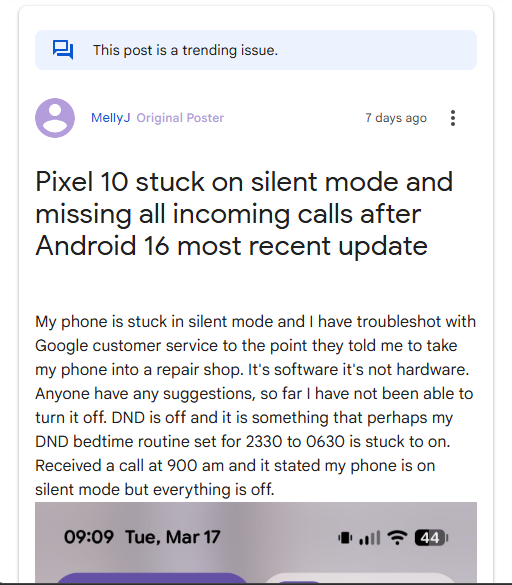
For others, the issue is a specific failure of the haptic motor during incoming calls. One user provided an incredibly detailed breakdown of the issue on their Pixel 10 Pro, noting that when the phone is set to vibrate, incoming calls fail to trigger the motor. Curiously, the call screen UI explicitly displays a “silent mode” indicator. The moment the call is missed, the phone immediately vibrates to deliver the missed call notification. It’s a localized failure; keyboard haptics and other system vibrations work perfectly fine.
The bug isn’t just limited to Google’s newest hardware, either. Users with older models like the Pixel 7 Pro are also experiencing the automatic switch to silent mode. If this sounds vaguely familiar, it’s because an incredibly similar issue plagued the Google Pixel family back in 2024.
The workarounds
Before you spend hours troubleshooting, you should know what hasn’t worked for the community. Affected users have run the gauntlet of standard fixes:
Booting into Safe Mode
Deleting all Do Not Disturb schedules
Disabling “Flip to Shhh”
Disconnecting Bluetooth wearables
Clearing the cache and storage for the default Phone app
None of these steps seem to resolve the underlying system-level routing error.
While Google has yet to officially acknowledge the bug or roll out a permanent fix, the Pixel community has managed to find a couple of reliable band-aids to get things vibrating again.
Workaround 1: The Slider reset
Sometimes, system defaults break after an OS update, and simply forcing the system to re-register your settings does the trick. A clever user in the forums discovered this quick fix:
Open Settings.
Tap on Sound & vibration.
Select Vibration & haptics.
Under the “Calls” section, slide the Ring vibration slider all the way down to zero.
Go back one screen (to ensure the setting saves).
Re-open Vibration & haptics.
Slide the Ring vibration back up to your preferred level (or all the way to maximum).

Workaround 2: Disable Gradual Ringing
If the slider reset doesn’t stick, another user found success by tweaking a specific phone setting. It’s a bit of a compromise if you like this feature, but it beats missing calls:
Go to your sound settings.
Find and turn off “Vibrate first then ring gradually”.
Until Google pushes a patch to address whatever software routing bug is overriding the active incoming call state, these workarounds are your best bet.