
I used to think smartphone automation was a gimmick where I could create a collection of nice-to-have shortcuts to save three seconds a day. I was wrong.
After diving into the Pixel’s automation ecosystem and tying my daily habits to Gemini and other location-based triggers, my entire relationship with my phone changed.
Now my Pixel seamlessly adapts to my environment, and going back to a standard out-of-the-box Pixel UI feels like taking a massive step backward.

Quiz
8 Questions · Test Your KnowledgeGoogle Pixel phones
Trivia challenge
From the original Pixel to the latest flagship — how well do you know Google’s own phone lineup?
HardwareHistoryCamerasSoftwareFeatures
Begin
In what year did Google release the very first Pixel smartphone?
A2014B2015C2016D2017
Correct! The original Google Pixel and Pixel XL were announced on October 4, 2016. They replaced Google’s Nexus line and marked the first time Google fully branded a smartphone under its own name.
Not quite — the first Google Pixel launched in 2016. Google had previously made Nexus devices with hardware partners, but the Pixel line was the first to carry Google’s own branding front and center.
Continue
What computational photography feature, first introduced on the Pixel 2, allowed sharp photos of moving subjects using a single lens?
ANight SightBPortrait ModeCSuper Res ZoomDMotion Photos
Correct! The Pixel 2 introduced Portrait Mode using a single rear camera, relying on Google’s machine learning rather than dual lenses to create that blurred background bokeh effect. It was hugely impressive for its time.
The answer is Portrait Mode. Unlike rivals that used two cameras to simulate depth, the Pixel 2 achieved Portrait Mode with just one lens by using Google’s advanced machine learning algorithms — a notable technical achievement.
Continue
Which Google-designed chip first appeared in the Pixel 6 series, marking Google’s shift away from Qualcomm processors?
ATensor G2BGoogle Titan MCGoogle TensorDPixel Neural Core
Correct! The original Google Tensor chip debuted in the Pixel 6 and Pixel 6 Pro in 2021. It was Google’s first in-house SoC designed specifically to accelerate AI and machine learning tasks on-device.
The correct answer is Google Tensor. Introduced with the Pixel 6 in 2021, Tensor was Google’s first custom-built SoC. It prioritized AI workloads like speech recognition and photo processing over raw benchmark performance.
Continue
What Pixel-exclusive calling feature uses AI to screen spam calls and read out a caller’s reason for calling before you pick up?
ALive TranslateBDirect My CallCCall ScreenDHold For Me
Correct! Call Screen launched with the Pixel 3 in 2018 and lets Google Assistant intercept unknown calls, asking the caller to state their purpose. You see a live transcript and can decide whether to answer or mark it as spam.
The answer is Call Screen. Introduced on the Pixel 3, this feature lets Google Assistant handle incoming calls from unknown numbers, transcribing the caller’s response in real time so you can decide how to respond without ever picking up.
Continue
Which Pixel model was the first to feature a hole-punch front camera, moving away from the notch design?
APixel 5BPixel 4aCPixel 6DPixel 4a 5G
Correct! The Pixel 4a, released in August 2020, was the first Pixel to use a punch-hole selfie camera cutout. It was a budget-friendly device that many considered one of the best value smartphones of that year.
The first Pixel with a hole-punch camera was the Pixel 4a, launched in 2020. Its predecessor, the Pixel 4, used a large top bezel housing Face Unlock sensors, so the 4a’s punch-hole design was a notable shift in Google’s approach.
Continue
What night photography mode, now a staple of smartphone cameras everywhere, did Google debut on the Pixel 3?
ANight ModeBNight SightCAstrophotographyDDark Mode Capture
Correct! Night Sight arrived as an update for the Pixel 3 in November 2018 and used computational photography to capture bright, detailed images in near-darkness. It set the benchmark that nearly every Android manufacturer has since tried to match.
The answer is Night Sight. Google launched Night Sight for the Pixel 3 in late 2018, and it quickly became a gold standard for low-light smartphone photography, using multiple exposures and machine learning to dramatically brighten dark scenes.
Continue
The Pixel 4 series featured a unique sensor array on the back. What was the distinctive sensor included that no other mainstream Android phone had at the time?
ALiDAR scannerBSoli radar chipCInfrared depth sensorDUltrasonic fingerprint sensor
Correct! The Pixel 4 included Google’s Soli radar chip, which enabled Motion Sense — allowing the phone to detect hand gestures hovering above the screen to skip tracks or silence alarms. It was innovative but ultimately discontinued in the Pixel 5.
The correct answer is the Soli radar chip. Google embedded this miniature radar sensor in the Pixel 4 to power Motion Sense gesture controls. Despite being a fascinating piece of technology, the feature was dropped by the Pixel 5 due to limited practical use.
Continue
Pixel phones are known for receiving Android updates first. How many years of OS updates did Google promise for the Pixel 8 series at launch?
A3 yearsB5 yearsC7 yearsD10 years
Correct! With the Pixel 8 and Pixel 8 Pro launched in 2023, Google committed to an impressive 7 years of OS and security updates. This matched Samsung’s Galaxy S24 promise and set a new standard for Android software longevity.
The answer is 7 years. Google announced 7 years of guaranteed OS and security updates for the Pixel 8 series — a major leap from the previous 3-year promise and a direct response to pressure from Samsung’s similarly extended update commitments.
See My Score
Challenge CompleteYour Score
/ 8
Thanks for playing!
Try Again
Set up Pixel Rules
Setting up native system Rules on the Pixel is easily one of Google’s most underrated features. It doesn’t get the same marketing hype as AI photo editing or call screening, but after you figure it out, it changes how you interact with your phone.
The beauty of Pixel Rules lies in their simplicity. You don’t need a degree in programming or a complex third-party like Tasker to get started.
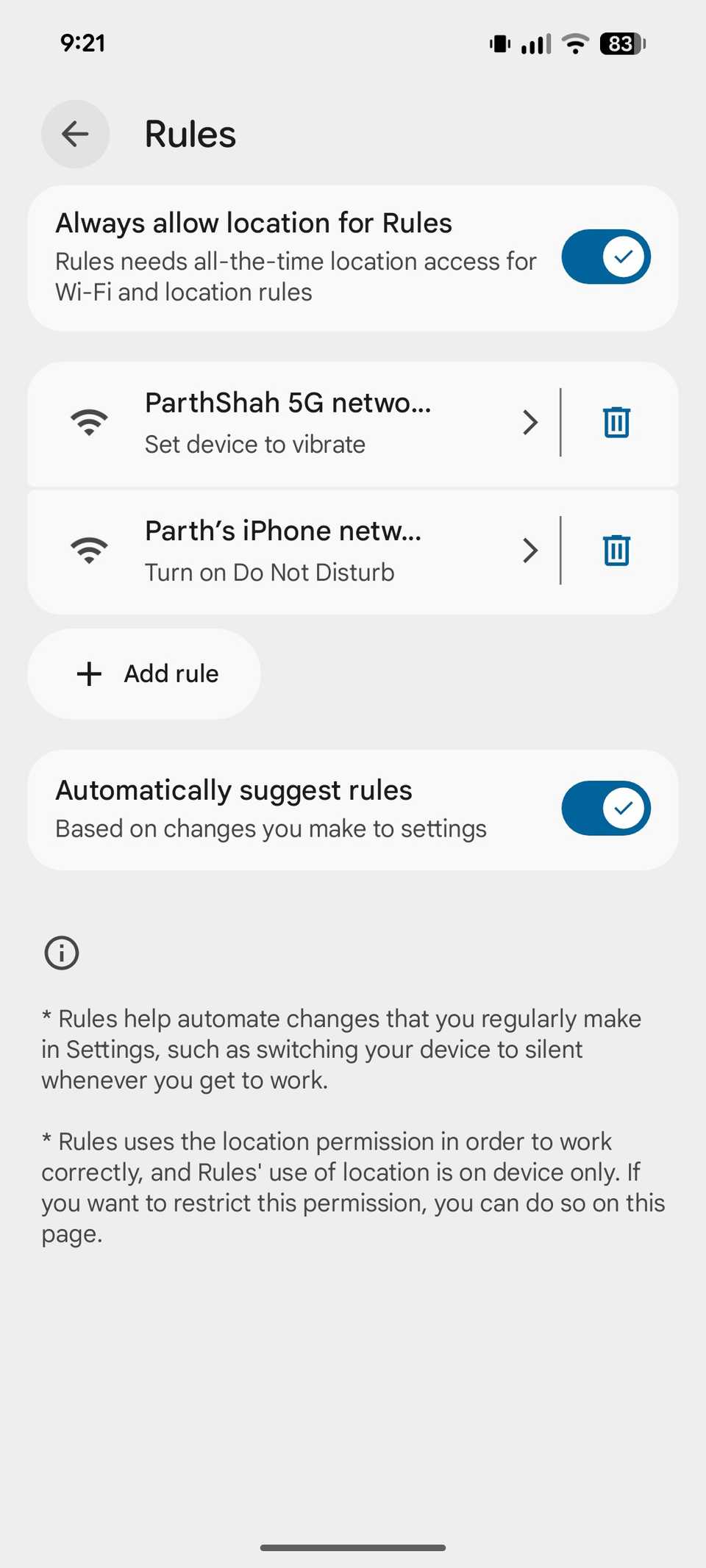
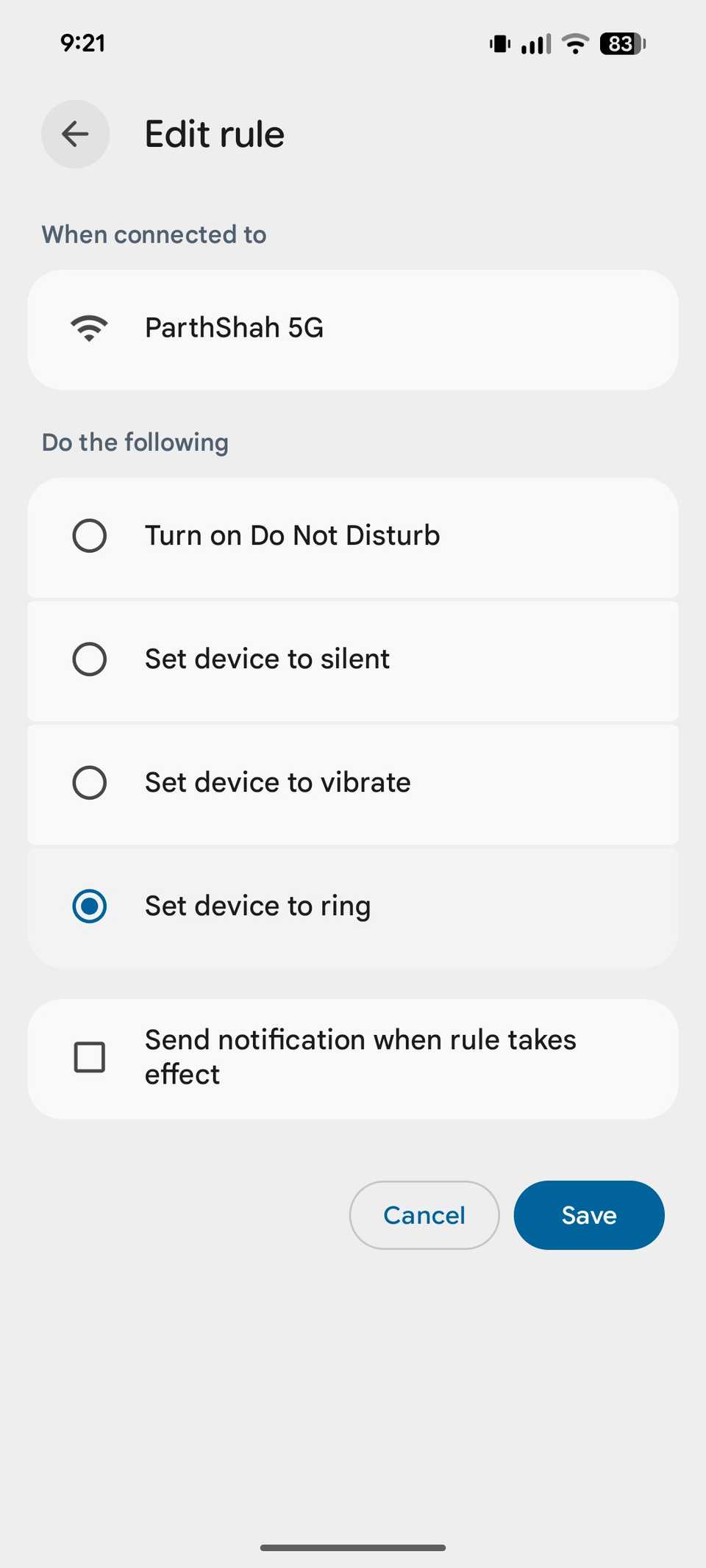
I can simply go to Settings > System > Rules and start creating new ones. Here are a couple of triggers I use.
I built a rule tied directly to my office workspace. The moment my Pixel registers that I have arrived at the office coordinates and connects to the Wi-Fi network, the system automatically flips the phone into DND.
The reverse transition is just as seamless. As soon as my Pixel connects to the home Wi-Fi network, it sets the device profile to Ring. You also have the option to use location-based rules.
When you realize how reliably the Pixel handles these location and network handoffs, you start setting automation triggers everywhere.
It takes less than two minutes to map out these boundaries, but the payoff is massive.
Related
The Pixel feature I forgot about — and fell back in love with
The hidden gem inside every Pixel
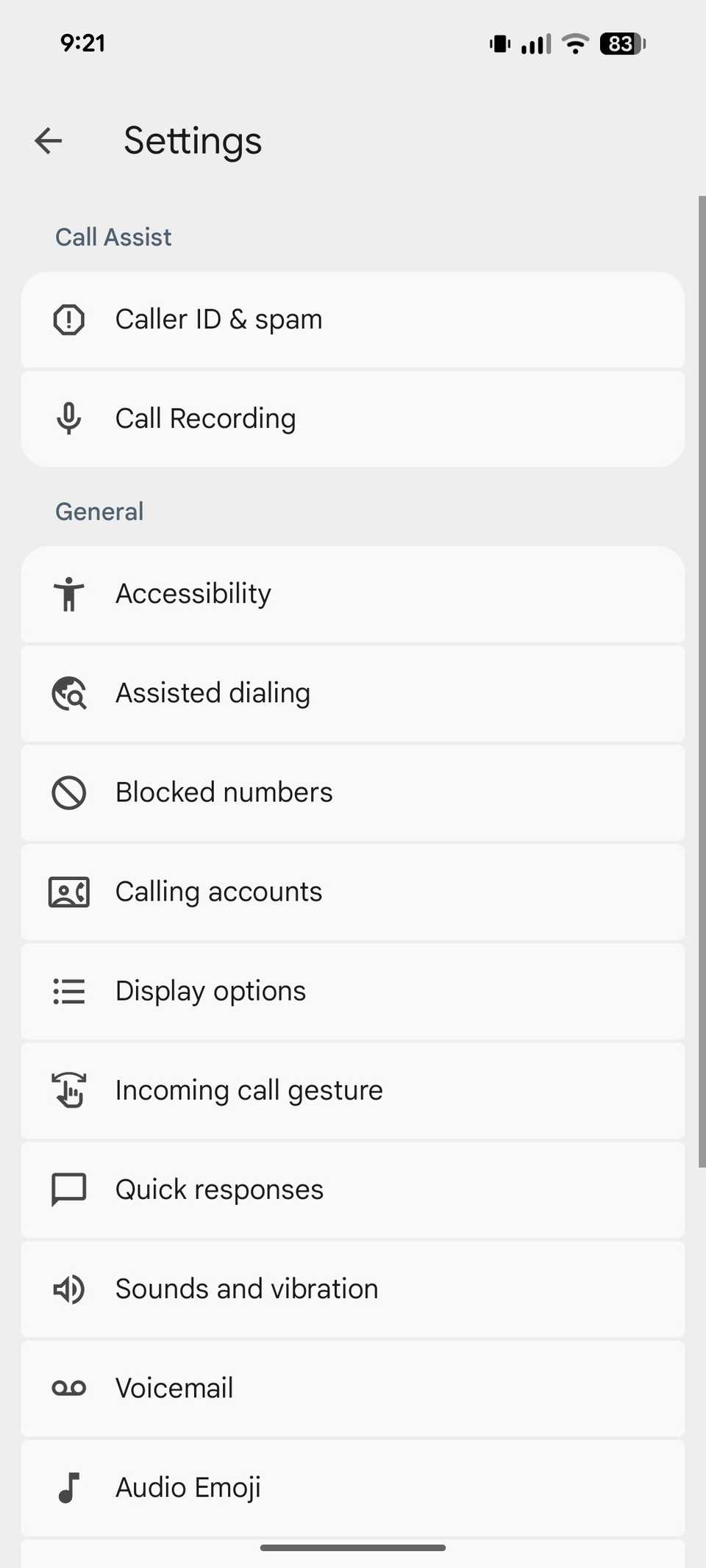
There have been instances when I answer a random number call, and suddenly it’s a detailed, high-stakes conversation about a pending project, a customer service dispute, or a potential vendor quote.
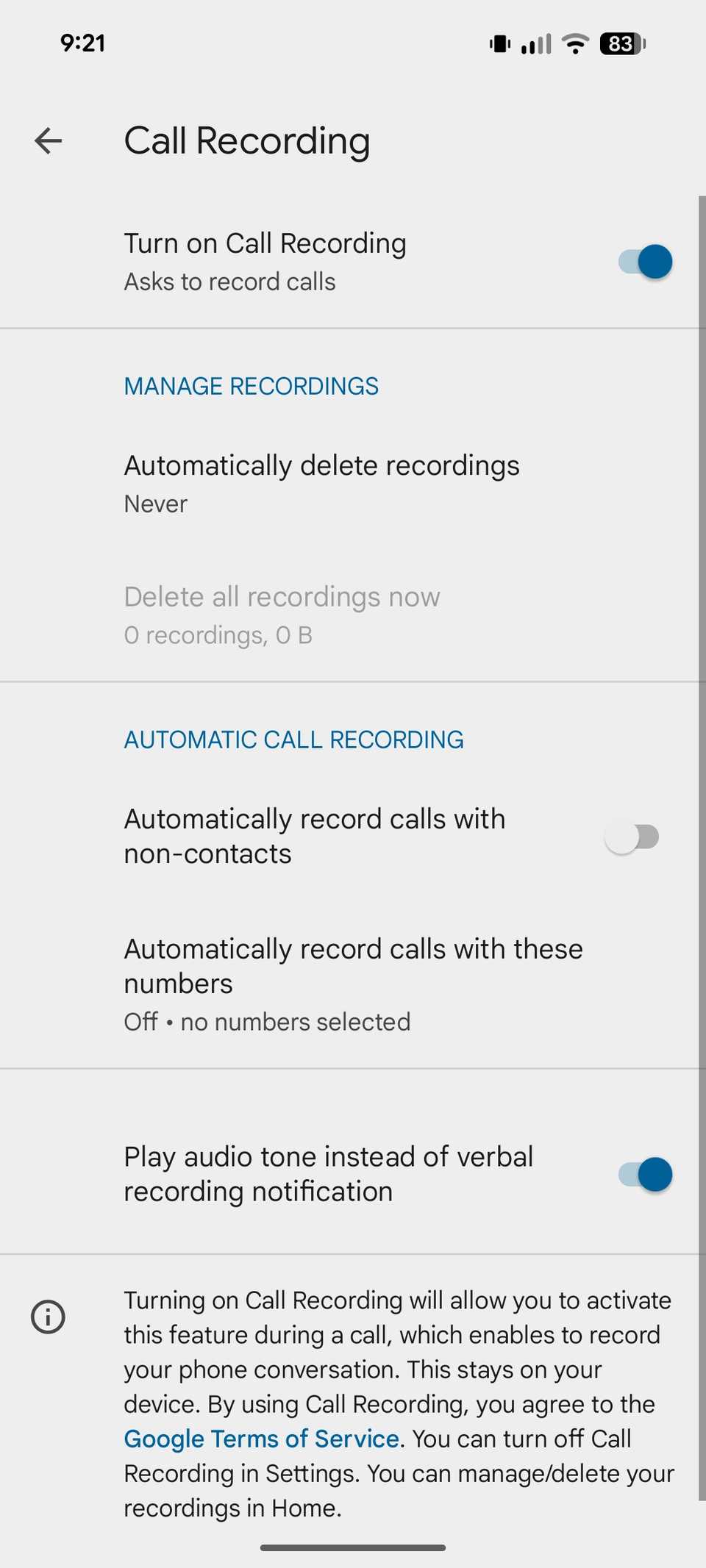
To avoid the anxiety of missing information from these unexpected interactions, I enabled the Automatically record calls with non-contacts toggle in the Phone Settings > Call Recording menu.
Now, if a freelance query or a logistic provider calls out of the blue, I don’t have to scramble for a pen and paper while driving or working at my workstation. The phone automatically captures the entire dialogue from the first second.
Because I use the official Google Phone framework, it plays a transparent audio disclosure to keep things legally compliant, which sets a highly professional boundary right from the jump.
Enable Flip to Shhh
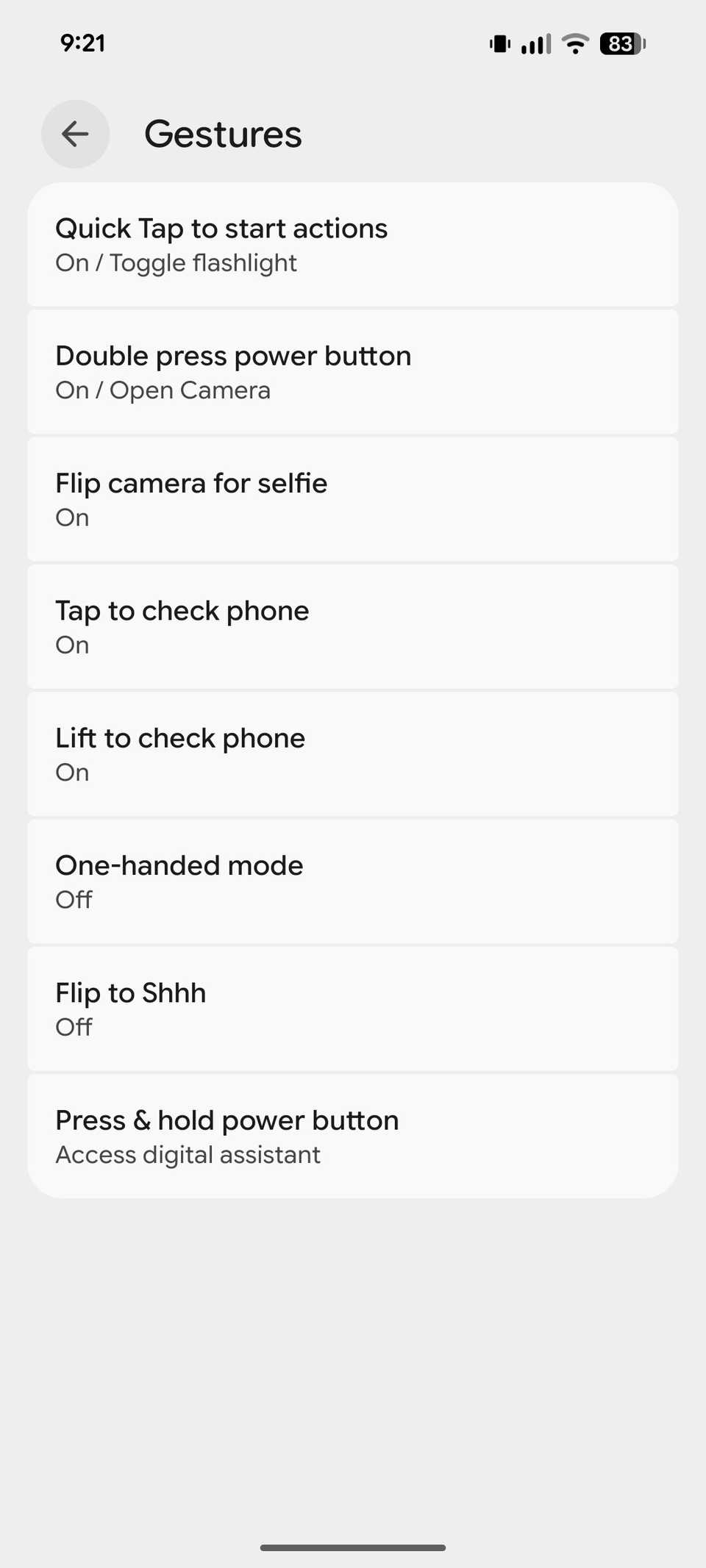
This elegant feature is buried inside the Pixel’s Gestures settings. It perfectly bridges the gap between hardware and software.
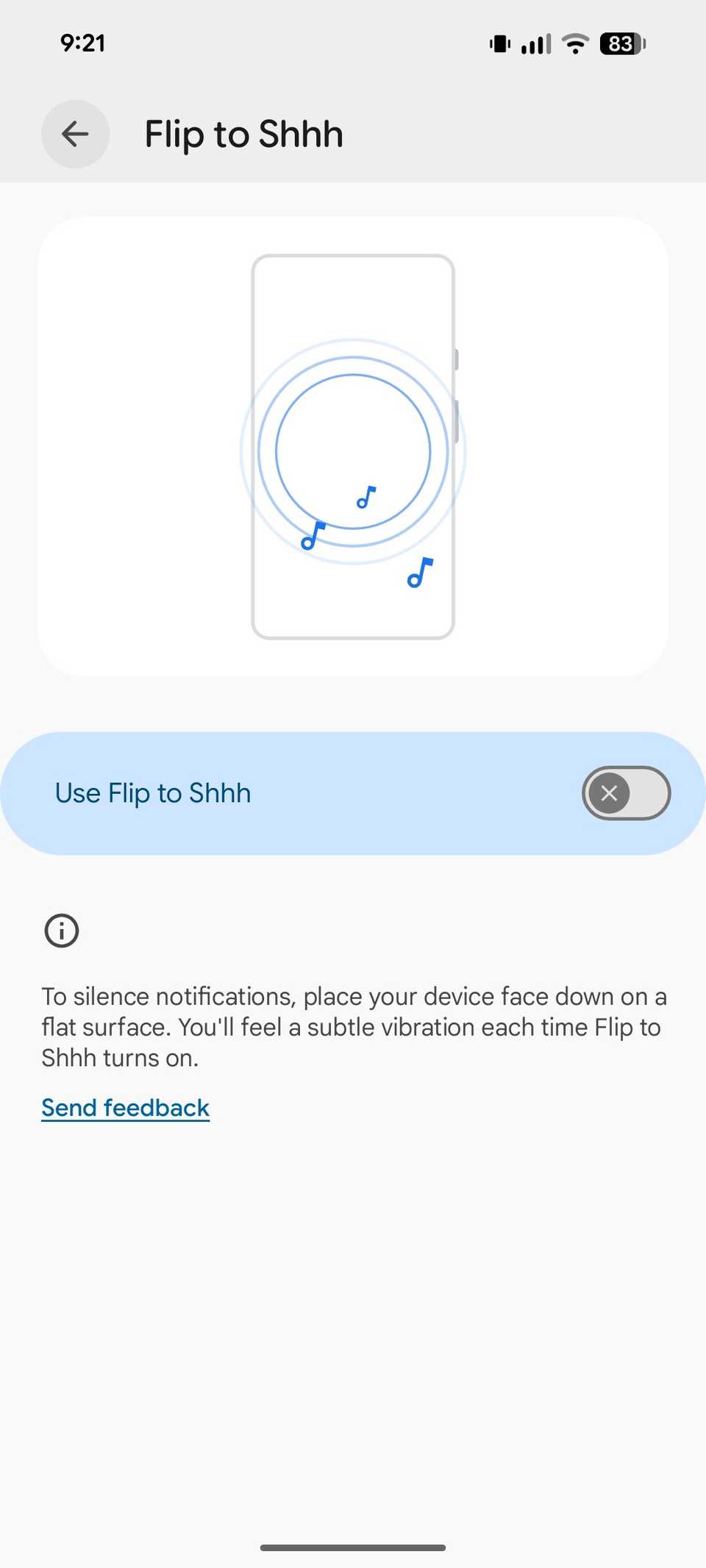
Whenever my phone starts buzzing or a notification lights up the screen at an awkward moment, I simply flip my Pixel face down on my desk.
The second the phone registers that face-down orientation on a flat surface, I feel a subtle, reassuring haptic vibration. It immediately silences all notifications, calls, and vibration hums.
To enable it, go to Settings > System > Gestures > Flip to Shhh.
Setting up Driving mode
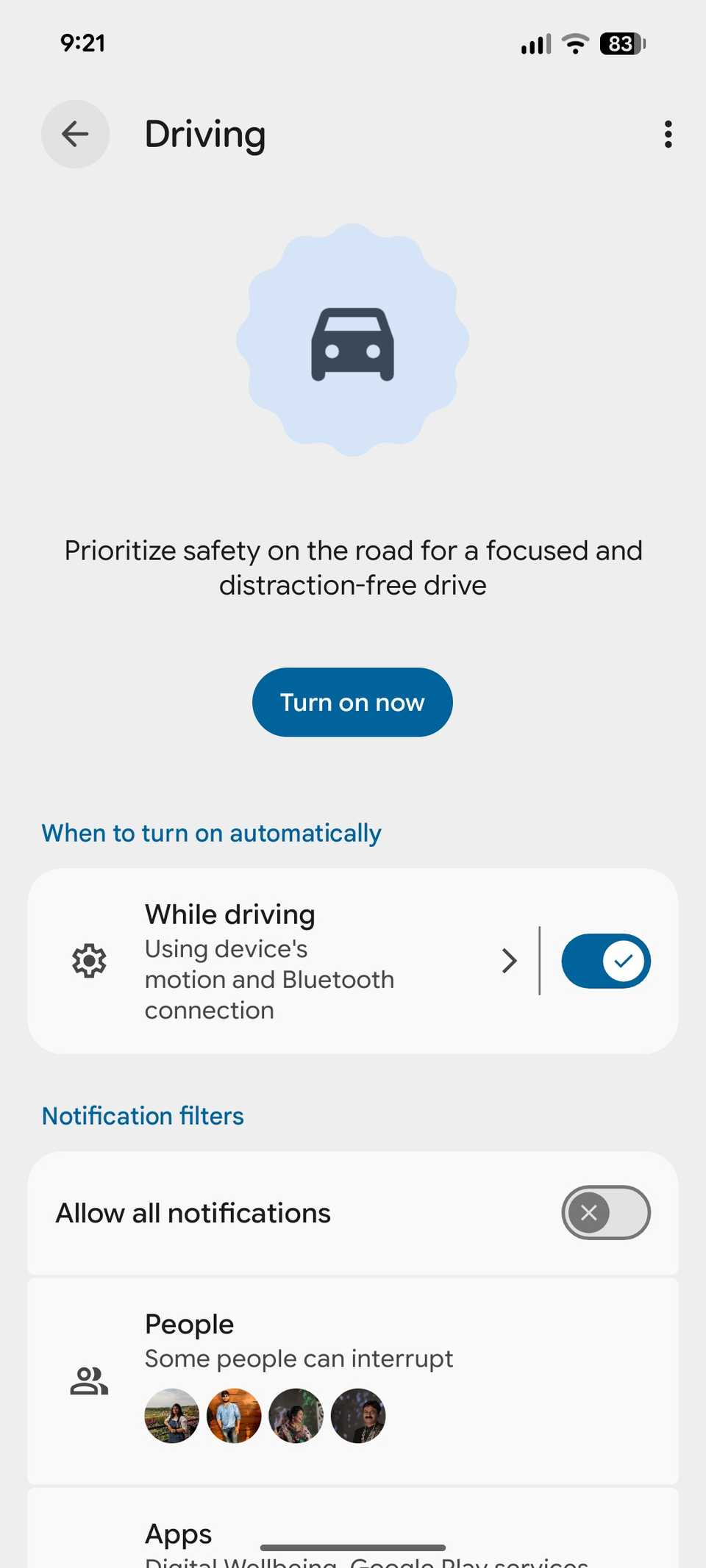

After I mapped out my Pixel’s native Driving Mode automation, I locked out my cabin experience for a distraction-free drive. The beauty of this setup is that it requires zero manual activation.
Instead, I set up a system-level trigger linked to my car’s hardware. The second my Pixel connects to the car’s infotainment system, the phone detects that I’m in transit and deploys Driving mode.
It silences notifications and calls from contacts. Still, staying distraction-free shouldn’t mean being entirely cut off in an emergency.
To balance safety with accessibility, I set exceptions for a few contacts and important apps.
Now, I can focus entirely on the road, my music plays uninterrupted, and I remain insulated from the urge to glance at my screen.
Related
I turned on these 5 Pixel modes — now my phone basically runs itself
Set it and forget it
Using Gemini Scheduled Actions
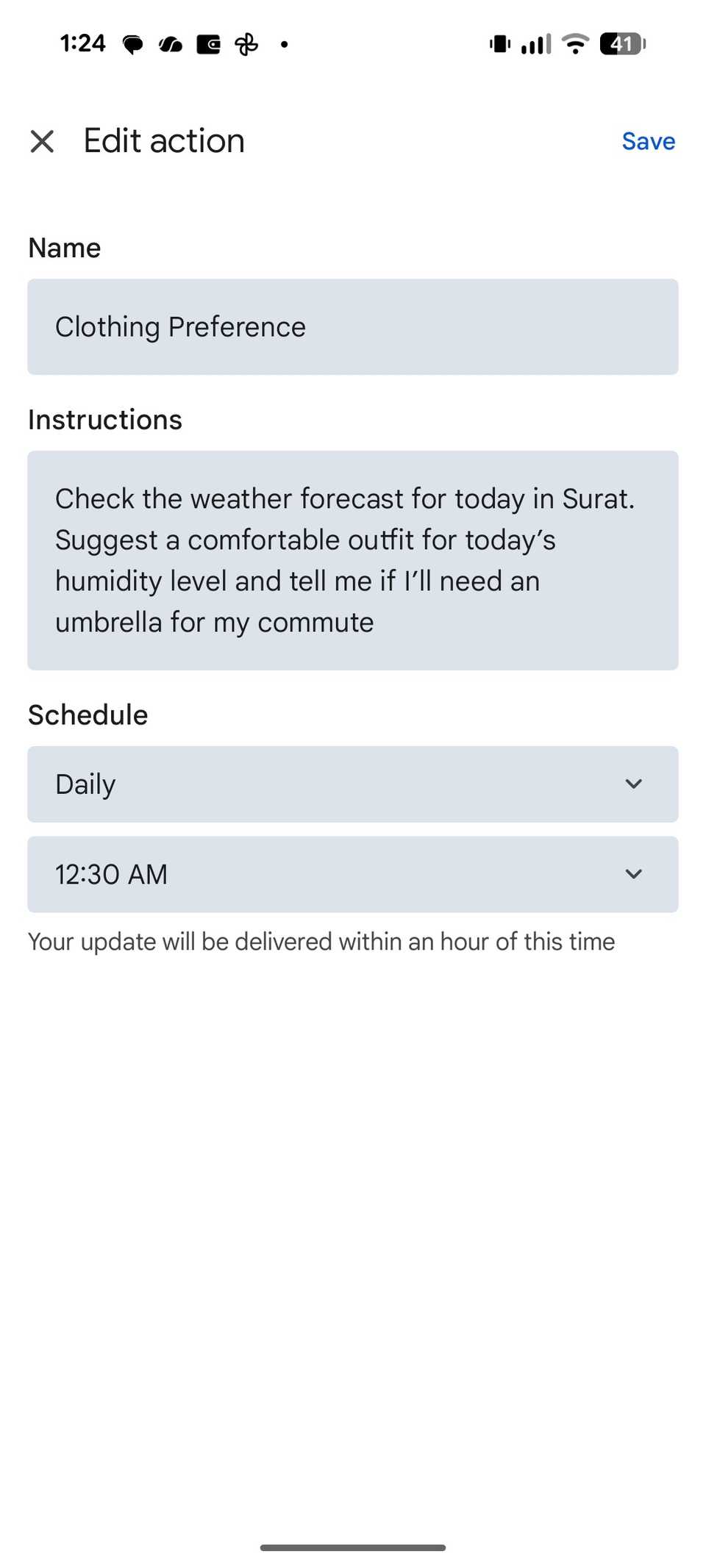
While location triggers and physical gestures turn the Pixel into a responsive hardware, the real shift happened when I started using Gemini Scheduled Actions.
Here, I ask Gemini to go through a routine at a specific time and day of the week. It works in the background and sends me an alert as soon as my task is ready.
For example, I set a recurring daily action at 7 AM with a specific prompt:
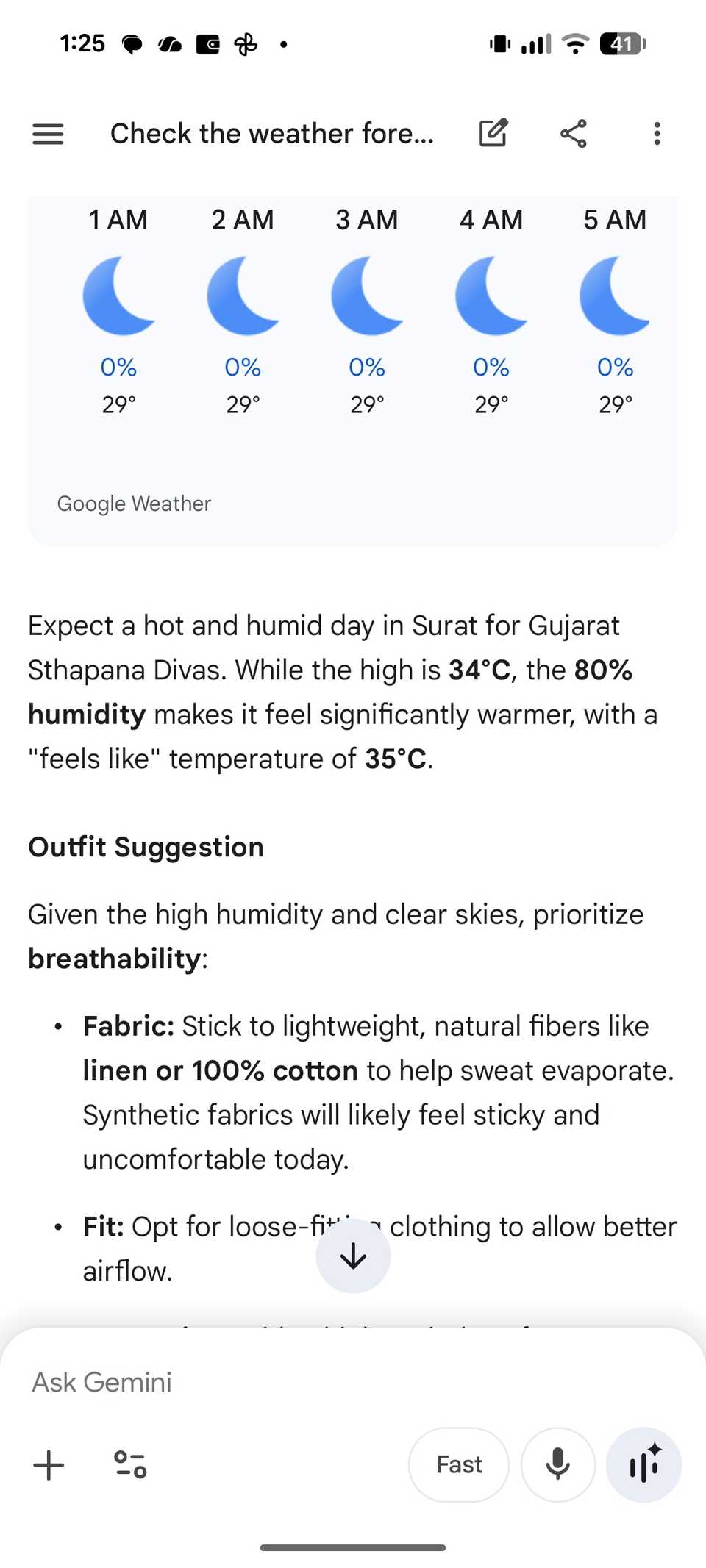
Check the weather forecast for today in Surat. Based on my preferences for clothes, suggest a comfortable outfit for today’s humidity level and tell me if I will need an umbrella for my commute.
By the time I walk into the dressing room, the plan is already waiting in my notifications.
This is just one of the examples. Check out my dedicated post to learn more about Gemini Scheduled Actions.
Unlocking the Pixel’s best feature
For me, the Pixel automation isn’t about saving a few seconds here and there; it’s about removing the micro-frictions that clutter my daily routine.
My Pixel setup didn’t change overnight, but by starting with one or two basic triggers and layering them over time, I have built a device that feels tailored to how I live and work.
So what are you waiting for? Start small, pick one repetitive task you do every single day, and automate it.