

OpenAI has just low-key released one of the best updates to ChatGPT it’s made in months – voice chat’s integration into regular chat. There was no grand Sam Altman tweet or big announcement. Instead, the OpenAI account simply tweeted, “You can now use ChatGPT Voice right inside chat—no separate mode needed,” and shared a video, which you can watch here:
You can now use ChatGPT Voice right inside chat—no separate mode needed.You can talk, watch answers appear, review earlier messages, and see visuals like images or maps in real time.Rolling out to all users on mobile and web. Just update your app. pic.twitter.com/emXjNpn45wNovember 25, 2025
And just like that, everything about ChatGPT has changed. Previously, when you activated Voice Mode you’d leave whatever chat you were currently in, and the whole screen would change to a floating orb that pulsed as it talked – it always reminded me a bit of talking to the sinister eye of HAL 9000 from 2001: A Space Odyssey, or when Dorothy and the gang met the floating head of Oz the Great and Powerful in The Wizard of Oz.
Voice Mode felt like you were uprooted from the rest of your ChatGPT experience and taken to a special place where the written word no longer existed, and you were banned from using your fingers to type. Instead, you had to listen carefully and wait reverently for its replies.
Best picks for you
Now Voice Mode is integrated into the regular chat dynamic, and it’s instantly become ten times easier to use. You can now flip in and out of Voice Mode without leaving your text chat environment, switching between voice and text as needed. You just tap the Voice Mode button and start talking.
ChatGPT replies to whatever you say while also giving you a live transcript in the chat. I much prefer this – you now choose between typing a text response or talking back, whichever you want. And when you don’t want ChatGPT to listen for your voice, you just tap the “End” button. You can still ‘go live’ in Voice Mode by tapping the video button, which enables ChatGPT to ‘see’ through your camera and answer questions about what it’s looking at.
You can also use the new integrated Voice Mode to bring up things like maps and weather in real time.
New tricks
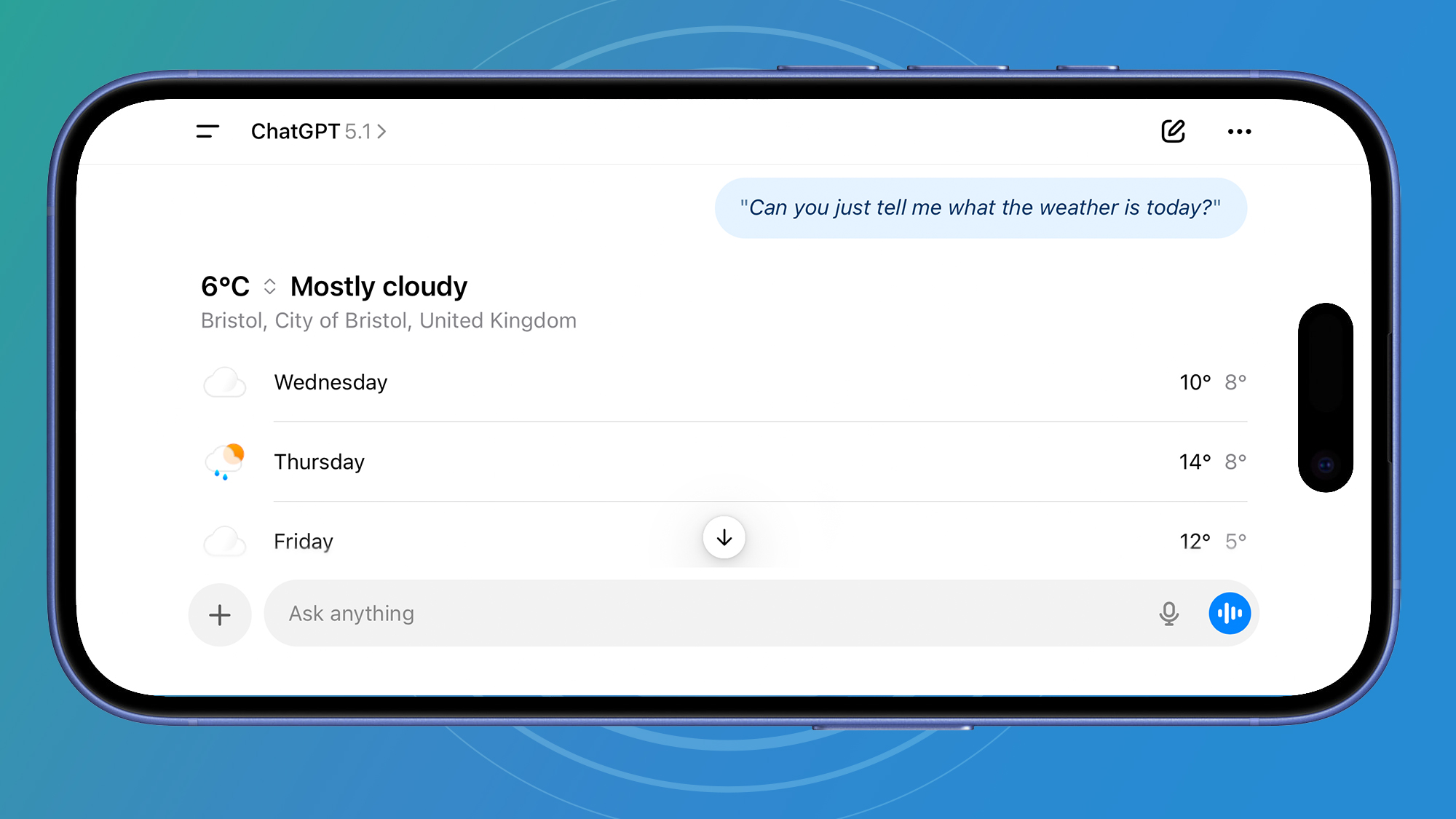
A weather report, generated from ChatGPT Voice mode. (Image credit: OpenAI)
Getting the weather in Voice Mode is actually now very cool. When you ask what the weather is like, it plays a strange little tune, a sort of modern equivalent of a drum roll, before giving you a nice summary using its voice and a handy table of the next seven days’ forecast.
If it’s just given you the weather for somewhere you’re not, you can simply say, “Can you remember that I live in…” and it will update its saved memory.
Voice Mode in ChatGPT is so much better than the experience many of us are used to with digital assistants like Alexa (not the new Alexa+) or Siri. It’s so much easier to talk to ChatGPT – it’s quick and responsive, and if you get bored listening to a reply, or it veers off into something you’re not interested in, you can interrupt and ask another question. Gemini Live is equally as good, but ChatGPT’s integration with text chat definitely puts it above Gemini now.
What’s nice is you can just ask ChatGPT what’s in the news today using Voice Mode, and it will tell you while also showing you links in the chat to the stories themselves.
Don’t miss these
It will also pull up maps of places for you, although these are just graphics – there’s no integration with Apple Maps or Google Maps, which is a little disappointing.
Even better, you can now use Voice Mode to create images. Just say, “Can you conjure up a frog on a skateboard for me?” and after about a minute, it should have your image ready. Or at least it says it will… I couldn’t actually get this to work at all. I tried several times, and despite ChatGPT assuring me that my image was coming, nothing ever materialized. ChatGPT kept apologizing for the wait and telling me it would generate the image “in a moment,” but nothing happened.
So, there are clearly still a few wrinkles that need to be ironed out of the new Voice Mode, but if you haven’t tried it yet, then give it a go. The Voice Mode update is described as “rolling out to all users globally on the ChatGPT mobile app and chatgpt.com.” If you prefer the original Voice Mode experience of the floating orb, you can switch back anytime by going to Settings and turning on Separate mode under Voice Mode.
The future of AI interfaces
They say that as technology evolves, it fades into the background and we don’t even notice it anymore. Being able to access the internet used to be a novelty reserved for geeks, one that required specialized knowledge and the ability to expertly configure inexplicable hardware devices. Now Wi-Fi is expected to be everywhere all the time, and we only notice it when it’s down.
The same thing just happened to Voice Mode in ChatGPT. I’ve got a feeling I might just leave it on all the time while I work, so I can ask ChatGPT questions whenever I like – it’s stopped being a special feature and moved into the background. What I’ve noticed is that I’m already using it much more than I used to, especially when I’m out and about. Typing on a mobile device is still not easy, so using your voice makes much more sense.
And for me, that’s the real story here. Voice Mode isn’t a novelty anymore – it’s becoming the default way I use ChatGPT, and the more it blends into the background, the more natural it feels. If this is the direction AI interfaces are heading, then this might be OpenAI’s most meaningful update in months.
Follow TechRadar on Google News and add us as a preferred source to get our expert news, reviews, and opinion in your feeds. Make sure to click the Follow button!
And of course you can also follow TechRadar on TikTok for news, reviews, unboxings in video form, and get regular updates from us on WhatsApp too.

The best video cameras
Finest choices for filmmakers and videographers