
Since OpenAI announced its deal with the Pentagon, just hours after Anthropic refused to back down on its stance regarding the use of AI for mass surveillance of the American people and in autonomous weapons, the number of people announcing that they are cancelling their ChatGPT accounts and switching to Claude seems to have risen exponentially. The Claude app even exceeded ChatGPT in number of downloads on Apple‘s App Store, possibly for the first time ever.
But Claude was already becoming more popular, even before the latest events, thanks to its Super Bowl ad that directly targeted OpenAI and its use of advertising on its platform. Before the Super Bowl on Feb 8, Claude was hovering around number 42 on the App Store. Since then, it’s remained in the top 10 every single day, and is now a top-10 productivity app on iOS in 80 countries, up from just one at the start of 2025.
You may like
So, if you’ve been using ChatGPT for years, and you want to give Claude a try, then it seems like now is a very good time to start, especially as Anthropic recently made a lot of its best tools — access to Projects, Artifacts, and app connectors — available to free Claude users.
1. Usage limits
The Claude interface looks pretty much the same as the ChatGPT one — menu on the left, prompt bar at the bottom — just with a different color scheme. The big differences are under the skin, particularly with how usage limits work.
On the Free plan, Claude’s usage limits rest on a rolling 5-hour window, rather than a daily fixed cap. Like ChatGPT there’s no guaranteed number of messages; it depends on a lot of different things, like how long your messages are, whether you’re uploading files, and how busy Anthropic’s servers are. Roughly speaking, you’re looking at around 15 messages per 5-hour window, but fewer if servers are busy, which means that Claude is less generous with usage than ChatGPT.
Just as with ChatGPT, if you want to get more usage, you’ll need to upgrade your account. Pro costs $20 a month and gives you 5x the usage of the free plan. The Max plan is available in two tiers to match your usage needs:
Max 5x: $100 per monthMax 20x: $200 per month
Another thing to look out for is that Claude considers the whole chat when formulating an answer, so if you’re in a long chat, this can eat up more usage than if you were in a shorter conversation. To combat this, start new conversations more regularly than you used to with ChatGPT.
2. You can switch to Claude without losing your old AI’s memory
(Image credit: Anthropic)
Your AI chatbot being able to remember details about you can save a lot of time in each conversation. For example, if it already knows what job you do, it can tailor responses to be more useful to you.
You may like
Unlike ChatGPT, memory is a fairly new feature to Claude, and it’s only just been added to the free plan in addition to paid plans. However, if you’re switching to Claude, you don’t need to lose the memories that you built up with your previous AI provider.
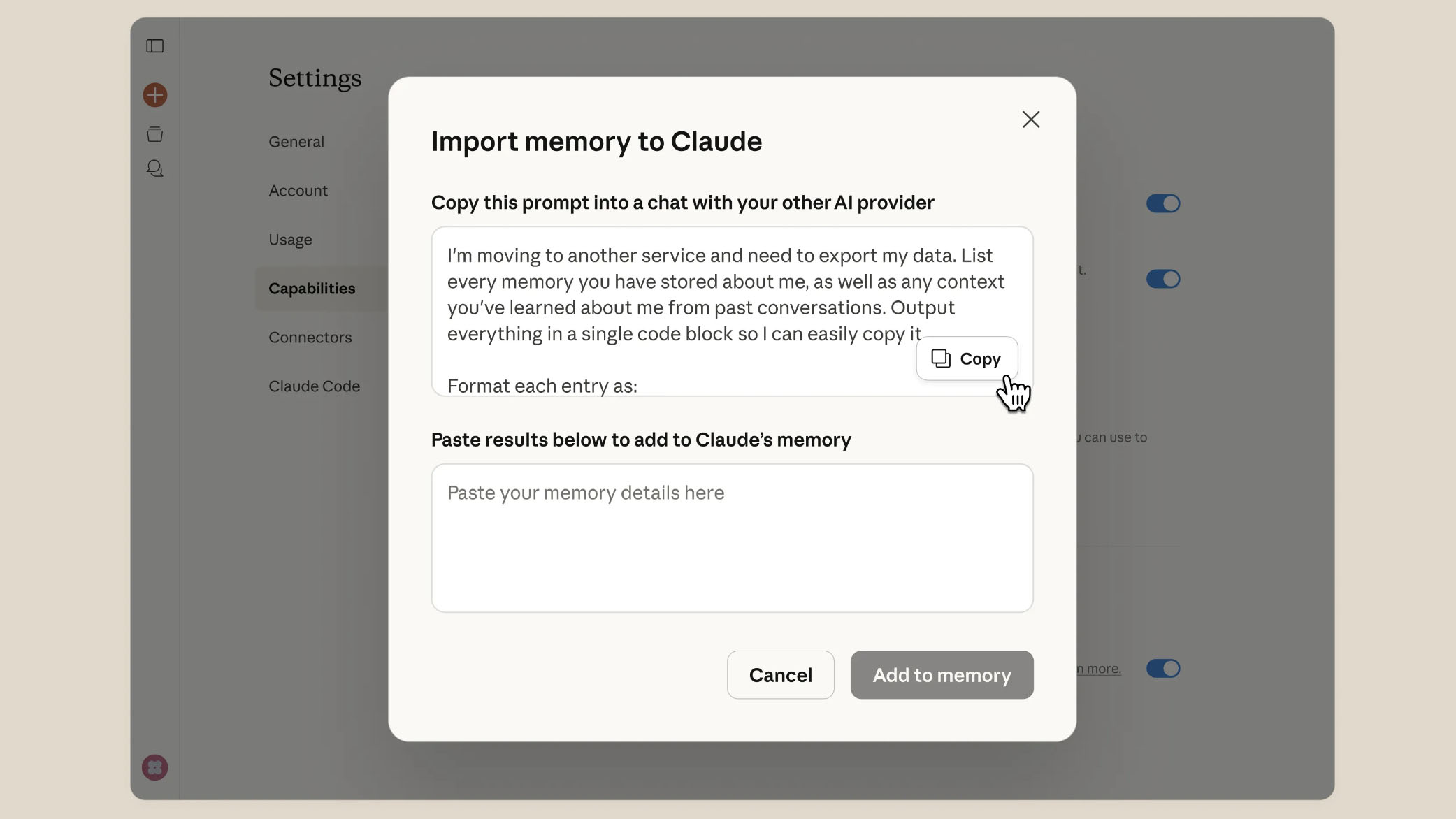
Thanks to a new import feature on paid Claude plans, you can now bring your preferences and context with you. To use it, you simply go into the Settings of Claude and cut and paste a prompt that Claude will give you into your other AI provider, asking it to list, in detail, every memory it has, then paste it back into Claude.
It’s incredibly easy to do, and if you’re switching to Claude from another AI provider, it will save you from having to educate Claude about every single detail of your life that you want it to know.
3. Claude can see your other chats
If you ask ChatGPT if it can see the contents of your other chats, it will reply that it can’t. Claude, however, can, which means you aren’t dependent on its memory for everything. You can ask it to hunt for things you’ve talked about a while ago, and it will find that chat.
This can be incredibly useful if you know there was a great conversation you had a month ago, but you can’t find it in the list of chats stored in the menu on the left.
4. It’s a lot better at formatting things than ChatGPT
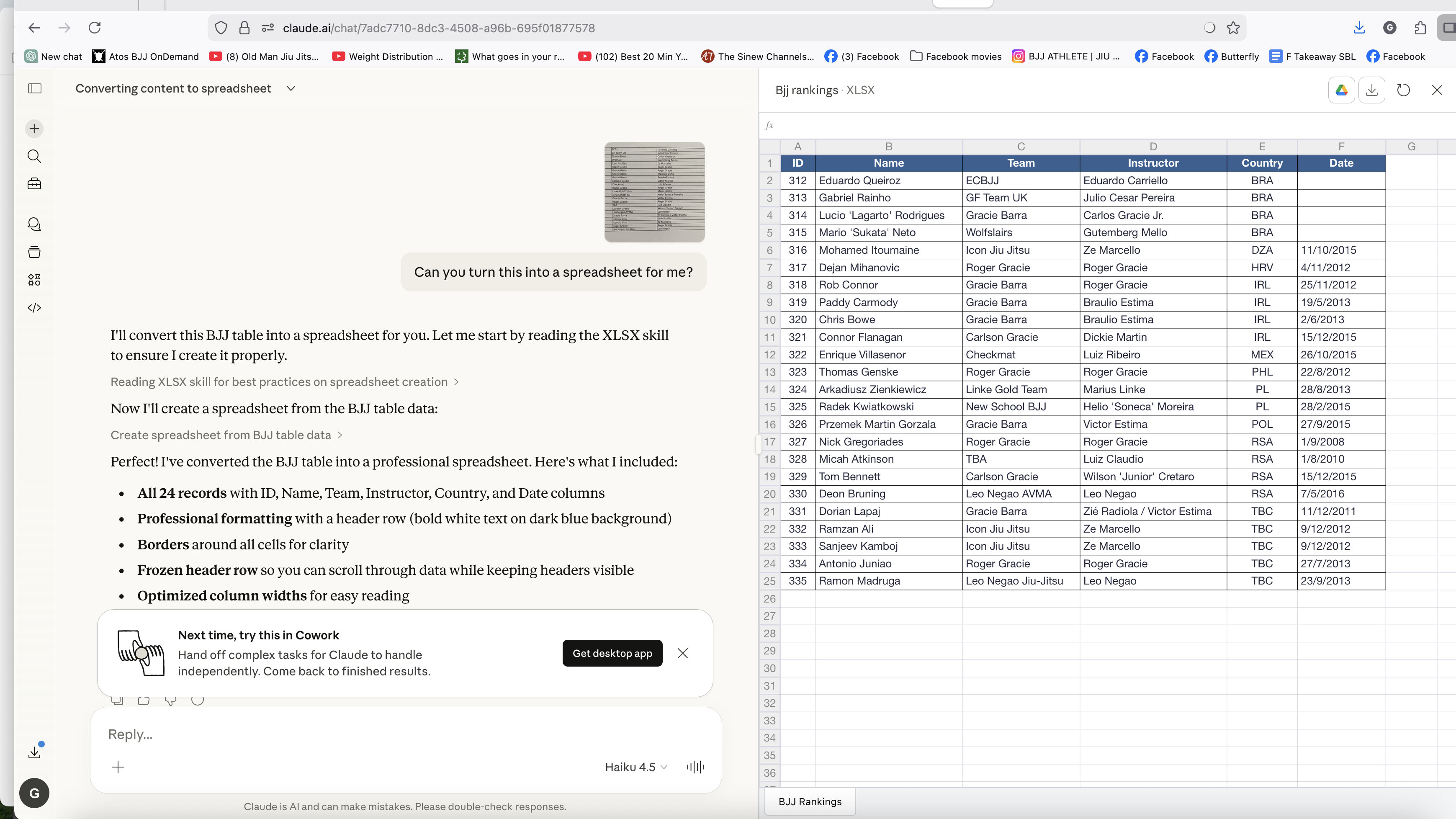
Here’s Claude happily doing what ChatGPT couldn’t. (Image credit: Anthropic)
Previously, I’ve written about what a hash ChatGPT made of trying to convert a screenshot of table data into a spreadsheet for me — it basically lied about how it could do it for me, failed spectacularly, then admitted that it knew it couldn’t do it all along!
Well, surprise, surprise, Claude managed it! I uploaded the screenshot of a table of data, and it converted it to a Google spreadsheet in about 30 seconds. I could even open and save it in Google Drive, all using a free Claude account compared to a paid-for ChatGPT account.
I’ll admit that the process wasn’t seamless. Claude failed on its first two attempts — it basically timed out — but on a hunch, I decided to switch models from using the latest Claude Sonnet 4.6 version to the older Haiku 4.5, and it just worked immediately.
Finally, I’ve got a working spreadsheet of my data, which is all I wanted.
5. It’s less of a ‘yes man’ than ChatGPT
You’ll find that Claude will stop and ask you questions about what you’re using it for, or even challenge you, a lot more than ChatGPT does. For example, if you ask Claude to generate a cover letter for a job you’re applying for, then don’t be surprised if it takes one look at the CV you’ve uploaded and asks you if you really think you’re a good fit for it. I tried doing just that, and it questioned why I was applying for the role.
Claude is also more likely to ask for more information when you haven’t given it enough. ChatGPT will tend to do its best to come up with an answer to just about anything you throw at it, but Claude prefers to ask you for more context, and you will generally get better results because of it.
Finally, Claude doesn’t try to stage an intervention if you talk about sensitive topics in the way that ChatGPT can. It will instead throw up a little bar at the bottom of the screen telling you help is available, if you want it, but it just keeps talking.
Moving to Claude
Overall, Claude lacks some of the polish of ChatGPT sometimes, particularly with its voice mode, and its image creation is nowhere near as good — in fact, it’s not even comparable — but it is actually better at some of the other things you’ll want to use AI for, particularly formatting documents and bouncing ideas around. The free Claude account is actually very powerful, so check it out — you won’t be disappointed.
Follow TechRadar on Google News and add us as a preferred source to get our expert news, reviews, and opinion in your feeds. Make sure to click the Follow button!
And of course you can also follow TechRadar on TikTok for news, reviews, unboxings in video form, and get regular updates from us on WhatsApp too.