
The rush to quit ChatGPT after OpenAI’s controversial Pentagon deal may have cooled (the app is already back at the top of the App Store charts) but some users are still leaving.
At least one senior OpenAI manager resigned over the agreement, and CEO Sam Altman has since admitted the deal was “rushed” and has revised parts of it.
ChatGPT quitters seem eager to reward Anthropic for its refusal to bow to the Department of Defense’s demands for unrestricted use of AI by switching to Claude en masse. However, Claude’s more limited access to its most powerful models, compared to ChatGPT’s all-you-can-eat buffet, may have come as a shock to many — although it might actually be a good thing.
Article continues below
You may like
Gone for good
If you’re thinking about quitting ChatGPT, don’t just delete your account. There are a few important things you should do first to protect your data and avoid losing information you might want later.
In particular, you may want to export your ChatGPT data, copy your stored memories, and delete your chat history before closing your account — below you’ll find details of how to do all three.

(Image credit: Anthropic)1. Import your memories into Claude
If you’ve chosen Claude as your replacement for ChatGPT, you’ll be pleased to learn that it comes with a menu option for importing your memories (the things ChatGPT remembers about you across chats) into your new chatbot.
You might be hoping that you can just press a button and it will be done automatically, but it’s a little more complicated than that — and a bit messier.
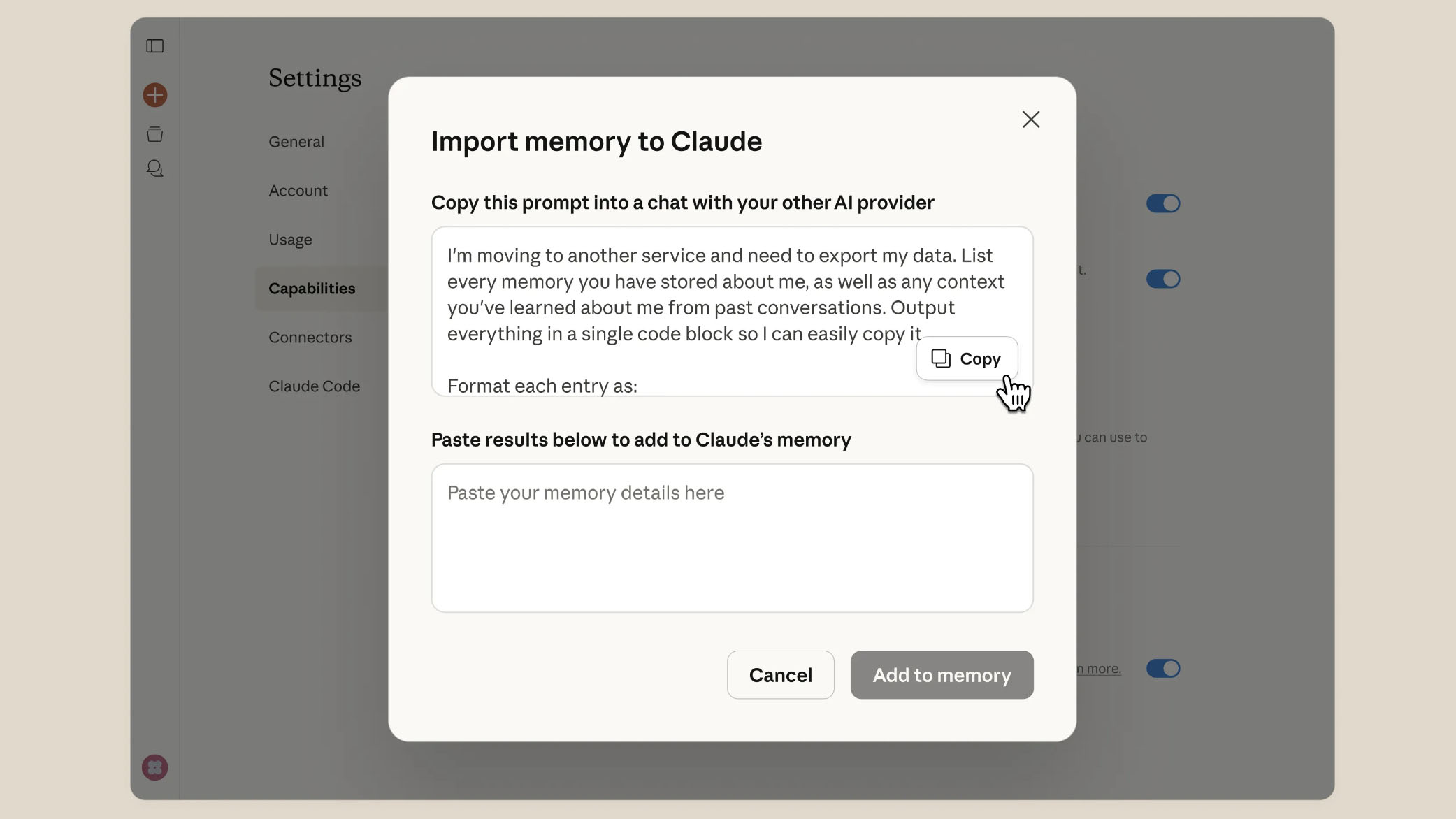
When you first open Claude, it will ask if you’d like to use its memory feature. Choose ‘Use memory.’ Then, in the web interface, click your name at the bottom-left of the screen. Choose Settings, then Capabilities from the menus that appear.
In the Memory section you’ll see an option to Import memory from other AI providers. Click Start Import. You’ll see a piece of text that you’re asked to copy and paste into ChatGPT. This will prompt ChatGPT to reveal all your stored memories. Paste the results into the box provided.
(Image credit: Anthropic)2. Grab your data
You don’t have to, but you may want to get a copy of all your ChatGPT data before you pull the plug on your account. The good news is that you can download everything, but the bad news is that you can’t get it instantly — you have to submit a request.
What to read next
OpenAI can take a while to process that request, but it will email you a download link after a few days. The link expires 24 hours after you receive it.
To request the link, click on your profile icon in the bottom-left corner of the ChatGPT web interface, then select Settings, and Data Controls. Click the Export button next to the Export data option, then follow the on-screen instructions.
(Image credit: Anthropic)3. Delete all chats
Obviously we’d recommend following step 1 first, but it is possible to delete all your chat data before you quit ChatGPT if you want to be sure that nothing remains after you leave.
To do this, head back to the Data Controls settings and click Delete all, which is next to the Delete all chats option.
Be aware that while a deleted chat is immediately removed from your chat history view, it can take OpenAI up to 30 days to actually delete your chats after you select this option. However, that doesn’t mean you can restore a chat once you select it — there’s no going back.
Follow TechRadar on Google News and add us as a preferred source to get our expert news, reviews, and opinion in your feeds. Make sure to click the Follow button!
And of course you can also follow TechRadar on TikTok for news, reviews, unboxings in video form, and get regular updates from us on WhatsApp too.