
Gemini has a new feature to import your memories from other AIs, like ChatGPT, which makes switching easier than everI tested Gemini’s new memory import by asking ChatGPT to “sum up what you know about me,” then transferring that data The result was an “almost worryingly thorough list” of my preferences, habits, and personal details, showing both how powerful, and slightly unsettling, AI memory has become
Switching between AI assistants has always had one deeply irritating flaw. No matter how polished the interface or how clever the answers, every new chatbot relationship begins with a bureaucratic ritual.
You have to explain yourself all over again. Your preferences, your habits, your projects, your weirdly specific recurring requests, all of it has to be painstakingly reintroduced like you are onboarding a very enthusiastic intern with no notes.
Google clearly knows this is annoying, because Gemini has enhanced its memory features to make that process much less tedious. Gemini will now help you bring over all the information another AI chatbot has accumulated about you in a couple of simple steps.
That means it will import everything ChatGPT, Claude, or other platforms know about you and your preferences, so Gemini can feel more familiar with how you’d like it to behave.
The company is pitching it as a smoother path for people who are curious about trying Gemini without losing the personalized feel they have already built up elsewhere.
(Image credit: Future)
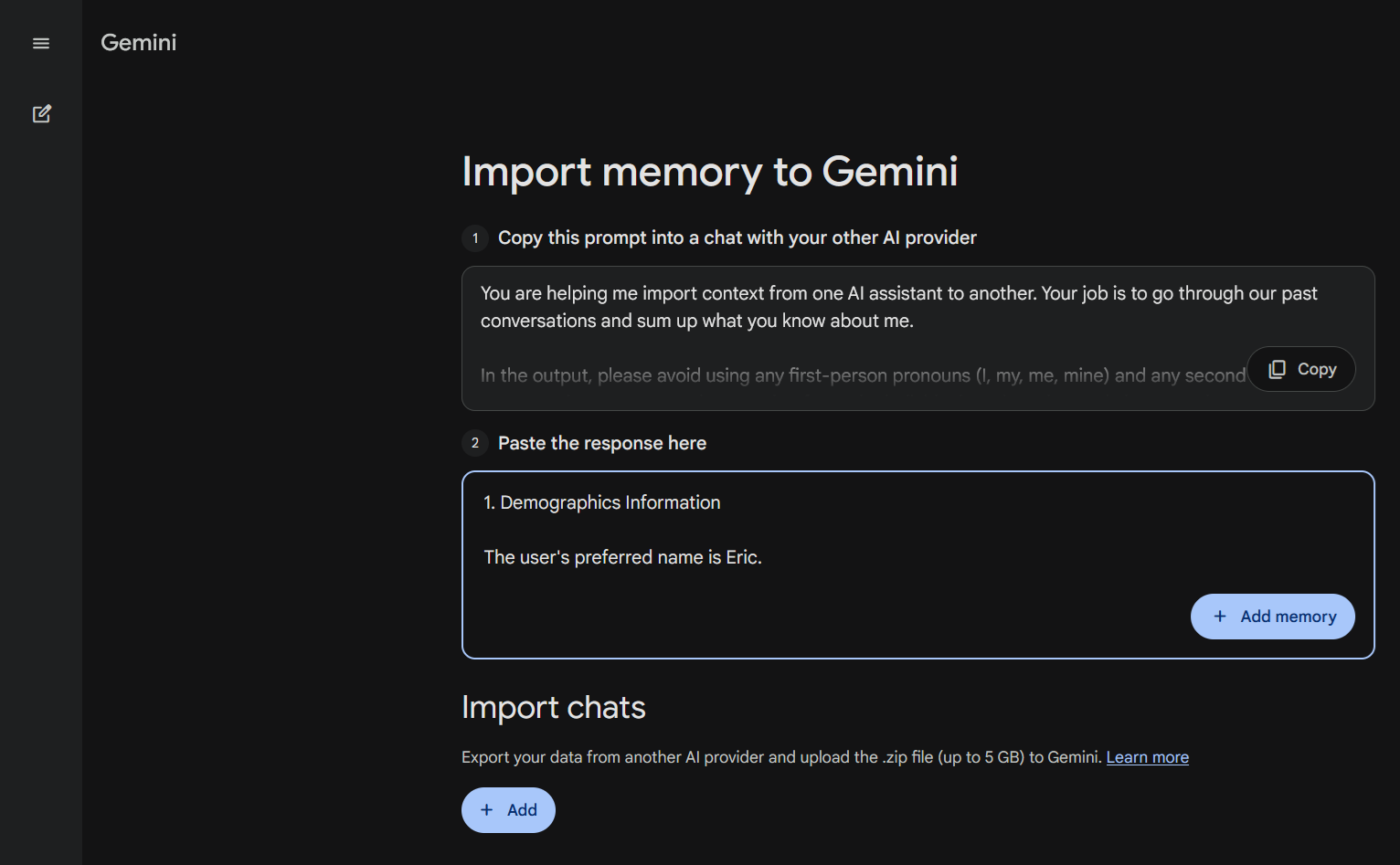
I have used ChatGPT long enough that it has accumulated plenty of information about me, so I decided to see what Gemini could learn from it through the process. I clicked on the new “Import memory to Gemini” button in the settings menu, and was offered the option of either uploading my conversations with an AI chatbot in a zip folder or using a provided prompt to gather the information.
Article continues below
You may like
The prompt, which I would present to my AI of choice, asks it to “go through our past conversations and sum up what you know about me” and provide all that information in a clean list format with demographic details, preferences and interests, relations, events, and any rules I’d given it.
I gave ChatGPT the prompt, and it wrote out an almost worryingly thorough list that I then submitted to Gemini.
Gemini knows
Gemini did not suddenly become a clone of ChatGPT, but suddenly it knew a lot about me, from where I live to the kinds of hobbies I have, and even my coffee preferences. It gained the familiarity ChatGPT had accumulated over multiple years. It had more context about me and how I want it to behave, so I wouldn’t need to constantly clarify my prompts.
That friction reduction is more important than it sounds. The promise of AI assistants has always been convenience, but convenience falls apart quickly when every platform makes you start over. A model that understands your patterns is often more useful than one that is technically stronger but has no idea how you think.
That creates a lock-in effect. The more a chatbot learns about your preferences, the harder it becomes to leave, even if another tool is better in some other way. Google’s import feature is a direct response to that problem.
Most people won’t want to feel married to one AI service forever just because it happens to remember that they like concise answers or very strong coffee. The more portable that context becomes, the easier it is to move around and compare tools without sacrificing all the setup work that made one of them feel helpful in the first place.
AI companies are still racing on speed and capability, but continuity is important too. They do not just want to be the smartest assistant. They want to be the one who already knows how you’d like it to operate.
What to read next
Google’s new import tools are an attempt to catch up on that front, and after trying them, I can say they make Gemini feel much less generic. It still has its own voice, but I don’t have to tell it how to couch its answers or to accommodate my food preferences if I ask for recipe ideas.
Which is, in the world of AI assistants, a surprisingly meaningful upgrade.
Follow TechRadar on Google News and add us as a preferred source to get our expert news, reviews, and opinion in your feeds. Make sure to click the Follow button!
And of course you can also follow TechRadar on TikTok for news, reviews, unboxings in video form, and get regular updates from us on WhatsApp too.

The best business laptops for all budgets
Our top picks, based on real-world testing and comparisons