
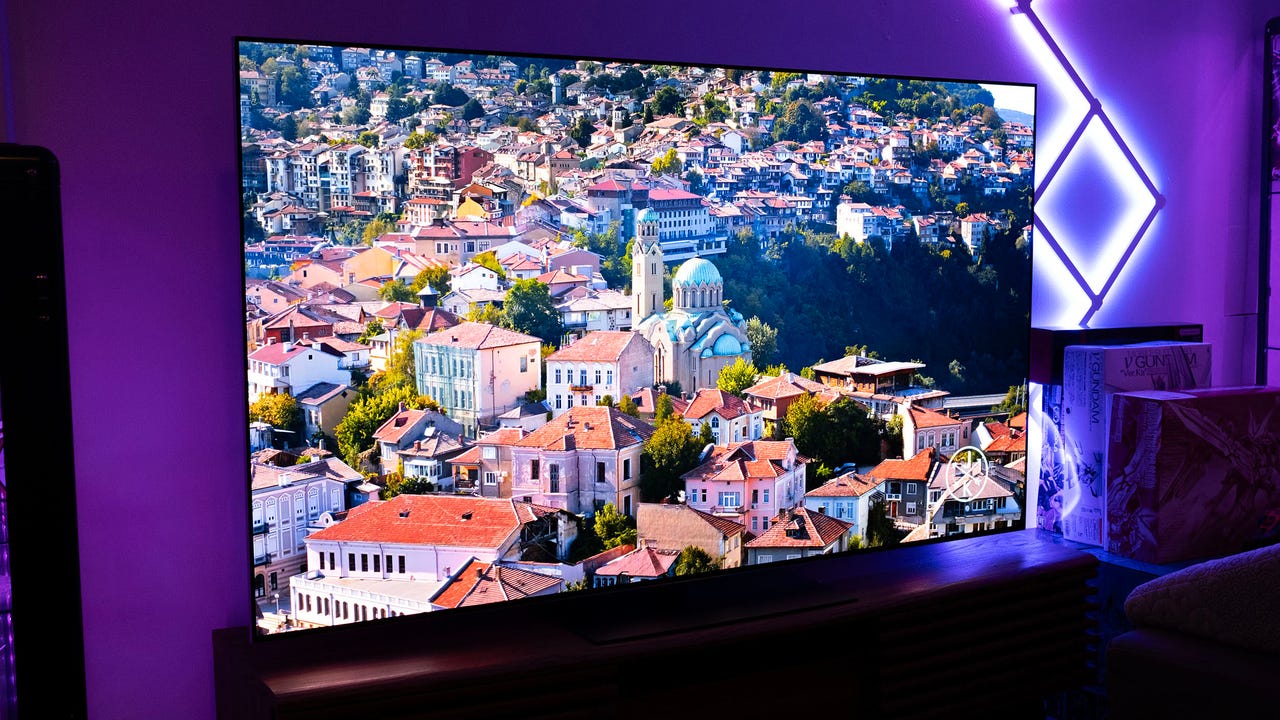
LG has been, for years, at the pinnacle of television technology. Its OLED panels are exceptional and with boosts to brightness without any sacrifice to color accuracy, the G-series televisions have been an easy recommendation as one of the best gaming TVs for several years. Now in 2025, LG has boosted peak brightness even further to make the G5 more suitable for bright rooms, and updated its AI processor to improve its picture and audio boosting capabilities.
These improvements are all welcome, but WebOS is feeling particularly bloated and slow these days. The new remote control also brings some welcome changes but at the same time makes it harder to access features that should be easy to get to.
LG G5 – PhotosLG G5 – Design and Build
The LG G5 looks very similar to the G4, which isn’t particularly surprising given that televisions aren’t doing a whole lot to stand out – especially because, for most buyers, a television needs to do the opposite: blend in. Basically, everything about the physical design of the G5 feels like a copy of the G4, and that’s perfectly fine.
Unfortunately, LG doesn’t include a stand with the panel, so if you’re like me and you don’t like wall mounting your television, you will need to shell out an extra $100 for the G5 stand accessory. I can’t say I agree with the sentiment that a stand is an “accessory,” but the G5 isn’t the first time LG has gone with this sales model, so I shouldn’t act surprised.

For $100, the stand is fairly priced as it is sturdy and provides an excellent system for routing cables so they are not visible from the front. As a center-column design, which is my preference over the two-foot design, it is much easier to keep a clean look. I do wish I could mount the G5 a bit higher up on the stand, though, as it doesn’t leave a lot of room for a sound bar.
LG continues its excellent legacy of providing great support for inputs. The G5 has four HDMI ports and all of them support 2.1, meaning 4K at 120Hz. It also supports WiFi 6E.
Sadly, LG still opts for an integrated power cable. I don’t like this because if that cable gets pulled out or damaged, you cannot easily replace it, meaning you are in for an expensive repair lest your TV become a giant rectangular piece of e-waste. Every other major TV brand has removable power cables at this price tier, and it would be nice to see LG join them.
There isn’t much else to say about the design, which is probably the goal. It is a simple, understated television with minimal borders and bezels and a beautifully thin frame. It looks good even from the side, which isn’t common.
LG G5 – The Remote and Software/UI
I typically group the remote and the operating system into two separate sections, but for the LG G5, they really need to be combined for reasons that will become clear.
Up until this year, LG has used a Nintendo Wii-like remote design, with a rounded grip that contours to the hand. It looks weird until you realize it’s designed to go with the motion-controlled system of WebOS, and then it makes sense. That said, I don’t like the motion controls and I typically ignore them. I probably was not alone there as LG has changed the design to be more standard to what is expected, and the G5 remote is just a flat rectangle now just like the rest of the industry.
While the motion controls are still present, they are pushed to the wayside more than in previous years. You can use it if you want to, but this remote is no longer as comfortable to hold for that purpose as it once was. I can’t help but think this is LG’s way of slowly phasing this whole feature out.

The issue I have with the new remote is not the change in physical design, but the adjustments to the options. LG really, really wants you to use its AI features and has dedicated two buttons on the remote to accessing them. In the upper right-hand corner is a button that brings up the accessibility panel, which allows you to customize how you want to use the TV. I don’t know why this needs a button, because once this is set up, you’ll never be coming back to it. There is also a centrally located “AI” button which brings up content recommendations it thinks I want to see.
Maybe I am alone in this, but I am wholly uninterested in what my television thinks I should watch. I never use this button.
There is also a TV Guide button (what year is it?), a home button, a button that brings up three quick settings options, a back button, a “Home Hub” button, and a settings button.
You’ll notice one button, a constant on remotes for a good reason, is missing: the input selection button. When I first fired up the G5, I thought I was going crazy because I could not for the life of me find a quick way to access the inputs. Sure, I like using the built-in smart TV interface to fire up streaming channels, but I play video games on my PC and my PlayStation 5 and I want a fast way to select those options. With this new remote, you just can’t do it.
Out of the box, WebOS is cluttered with massive ads and distracting boxes.

LG has hidden that option inside of the Home Hub, which means it’s now an additional step to get there. Once you select it, you can find it again in the “recently used” section, but that only sticks around if you recently used it. If you watch Hulu, then YouTube, then HBO, and then want to go back to gaming, that input is no longer “recent” and you have to navigate back to the Home Hub.
But don’t worry, we’ve got six pre-installed shortcut buttons: Netflix, Prime Video, Disney+, LG Channels, Sling, and Alexa are all here.
Despite touting a new and improved AI chip, WebOS does not navigate what I would call “quickly.” When I first turn on the television from standby, WebOS takes a few seconds to spin up, and then it takes a few seconds more to load Home Hub. So I have to wait for WebOS to load, wait for Home Hub to load, then navigate over to the input, and then I can finally use my PlayStation.
Once ads and recommendations are turned off, it becomes much easier to navigate.

This is, quite frankly, an insane design choice. I had to go back and make sure that this wasn’t something LG had done before, but looking at my review of the G4 last year, I can clearly see an input select button on the remote, so I know my memories are correct. Why LG got rid of this, I don’t think I can ever understand.
WebOS is now also the second-most cluttered interface out of the box that I have ever used, behind only the advertisement-loaded Vizio interface. You can, and should, turn “Content Recommendation” and ”Home Promotion” off by going to Settings, General, System, Additional Settings, Home Settings, and then turning off Content Recommendations, which then removes autoplaying ads and makes the home screen less of a visual overload, but the fact that it fires up with so much bloat is pretty frustrating.
Overall, changes to WebOS are a “miss” and LG needs to take a good hard look at user experience in next year’s model, because this is actively dragging down the G5 experience.
LG G5 – Picture Quality
Moving back to a more pleasant topic, the picture quality of LG’s G5 is outstanding.
LG says brightness has been improved 45% over the prior model, but I’m not seeing that in practice. Instead, I would say it’s about the same, generally, in real-world situations. It actually rarely gets as bright as the G4 panel did last year, but it sustains at an average that is well above last year’s model. I think this is a better balance.
While it falls short of pure brightness power found in LCD televisions like the TCL QM8K, it is plenty bright. I’m seeing about 2,000 nits peak in HDR content, with it sometimes getting as high as 2,300 depending on the content. That is way more than I need in my basement studio and should be enough to mostly overpower a bright window in a living room. Pure brightness has never been OLED’s strength, and the WOLED technology LG uses doesn’t typically get as bright as QD-OLED technology from Samsung, but the performance here is pretty great.
LG G5 – Panel Tests
It’s good to see that despite being brighter for most uses, color reproduction remains strong. The LG G5 tested at 100% of sRGB, 93.6% of Adobe RGB, and 91.5% of the DCI P3 color gamuts with an average Delta E of 1.38 – which is outstanding. OLED basically always provides fantastic color accuracy results and that remains the case here.
Panel uniformity is pretty good, although my review unit did show some issues on the lower left side. Uniformity is the most variable-prone issue on televisions, so your results will likely differ from mine.
Looping back to HDR, the LG G5 supports a bunch of common HDR profiles too, including Dolby Vision, HDR10, and HLG. It’s great to see native Dolby Vision support since that is one HDR format Samsung doesn’t support, which gives LG’s competing OLED tech something to hang its hat on. It would be nice to see HDR 10+ and IMAX Enhanced added in the future, however.

Off-angle viewing is spectacular, which is another benefit of OLED, meaning your whole living room can enjoy content equally, no matter where they’re sitting, and not have to worry about weaker contrast or a washed-out picture. Equally impressive are stutter and judder, which I did not notice any of and enjoyed a super-smooth picture even when the camera slowly panned across the screen. Virtually infinite contrast also adds to the visual fidelity of whatever you’re watching.
Also because it uses OLED technology, you will not see any halo or bloom on any bright object, unless that is by design (the Apple TV+ logo, for example, has halo by choice). Captions set against a black background have a clean, crisp look that is so far not fully replicable on non-OLED panels.
LG G5 – Gaming Performance
LG televisions have been a top choice for gaming for years and I’m happy to report that doesn’t change with the G5. While it takes longer to navigate to your console or PC’s input (as mentioned), once you’re there, you’re in for a treat.
When the G5 detects a console or PC, it automatically swaps over to Game Mode, which optimizes color and brightness for the best experience, although you can tweak it manually beyond that if you want.

The G5 is excellent at displaying bright, clean, neutral picture quality. Unlike other televisions, saturation and highlights are not overly juiced, so it’s easier to see a game how the developers intended. Shadow balance is outstanding, too, and if you need to boost shadows a bit to make it easier to see what might be hiding there, LG provides that option in its gaming hub via the Black Stabilizer.

I have always liked LG’s gaming options menu because it loads quickly, provides great at-a-glance information, and also lets you dive deeper into specific settings should you want to. You can also customize the color, which is a nice touch.
I’ve played many hours of Marvel Rivals, Apex Legends, and Battlefield 6 on the LG G5 and enjoyed every second of it. This is a fantastic gaming television and strongly carries LG’s well-earned reputation forward.
LG G5 – Audio Quality
No surprise here, but another weak point of the LG G5 is its audio quality. While LG’s AI audio enhancements absolutely help make sounds both louder and more distinct, the laws of physics will always come into play when it comes to flat panels.
No flatscreen television on the market has what I would call “good” audio: they are all levels of middling to poor. I would say the G5 is more on the middling end of that spectrum, as the mids can be muddled and the lows are very weak. I will say voices are very easy to make out, especially with LG’s AI enhancements on. You’re not going to get the theater experience when watching Dune, but you will absolutely be able to hear every word they’re saying.
If you care about an even audio and visual experience, my advice echoes what I said about the G4: get a soundbar or some kind of standalone sound system. It’s the only way to do the picture quality of the G5 justice.
TCL QM8K – The Competition
LG finds itself competing against Samsung, Sony, TCL, and itself. The G5 is an expensive television that retails for $3,400 but can often be found on sale for about $2,000 (not including the $100 stand). That means the $2,600 Samsung S95F, Sony Bravia 8, TCL QM8K, and the LG C5 and B5 are all possible alternatives.
The Bravia 8 disappointed me with its low brightness and Samsung’s televisions tend to have way poorer customization options and over-saturated images. TCL’s QM8K is a great television, but it’s not an OLED and even though it has some really lovely benefits and features compared to LG’s G5, it is not yet possible to replicate all of the benefits of OLED with an LCD panel. That said, if you care more about brightness power than anything else (let’s say your living room is very bright), then the QM8K is a better buy.
LG’s C5 and B5 are both outstanding televisions with only a few compromises, namely brightness and AI features, separating them from the G5. Only you can answer if those features are worth the premium.
Purchasing Guide
The LG G5 is available from LG, Best Buy, and Amazon. The 65″ model is typically available for $2,000 on sale.