
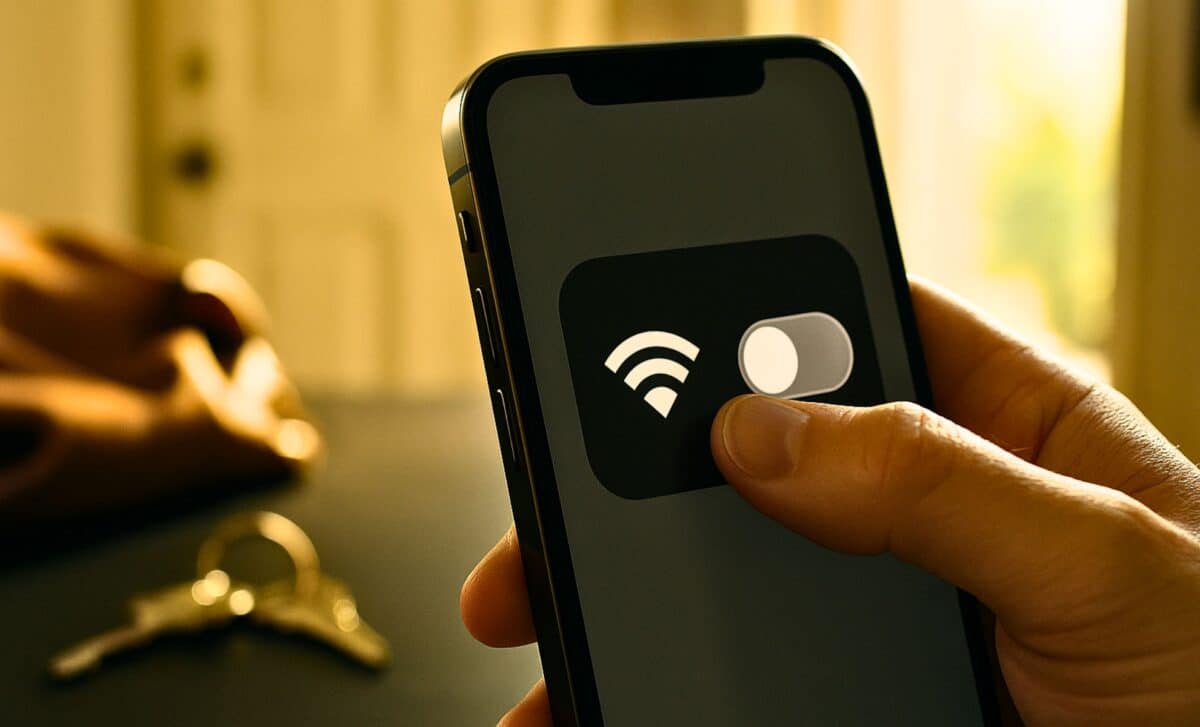
Walking out the door typically involves a familiar checklist: keys, wallet, bag, and phone. Yet one small action rarely makes the cut — turning off the phone’s Wi-Fi. It seems harmless to leave it on, but cybersecurity researchers warn that doing so creates a hidden exposure window that puts personal data, location information, and device security at risk the moment a user steps beyond their home network.
Modern smartphones constantly scan the environment for available access points, quietly sending out probe requests meant to locate known networks. This automatic behavior can reveal unique device identifiers and connection histories, enabling attackers to track movement patterns or push devices into connecting to malicious networks without the user’s awareness. In a world where smartphones store banking access, authentication tokens, personal messages, medical information, and corporate credentials, the consequences extend far beyond digital inconvenience.
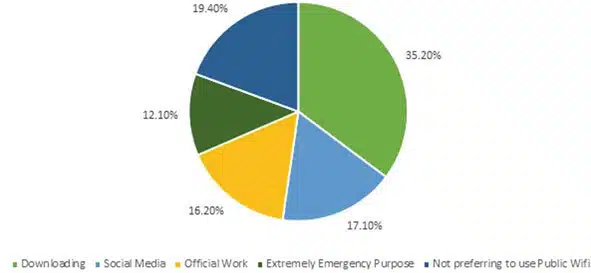 Pie-chart regarding the purpose of using Wi-Fi in public areas. Credit: Siddharth Dabhade
Public wireless infrastructure has expanded rapidly, transforming free Wi-Fi from a luxury into an expectation. Yet this growth has outpaced user awareness and security protections, leaving millions exposed every day. Cybersecurity experts caution that attackers no longer need sophisticated tools to compromise personal devices — they simply exploit routine behavior.
Public Wi-Fi Hotspots Are Becoming a Global Security Weak Point
Research demonstrates that public hotspots represent a significant cybersecurity vulnerability. A widely cited study, On Privacy Risks of Public WiFi Captive Portals, examined 67 real-world login systems and found extensive tracking mechanisms embedded within them, including persistent third-party tracking cookies and browser fingerprinting techniques that enabled long-term surveillance even before consent was granted.
Further analysis published in The Rise of Public Wi-Fi and Threats documented how attackers intercept traffic on unsecured hotspots, harvest login credentials, and deploy malware using simple scanning tools available to anyone with basic technical skills. The findings highlighted that open public networks continue to serve as one of the easiest and most common entry points for account takeover and identity theft.
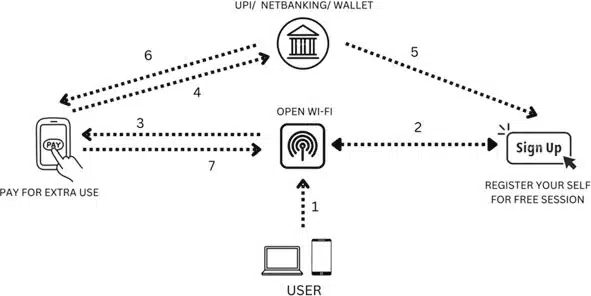 Block diagram of secure public Wi-Fi. Credit: Siddharth Dabhade
Even password-protected networks are far from safe. A 2024 technical investigation detailed how attackers could exploit a side-channel vulnerability to hijack encrypted TCP sessions on standard Wi-Fi configurations, demonstrating that shared passwords and WPA protection do not eliminate risk.
Cybersecurity industry guidance also warns about “evil twin” hotspots — fake access points designed to mimic legitimate networks such as airport or café Wi-Fi, tricking devices into automatic connection and quietly capturing unencrypted traffic.
Leaving Wi-Fi Enabled Creates a Silent Exposure Window
A smartphone with Wi-Fi enabled broadcasts background signals even when it has not connected to a network. These probes reveal information including MAC addresses and previously known network names, which can be used for real-time tracking or identity profiling. Attackers often combine this data with cloned network names to trigger automatic connection without user interaction.
 Collecting All The Wi Fi Network User Details. Credit: Siddharth Dabhade
Behavior-based research supports this concern. A peer-reviewed study, Blind-trust: Raising awareness of the dangers of using Public Wi-Fi, found that users frequently connect to shared networks despite acknowledging security concerns, especially when convenience outweighs caution.
This dynamic creates a perfect storm: predictable behavior, automatic device communication, and an expanding attack surface..
What Cybersecurity Professionals Recommend Now
Digital security researchers strongly recommend disabling Wi-Fi when leaving home, enabling it only when manually connecting to a trusted network. This single action stops probe broadcasts, network history exposure, and involuntary reconnection attempts.
Commonly recommended safety practices include:
Rely on mobile data or a personal hotspot instead of public networks for sensitive tasks
Turn off automatic network-connection settings
Use a VPN to encrypt traffic when public access is unavoidable
Avoid entering passwords or banking information on shared networks
Install software updates and security patches promptly
Industry experts increasingly frame Wi-Fi management as a personal responsibility in the absence of global infrastructure standards.
The Broader Stakes Behind a Simple Switch
Mobile devices now function as primary identity platforms — powering digital wallets, workplace authentication, electronic health services, and secure government access. A compromised session no longer threatens only casual browsing; it can undermine entire digital ecosystems including payment systems, remote work accounts, and biometric security layers.
Public Wi-Fi once symbolized convenience and connectivity. Today it represents one of the strongest pathways for cyberattacks, surveillance, and data harvesting. Turning off Wi-Fi when stepping outside may appear minor, yet it remains one of the most efficient defenses available to everyday users.
Whether system-level protections and public awareness evolve quickly enough remains uncertain. One fact is stable: the safest network connection is the one you choose intentionally — not the one your phone silently negotiates for you in the background.