

Apple is cutting a small number of jobs across its sales teams
Apple is cutting some sales team jobs. The company told Reuters it continues to hire and affected employees can apply for new roles.
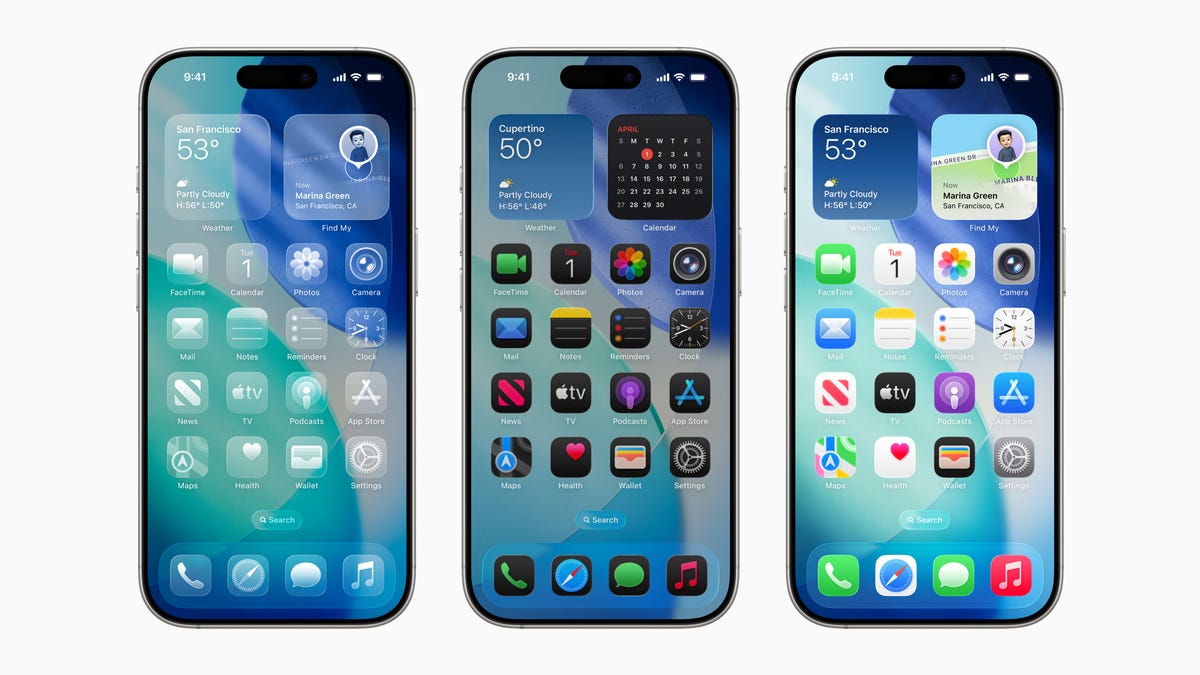
Apple’s iOS 26.2 update is expected to be released between Dec. 10 and Dec. 15, 2025.The update will refine the Liquid Glass design and add features like Sleep Score and podcast chapters.
Apple introduced the new Liquid Glass design and AI-powered features with iOS 26 earlier this fall.
Now, users can expect to be able to update their Apple devices to iOS 26.2 soon. The latest Apple iOS 26.2 update will polish and improve what iOS 26 introduced in September for your iPhone.
Is iOS 26.2 coming out today?
Not yet! Apple’s iOS 26.2 update will be released sometime today, Dec. 10, and likely no later than Monday, Dec. 15, or Tuesday, Dec. 15, 2025, per AppleHeadlines.
Apple iOS 26 vs iOS 26.2; what’s different?
According to Apple technology blog Macworld, some of these improvements include:
Let’s users choose between the traditional Liquid Glass look and a “Tinted” mode that makes everything more frosted;Apps’ controls, buttons, and panels assume the same translucent, fluid look introduced earlier this year;Automatically creates chapters for podcasts based on the content transcript;Introduces Sleep Score, which ranks the user’s sleep quality based on data obtained from the Apple Watch;Users can choose to display reminder notifications as alarms;When using AirDrop with someone who isn’t in your contacts list, AirDrop will show a PIN code to be entered on the other device, similar to Apple TV pairing;New shortcuts with quick access to specific sections of the Apple News app;Apple’s Freeform whiteboarding app introduces a new option to add tables alongside the existing options for creating notes and adding shapes;Live Translation expanded to more countries.Here’s how to update to iOS 26.2 when it launches
Before updating your iPhone, make sure to back up your phone. This lets you keep your data safe by making a copy and backing up your iPhone, iPad, or iPod touch.
Once you have backed up your phone, Apple advises you to plug your phone into a power outlet and connect to Wi-Fi. Then you can follow these steps:
Go to Settings > General, then tap Software Update.If multiple software update options are available, choose the one you want to install.Tap Install Now. If you see Download and Install instead, tap it to download the update, enter your passcode, then tap ‘Install Now’What phones will support iOS 26? Not every phone is compatible
These Apple devices are compatible with iOS 26, according to the company:
iPhone 17iPhone 17 ProiPhone 17 Pro MaxiPhone AiriPhone 16eiPhone 16iPhone 16 PlusiPhone 16 ProiPhone 16 Pro MaxiPhone 15iPhone 15 PlusiPhone 15 ProiPhone 15 Pro MaxiPhone 14iPhone 14 PlusiPhone 14 ProiPhone 14 Pro MaxiPhone 13iPhone 13 miniiPhone 13 ProiPhone 13 Pro MaxiPhone 12iPhone 12 miniiPhone 12 ProiPhone 12 Pro MaxiPhone 11iPhone 11 ProiPhone 11 Pro MaxiPhone SE (2nd generation and later)Still operating iOS 18? Apple recommends to update
The technology giant recently changed iOS 26 from an “optional upgrade” to a recommended one, seemingly pushing those to upgrade if they have not yet.
According to Apple technology blog MacRumors, Apple is still providing iOS 18 security updates to those who choose to stay on the operating system, but that may stop in the coming months. Users who want to keep up to date on security fixes will need to upgrade to iOS 26, though Apple will continue to provide iOS 18 updates for devices that do not support iOS 26.