
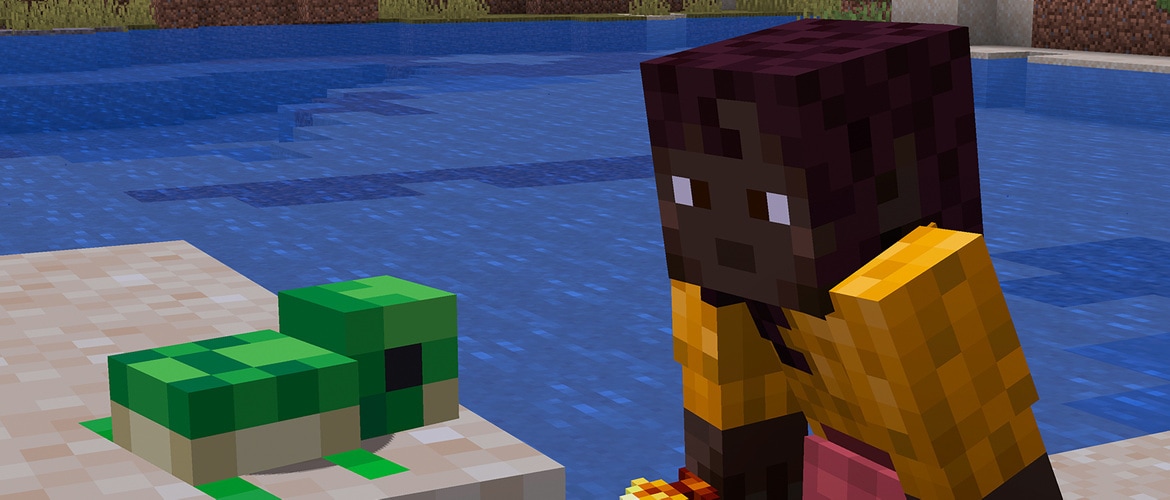
With today’s snapshot release, we’re bringing you another set of features from our next game drop! Dive into testing with new versions of aquatic baby mobs and discover eternal youth! Making big waves for looking adorably tiny are new baby versions of the axolotl, dolphin, turtle, squid, and glow squid. Don’t want them to grow up? Feed your favorite baby mobs a golden dandelion to keep them young forever.
Happy mining!
New Features
Revamped the visuals of more baby mobs
Added new baby sounds for Chicken
Added Golden Dandelion
Golden Dandelion
Golden Dandelion is a new type of flower that can be used to stop baby mobs from aging
Interacting with a baby mob while holding a Golden Dandelion will stop the mob from aging
Interacting with a baby mob that has been stopped from aging while holding a Golden Dandelion will cause it to start aging again
Golden Dandelion can not be used on hostile baby mobs and Villagers
Can be crafted using a Dandelion and Gold Nuggets
Baby Mobs
Updated the models and textures of the following baby mobs:
Dolphin
Squid
Increased the bounding box of baby Squid to better fit the new model
Glow Squid
Increased the bounding box of baby Glow Squid to better fit the new model
Turtle
Axolotl
Increased the bounding box of baby Axolotl to better fit the new model
UI
Game rules
The search bar will now also select gamerules based on description and category in addition to namespaced ID and name
Technical Changes
The Data Pack version is now 98
The Resource Pack version is now 79
Tags resolved from minecraft:nbt text components, with interpret: false, are now pretty-printed instead of being flattened into a single text component
Data Pack Version 98
Changed syntax of some custom recipe fields
Updated the gameplay/turtle_egg_hatch_chance environment attribute to have a default value of 0.002
Data Components
Added minecraft:dye
Represents a color of dye
Used in various places that previously required the exact dye item, including mob and block interactions
Note: the presence of this component itself does not enable functionality. The item has to be explicitly allowed for the given functionality, for example by adding it to tags or changing recipe ingredients
Format: one of white, orange, magenta, light_blue, yellow, lime, pink, gray, light_gray, cyan, purple, blue, brown, green, red, black
Loot Functions
minecraft:set_random_dyes
No longer works only for items in #dyeable tag
Recipes
minecraft:crafting_special_mapcloning recipe type has been removed, functionality has been absorbed by minecraft:crafting_transmute
New show_notification fields with the same functionality as existing one in minecraft:crafting_shaped have been added to the following existing recipe types:
minecraft:crafting_shapeless
minecraft:crafting_shaped
minecraft:crafting_transmute
minecraft:smelting
minecraft:blasting
minecraft:smoking
minecraft:campfire_cooking
minecraft:stonecutting
minecraft:smithing_transform
minecraft:smithing_trim
Removed unused group field from recipes without a recipe book:
minecraft:stonecutting
minecraft:smithing_transform
minecraft:smithing_trim
Renamed the following stonecutter recipes, along with the relevant advancement:
minecraft:chiseled_stone_bricks_stone_from_stonecutting is renamed to minecraft:chiseled_stone_bricks_from_stone_stonecutting
minecraft:end_stone_brick_slab_from_end_stone_brick_stonecutting is renamed to minecraft:end_stone_brick_slab_from_end_stone_bricks_stonecutting
minecraft:end_stone_brick_stairs_from_end_stone_brick_stonecutting is renamed to minecraft:end_stone_brick_stairs_from_end_stone_bricks_stonecutting
minecraft:end_stone_brick_wall_from_end_stone_brick_stonecutting is renamed to minecraft:end_stone_brick_wall_from_end_stone_bricks_stonecutting
minecraft:mossy_stone_brick_slab_from_mossy_stone_brick_stonecutting is renamed to minecraft:mossy_stone_brick_slab_from_mossy_stone_bricks_stonecutting
minecraft:mossy_stone_brick_stairs_from_mossy_stone_brick_stonecutting is renamed to minecraft:mossy_stone_brick_stairs_from_mossy_stone_bricks_stonecutting
minecraft:mossy_stone_brick_wall_from_mossy_stone_brick_stonecutting is renamed to minecraft:mossy_stone_brick_wall_from_mossy_stone_bricks_stonecutting
minecraft:prismarine_brick_slab_from_prismarine_stonecutting is renamed to minecraft:prismarine_brick_slab_from_prismarine_bricks_stonecutting
minecraft:prismarine_brick_stairs_from_prismarine_stonecutting is renamed to minecraft:prismarine_brick_stairs_from_prismarine_bricks_stonecutting
minecraft:quartz_slab_from_stonecutting is renamed to minecraft:quartz_slab_from_quartz_block_stonecutting
minecraft:stone_brick_walls_from_stone_stonecutting is renamed to minecraft:stone_brick_wall_from_stone_stonecutting
minecraft:crafting_transmute
Recipes with this type can now accept multiple items matched by the material ingredient
Added fields:
material_count – integer range describing the amount of items matched by the material ingredient
Must be a subrange of [2,8]
Default: [1,1] (i.e. exactly one item)
add_material_count_to_result – boolean field (default: false)
When true, the amount of slots containing items matched by the material ingredient will be added to the final count of the result
minecraft:crafting_dye
Replaces minecraft:crafting_special_armordye
Output:
This recipe will first mix the current value of the minecraft:dyed_color component from the item matched by the target ingredient with the minecraft:dye component values from the items matched by the dye ingredients
Result will be built by transmuting the item matched by the target ingredient into the result item stack and then applying the new value of the minecraft:dyed_color component
Fields:
category – crafting book category, one of building, redstone, equipment, misc, default: misc
group – string value used for grouping recipes in the crafting book, default: empty string
show_notification – optional boolean describing if a popup should be shown when this recipe is unlocked, default: true
target – ingredient (was harcoded to #dyeable tag)
dye – ingredient (was hardcoded to Dye items)
The minecraft:dye component is required on matching items for the whole recipe to match
result – resulting item stack (was always a copy of the item matched by the target ingredient)
minecraft:crafting_imbue
Replaces minecraft:crafting_special_tippedarrow
Matches a single source ingredient surrounded by eight material ingredients
Output:
This recipe will copy the minecraft:potion_contents component value from the item matched by the source ingredient to the resulting stack
Fields:
category – crafting book category, one of building, redstone, equipment, misc, default: misc
group – string value used for grouping recipes in the crafting book, default: empty string
show_notification – optional boolean describing if a popup should be shown when this recipe is unlocked, default: true
source – ingredient (was hardcoded to minecraft:lingering_potion)
material – ingredient (was hardcoded to minecraft:arrow)
result – resulting item stack (was hardcoded to eight minecraft:tipped_arrows)
minecraft:crafting_special_bannerduplicate
Ingredients can now be restrained
Output can now be configured
The recipe still only works for Banner items
Removed unused category field
Added fields:
banner – ingredient to be used for both source and target items (was hardcoded to any Banner item)
result – resulting item stack (was always a copy of the Banner item with non-empty pattern)
Output:
The recipe finds the first Banner item matched by the banner ingredient and treats it as the source Banner
Result will be built by transmuting the source Banner into the result item stack
The source Banner will be kept in the crafting grid
minecraft:crafting_special_bookcloning
Ingredients and output can now be configured
Removed unused category field
Added fields:
source – ingredient to be used as a source book
The minecraft:written_book_contents component is required on the matching item for the whole recipe to match
material – ingredient to target the item to be cloned (was hardcoded to #book_cloning_target tag
allowed_generations – integer range describing allowed value of the generation field of minecraft:written_book_contents component on the item matched by the material ingredient
Must be a subrange of [0,2]
Default: [0,1] (i.e. accepting original and first copies, but not copies of a copy)
result – resulting item stack (was always a copy of the item matched by the source ingredient)
Output:
The recipe will first take the value of minecraft:written_book_contents component in the item matched by the source ingredient
Field generation in minecraft:written_book_contents will be incremented by one
The recipe will not yield a result if the value of generation is 2 or more
Result will be built by transmuting item matched by the source ingredient to the result item stack and then applying the new value of minecraft:written_book_contents component
Number of items matched by the material ingredient beyond the first one will be added to the resulting stack size
The original item matched by the source ingredient will be kept in the crafting grid
minecraft:crafting_decorated_pot
Ingredients and result can now be configured
Removed unused category field
Added fields:
back, left, right, front – ingredients (was hardcoded to #decorated_pot_ingredients)
result – resulting item stack (was hardcoded to a single minecraft:decorated_pot)
Other functionality remains unchanged, i.e. items matched by ingredients will be added to the matching fields in the minecraft:pot_decorations component of the resulting stack
minecraft:crafting_special_firework_rocket
Ingredients and result can now be configured
Removed unused category field
Added fields:
shell – ingredient (was hardcoded to minecraft:paper)
fuel – ingredient (was hardcoded to minecraft:gunpowder)
star – ingredient (was hardcoded to minecraft:firework_star)
result – resulting item stack (was hardcoded to three minecraft:firework_rockets)
Outout:
Exactly one stack matching the shell ingredient must be present
The number of stacks matching the fuel ingredient will control the flight_duration field
The explosions field will be copied from the minecraft:firework_explosion component of the star ingredient (if any)
minecraft:crafting_special_firework_star_fade
Ingredients can now be configured
Removed unused category field
The recipe will now use the minecraft:dye component instead of a hardcoded mapping of Dye items to colors
Added fields:
target – ingredient (was hardcoded to minecraft:firework_star)
dye – ingredient (was hardcoded to Dye items)
The minecraft:dye component is required on matching items for the whole recipe to match
result – resulting item stack (was always a copy of the item matched by the target ingredient)
Output:
This recipe will find the current value of the minecraft:firework_explosion component from the item matched by the target ingredient
The fade_colors field of the minecraft:dye component will be set to the values from the items matched by the dye ingredients
Result will be built by transmuting item matched by the target ingredient into the result item stack and then applying the new value of minecraft:firework_explosion component
minecraft:crafting_special_firework_star
Ingredients and result can now be configured
Removed unused category field
Added fields:
trail – ingredient (was hardcoded to minecraft:diamond)
twinkle – ingredient (was hardcoded to minecraft:glowstone_dust)
fuel – ingredient (was hardcoded to minecraft:gunpowder)
dye – ingredient (was hardcoded to Dye items)
The minecraft:dye component is required on matching items for the whole recipe to match
shapes – a map of shapes to ingredients
Allowed keys are the same as the ones for the shape field in the minecraft:firework_explosion component (i.e. small_ball, large_ball, star, creeper, burst)
Was hardcoded to: minecraft:fire_charge – large_ball, minecraft:feather – burst, minecraft:gold_nugget – star, any Skull or Head – creeper
result – resulting item stack (was hardcoded to three minecraft:firework_star)
The recipe will now use the minecraft:dye component instead of a hardcoded mapping of Dye items to colors
Output:
Exactly one stack matching the fuel ingredient must be present
Result will be based on the result field, with the contents of the minecraft:firework_explosion component built with following values:
The values of the minecraft:dye component of items matched by the dye ingredient will be added to the colors field
If an item matched by the trail ingredient is present, the has_trail field will be set to true
If an item matched by the twinkle ingredient is present, the has_twinkle field will be set to true
The shape field will be set based on the item matched by any of ingredients in the shape field (or small_ball if none is found)
minecraft:crafting_special_mapextending
Ingredients and output can now be configured
Removed unused category field
Added fields:
map – ingredient (was hardcoded to minecraft:filled_map with minecraft:map_id components)
minecraft:map_id component is required on the matching map item for the whole recipe to match
material – ingredient (was hardcoded to minecraft:paper)
result – resulting item stack (was always a copy of the item matched by the map ingredient)
Output:
The recipe finds the item matched by the map ingredient with the minecraft:map_id component set
Result will be built by transmuting the source item into the result item stack
minecraft:map_post_processing component will be set on the result item
The source item will be kept in the crafting grid
minecraft:crafting_special_shielddecoration
Ingredients and output can now be configured
Removed unused category field
Added fields:
banner – ingredient (was hardcoded to any Banner item)
will only match if the item is a Banner
target – ingredient (was hardcoded to minecraft:shield)
minecraft:banner_patterns component must be not set or be empty for the whole recipe to match
result – resulting item stack (was always a copy of the item matched by the target ingredient)
Functionality remains unchanged, i.e. this recipe will apply the following changes to the copy of the item matched by the target ingredient:
Output:
Result will be built by transmuting the item matched by the target ingredient into the result item stack and then:
copying the minecraft:banner_patterns component from the item matched by the banner ingredient
setting the minecraft:base_color component based on the type of the Banner matched by the banner ingredient
Tags
Item Tags
Added #dyes – helper tag containing vanilla dyes
Added #loom_dyes – items that are allowed in the Loom screen to set pattern colors
The Loom screen also requires the minecraft:dye component to be present on item stacks
Added #loom_patterns – items are allowed in the Loom screen to unlock patterns
The Loom screen also requires the minecraft:provides_banner_patterns component to be present on item stacks
Added #cat_collar_dyes – items that can be used to dye a pet Cat’s collar
The color will be taken from the minecraft:dye component of the used item stack
Added #wolf_collar_dyes – items that can be used to dye a pet Wolf’s collar
The color will be taken from the minecraft:dye component of the used item stack
Added #cauldron_can_remove_dye – items that can be used on water-filled Cauldron to remove minecraft:dyed_color component
Removed #dyeable tag
Entity Tags
Added #cannot_be_age_locked to define which baby mobs that age that can not have its aging stopped using Golden Dandelion
Resource Pack Version 79
The Glow particles emitted by Glow Squids, Lightning Rods, blocks being waxed, unwaxed and scraped is now rendered as opaque, since they never actually used translucency
Removed demo_background.png in favor of popup/background.png sprite
Block Sprites
Added new block textures:
block/golden_dandelion.png
Sounds
Added new sound events for the Chicken:
entity.baby_chicken.ambient
entity.baby_chicken.hurt
`entity.baby_chicken.death
Added new sound events for Golden Dandelion:
item.golden_dandelion.use
item.golden_dandelion.unuse
Fixed bugs in 26.1 Snapshot 5
MC-102774 – You can respawn the ender dragon with only two end crystals
MC-163978 – Mobs can spawn on moving blocks
MC-260148 – show_notification only works for shaped crafting recipes
MC-305145 – Emissive elements of items are invisible in the GUI
MC-305388 – Bees never cease to be angry
MC-305457 – The targeted fluid is always displayed as “empty” in the debug overlay
MC-305692 – The World Options menu does not display or update properly for clients connected to dedicated servers
MC-305693 – Smelting recipes do not add the correct count of items to the output
MC-305698 – Some functions fail to load due to “components not bound yet”
MC-305732 – Dedicated server operators can make all monsters despawn unintentionally with the World Options screen
MC-305847 – Closed captions for baby horses are untranslated
MC-305850 – Translucent blocks and fluids are no longer visible behind translucent particles if “Improved Transparency” is disabled
MC-305886 – Unused sound event ‘entity.baby_horse.fall’
MC-305888 – Turtle eggs no longer hatch in the Nether or the End
Get the Snapshot
Snapshots are available for Minecraft: Java Edition. To install the Snapshot, open up the Minecraft Launcher and enable snapshots in the “Installations” tab.
Testing versions can corrupt your world, so please backup and/or run them in a different folder from your main worlds.
Cross-platform server jar:
Report bugs here:
Want to give feedback?