
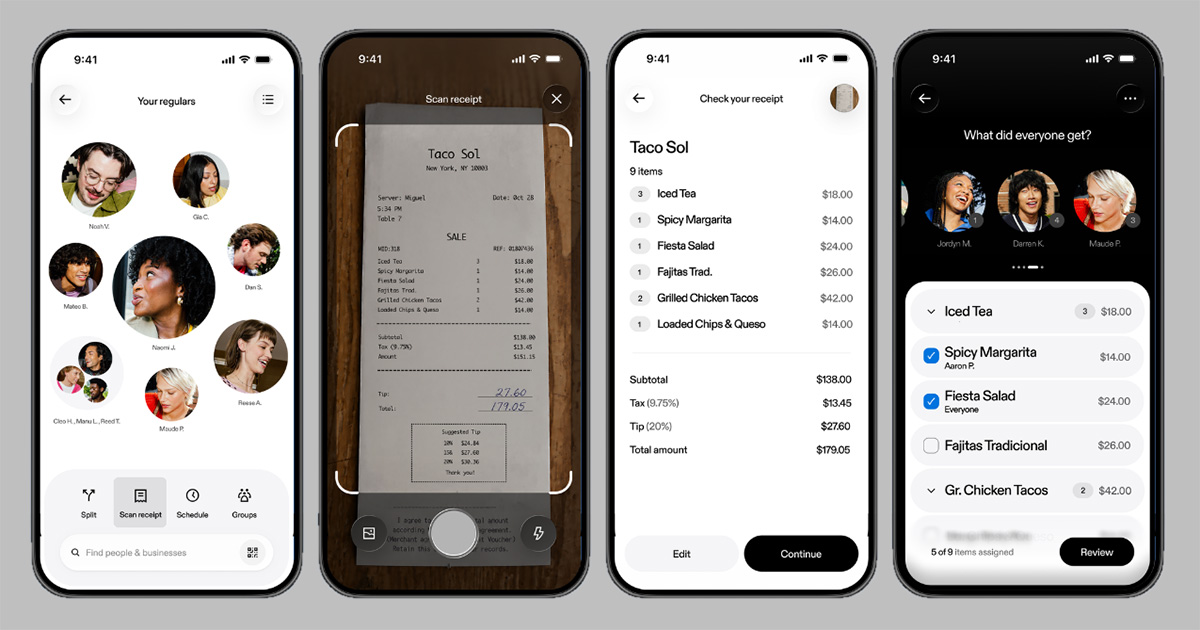
One photo, zero math: Snap a photo and Venmo itemizes the receipt, adds tax and tip, and sends the requests
Nobody has ever finished a group dinner excited to do the math. With Venmo’s new receipt scanning feature, nobody has to. In the same app people already use to split the bill with friends, they can now scan a receipt, and Venmo helps itemize it. They can assign each item to whoever ordered it, Venmo adds each person’s share of tax and tip, and sends the payment requests. It works for everyone in the group regardless of mobile device, with no app switching involved.

It’s a hassle people know too well, especially Gen Z. New research from Venmo1 found that four in 10 (40%) adults aged 18-22 say they’re usually the person who pays first and collects everyone’s share later. And there’s no single way to split a dinner or food delivery: 20% say everyone pays for exactly what they ordered, 15% divide the total evenly, 12% take turns or different people cover different parts, and 11% have one person cover it and request each share afterward. Receipt scanning takes the busy work out dividing the bill however the group chooses to split it.
“Splitting the bill is one of the most common things people do on Venmo, but it can also be one of the most tedious,” said Alexis Sowa, General Manager of Venmo. “With receipt scanning, a pile of math goes away with a single photo. Venmo does the heavy lifting so customers can get back to what matters: the meal, the trip, or the night out with friends.”
How It Works
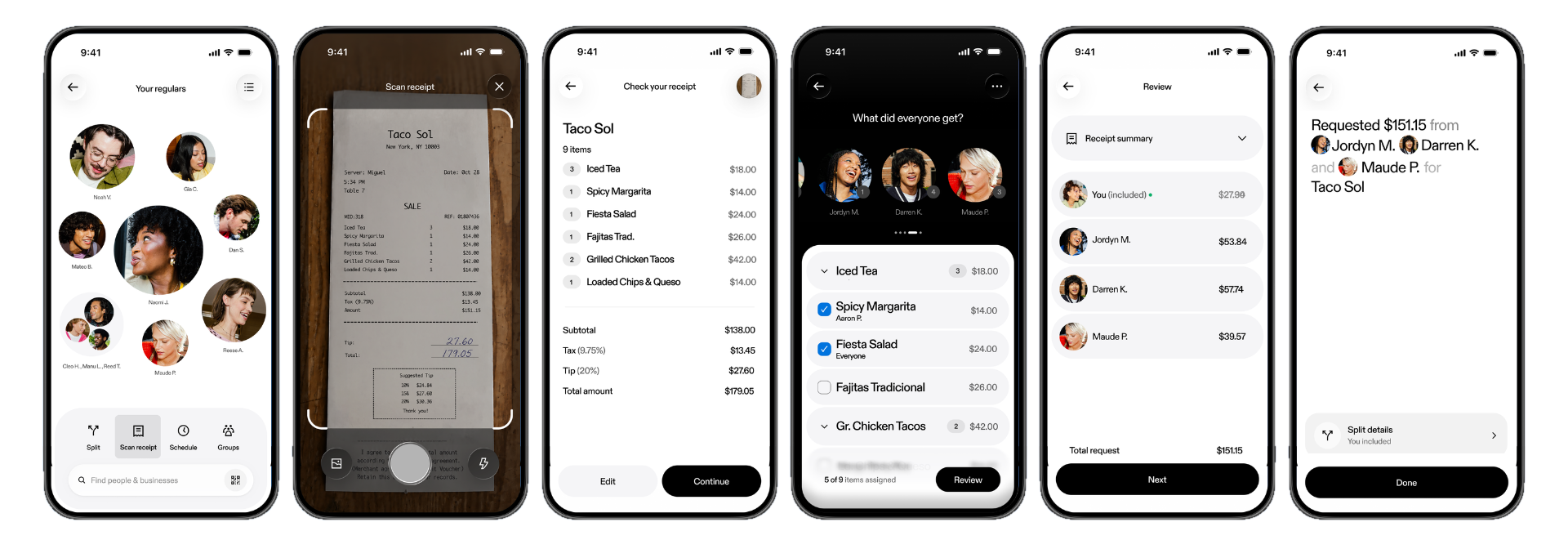
Open the Venmo app. From the home screen, tap the V to start a payment like you always do, then select, ‘Scan receipt’.
Scan. Take a photo of the receipt, or upload one, and Venmo automatically itemizes it.
Assign. Match each item to whoever ordered it and adjust as needed. Treating the table to the first round? Assign it to yourself and split the rest. Some people skipped dessert? Assign it just to the sweet tooths.
Send. Venmo adds everyone’s share of tax and tip and sends the payment requests in just a few taps.
Perfect for Dinners, Trips, and Everything in Between
Receipt scanning helps with the moments when the bill gets complicated:
Group dinners. Everyone ordered something different, so everyone pays accordingly.
Treating friends. Cover what you want and split the rest.
Travel. The trip is over, but the receipts aren’t. Scan, split, and send requests in seconds.
Grocery runs. Split by item, not by guess.
And for the people you share more than a single bill with, there’s Venmo Groups. Some shared costs last a weekend, like a bachelorette party or a getaway with friends. Others last all year, such as roommates splitting rent and groceries, or partners keeping up with monthly household expenses. Groups gives each one a single place to track shared spending, so everyone can see where things stand over time. When it’s time to settle up, everyone pays their share.
Receipt scanning is rolling out now, and will be widely available in the coming weeks. The feature is the latest addition to Venmo’s new app which makes products and features easier to discover and use in the moment, from scheduling your monthly rent payment to earning rewards through Venmo Stash. For more information, go to: venmo.com.
1Survey Methodology: This survey was commissioned by Venmo and conducted by Morning Consult between July 29-31, 2026, among a sample of 5,000 US adults ages 18-22. “College students” refers to adults ages 18–22 who report they are currently enrolled in college. Interviews were conducted online. Results from the full survey have a margin of error of ±1 percentage point. “Venmo users” or “users” refers to respondents who used Venmo in the past 30 days.