
SammyGuru has affiliate and sponsored partnerships, we may earn a commission.
Creative Studio, previously known as Drawing Assist, is, admittedly ,a rather forgettable feature. Samsung hopes to change that with an updated version coming to One UI 8.5, that makes it surprisingly fun to use.
A major glow-up UI for Creative Studio with One UI 8.5
The UI got a pretty major glow-up with this new version, featuring redesigned home and creation pages. The home page now has a Tinder-style card stack, where swiping dismisses each suggestion. Below that, there’s a carousel with prompts to create all kinds of artwork, from stickers to wallpapers. Underneath, your recent creations appear.
Tapping a suggestion or the flowing create button will show a bright blue creation page. There’s a lot in here, so let’s break it down.
First, there’s a button to change the aspect ratio of the generated image. You can choose from several sizes, including 1:1, 4:3, 16:9, and their portrait equivalents. You can draw a sketch to prompt the AI, upload an image for reference, or tap the new Ideas button to get some inspiration. There are also two new styles you can apply to your creation: Marker drawing and Childhood sketch.
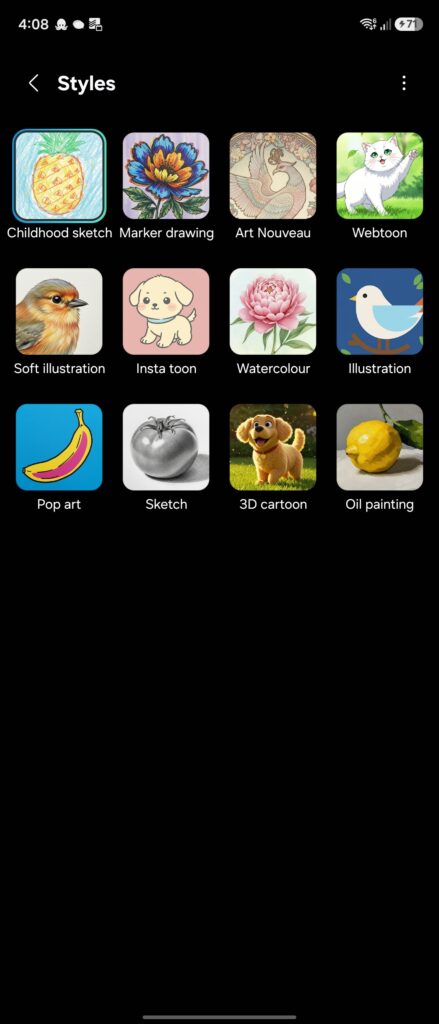
Once you’ve written your prompt, hit Generate and give it a few seconds. You’ll get your image back shortly after. You can tweak it using the text bar at the bottom of the screen or tap Generate again to make further edits. You can also add stickers, images, or text to personalize it. Once you’re happy with the result, you can save it or share it with your friends.
Creative Studio in One UI 8.5 is a sizable update to one of the many Galaxy AI utilities at your disposal. This update isn’t live to users running One UI 8.5 beta just yet, and we expect this to ship out the box with the Galaxy S26 series.
Editor’s Note: You can grab a free One UI wallpaper pack (by That Josh Guy) if you’re planning to preorder the Galaxy S26 series!
Huge thanks to @teknologia007 for sharing the APK!